
A developer portfolio can open doors before you ever speak to a recruiter, client, or hiring manager. It is often the first proof that you can build, communicate, and think like a professional. A weak portfolio gets skimmed and forgotten. A focused one creates trust in minutes.
The good news is that building a developer portfolio website is not as complicated as many people assume. You do not need a flashy, animation-heavy homepage or weeks of design work. What you need is a clear structure, a few strong projects, clean presentation, and a site that loads fast and tells your story well.
If you want to build a portfolio website step by step as a developer, this guide will walk you through the process from planning and structure to writing content, choosing tools, launching, and improving over time. The goal is not just to make a website that looks good. The goal is to create one that helps people understand what you can do and why they should contact you.
What It Means to Build a Portfolio Website Step by Step as a Developer
A developer portfolio website is a personal site that showcases your skills, projects, background, and professional identity. Think of it as a hybrid between a resume, a product demo, and a landing page for your career. It should answer a few core questions quickly: who you are, what kind of developer you are, what you have built, and how someone can work with or hire you.
Many developers make the mistake of treating a portfolio like a scrapbook. They add every class project, every language they have touched, and a long list of technologies with no context. That approach usually creates noise, not credibility. A strong portfolio is curated. It highlights the most relevant work and explains it in a way that makes your value obvious.
Building your portfolio step by step matters because it helps you make better decisions. Instead of jumping straight into templates, colors, and animations, you first define your audience and your message. Then you choose the structure, write content, build the site, optimize it, and publish it. This process leads to a portfolio that feels intentional rather than rushed.
For developers, this site does double duty. It shows both your technical ability and your product thinking. Even simple choices, such as navigation, project descriptions, accessibility, performance, and mobile responsiveness, say something about how you build software. In that sense, your portfolio is itself a project.
Key Aspects of Building a Developer Portfolio Website
Start with the audience, not the design
Before choosing a framework or a color palette, decide who the website is for. A freelance web developer trying to attract small business clients needs a different portfolio from a backend engineer applying to startups. The first may focus on outcomes, client communication, and service packages. The second may emphasize architecture, APIs, deployment, and engineering decisions.
This affects everything from your homepage headline to the projects you feature. If your target audience is recruiters, clarity and speed matter most. If your target is clients, trust signals and business results become more important. If you want both, you need a portfolio that balances technical depth with simple explanations.
When you understand the audience, the site becomes easier to build. You know what to include, what to leave out, and what tone to use. That is why the best portfolio websites feel clear. They are not trying to impress everyone.
Focus on a simple structure that supports your goals
A portfolio does not need ten pages. In most cases, a small, well-structured site performs better than a large one. Visitors usually scan quickly. They want to find key information without hunting through menus.
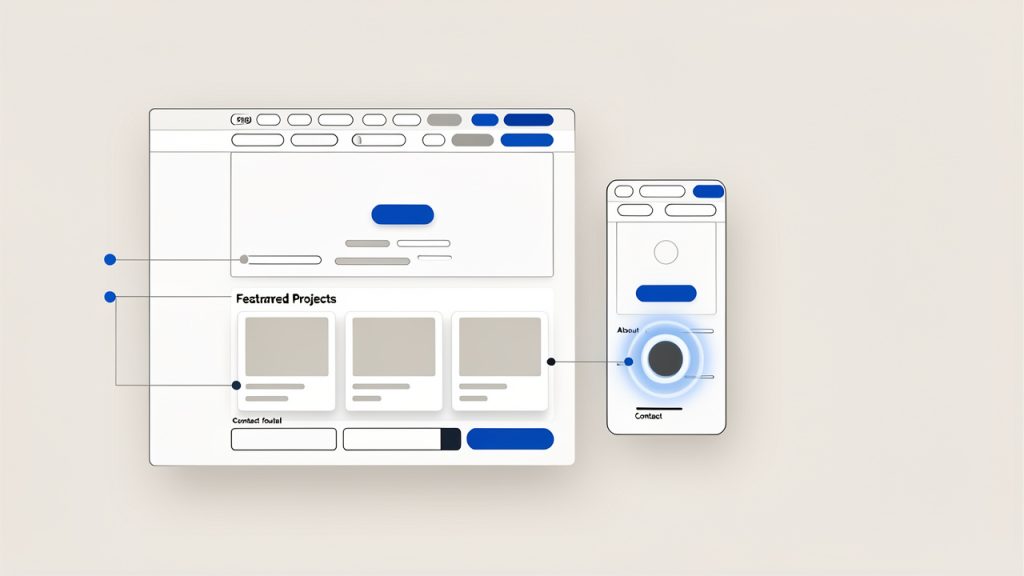
A strong structure often includes these core sections:
- Home: A clear introduction, your role, and your value.
- Projects: A curated set of your best work with meaningful explanations.
- About: Your background, strengths, and what kind of work you enjoy.
- Contact: A simple way to reach you, plus links to GitHub and LinkedIn.
If you have relevant writing, talks, open-source work, or a resume, those can be added thoughtfully. But the main experience should remain focused. Every page should support one central goal, helping the visitor understand your skills and take the next step.
Your projects matter more than your tech stack list
One of the most important parts of any guide on how to build a developer portfolio website step by step is project selection. Your projects are the strongest proof of your ability. A list of tools tells people what you have seen. Projects show what you can actually build.
Choose two to five projects that represent your current level and direction. It is better to show three polished projects than twelve unfinished ones. Each project should explain the problem, your role, the tools used, the key decisions you made, and the result.
This is where many portfolios fall short. Developers often link to a repository and expect the work to speak for itself. But most visitors will not read your code. They will read your explanation. A project description should help both technical and non-technical readers understand why the work matters.
Good writing is part of good development
Developers sometimes underestimate how much writing influences the effectiveness of a portfolio. Yet your words shape first impressions almost as much as the design does. A vague headline like “Passionate developer building innovative solutions” says almost nothing. A sharper line like “Frontend developer building fast, accessible interfaces for SaaS products” is specific and useful.
The same applies to project descriptions, your about page, and calls to action. Clear writing signals clear thinking. It makes your technical work easier to trust. It also helps with search visibility, since relevant phrases around your niche, tools, and projects improve discoverability.
If writing feels difficult, keep it simple. Describe what you built, why you built it, what challenges you solved, and what happened as a result. Use plain language. Avoid filler. The goal is not to sound impressive. The goal is to be understood.
Design should support readability and trust
A portfolio website does not need to win design awards. It needs to feel clean, modern, and easy to use. Visual hierarchy matters more than visual complexity. Typography, spacing, contrast, and consistency will do more for your site than fancy effects.
Good portfolio design is often invisible. Visitors notice that it feels easy to scan, easy to navigate, and pleasant to read. That is exactly what you want. If your animations make the site harder to use, or your dark theme lowers readability, those choices hurt more than they help.
Trust is also visual. A site with broken layouts, inconsistent spacing, cluttered sections, or obvious template leftovers makes people wonder how carefully you work. On the other hand, a calm and polished interface suggests discipline and professionalism.
Performance, accessibility, and responsiveness are part of the portfolio
Your portfolio is not just content. It is an example of your engineering standards. If the site is slow, inaccessible, or broken on mobile, visitors may assume your production work is similar.
That is why performance and usability are not optional extras. Compress images, avoid unnecessary dependencies, use semantic HTML, and make sure the site works well on phones and tablets. Add descriptive alt text where appropriate. Use color contrast that supports readability. Test forms and links.
These choices matter for users, and they also matter for credibility. A developer portfolio should demonstrate care. Even a simple static site can stand out if it is fast, accessible, and well-structured.
Choose the right build approach for your goals
There is no single correct tech stack for a portfolio. The best choice depends on your goals, time, and comfort level. Some developers want a fast launch with minimal maintenance. Others want the portfolio itself to showcase a modern stack.
| Approach | Best For | Pros | Trade-offs |
|---|---|---|---|
| Static HTML/CSS/JS | Beginners, minimal portfolios | Fast, lightweight, easy to host | Less scalable for frequent content updates |
| React or Next.js | Frontend developers, modern app showcase | Great for component-based design, flexible, strong ecosystem | More setup and complexity |
| Astro | Content-focused portfolios with strong performance | Excellent speed, modern workflow, low JS by default | Smaller ecosystem than React |
| Vue or Nuxt | Developers already working in Vue | Smooth developer experience, flexible architecture | Slightly less common in portfolio tutorials |
| Website builder or template platform | Freelancers who need speed over customization | Quick setup, low technical overhead | Limited control, less technical showcase |
If you are early in your career, do not overthink the stack. A clean portfolio built with basic web technologies can outperform a half-finished site built with the latest framework. If you are applying for frontend roles, your stack can become part of the demonstration. But even then, usability matters more than novelty.
How to Get Started with a Developer Portfolio Website
Define the message before you write a single line of code
Start by answering a few practical questions. What roles are you targeting? What type of work do you want more of? What are your strongest skills right now? Which projects best support that story?
This exercise helps you avoid the common trap of building a generic site. For example, if you want full-stack roles, your featured projects should show both interface work and backend logic. If you want freelance work from small businesses, your messaging should emphasize outcomes, communication, reliability, and practical solutions.
Once you know the message, write a simple positioning statement. It should explain who you are, what you build, and who you help. This line often becomes the core of your homepage hero section.
Plan the content architecture
Now sketch the structure of the site before building anything. Think of it as creating the skeleton before adding the skin. Decide what pages or sections you need, how navigation will work, and what each section should accomplish.
A homepage should usually include a concise introduction, a snapshot of your best projects, a short skills section, and a clear call to action. Your projects page should make it easy to browse deeper. Your about page should add personality and context, not repeat your resume word for word.
At this stage, it is useful to think like a visitor. If someone lands on your site and spends 90 seconds there, what should they learn? That question keeps the structure focused.
Gather your assets and proof points
Before development begins, collect everything you need. This includes project screenshots, live links, repository links, short summaries, your headshot if you plan to use one, social links, and your resume. Organizing this early makes the build process much smoother.
Also gather evidence that strengthens your story. That might include GitHub contributions, measurable project outcomes, testimonials from clients or teammates, blog posts, certifications, or open-source activity. These are not mandatory, but they can add depth and trust when used selectively.
Try to avoid empty claims. Saying you are “results-driven” means little unless the site shows actual results. Specific proof always beats generic adjectives.
Build the core pages with clean, maintainable code
If you are comfortable coding your own site, keep the first version lean. You can always expand later. Start with semantic markup, mobile-first layout decisions, and a reusable design system for spacing, type, buttons, and cards. A consistent system helps the site feel polished without requiring a complex visual design process.
Here is a simple HTML starting point for a homepage structure:
<!DOCTYPE html>
<html lang="en">
<head>
  <meta charset="UTF-8" />
  <meta name="viewport" content="width=device-width, initial-scale=1.0" />
  <meta name="description" content="Portfolio of Alex Kim, a full-stack developer building fast, scalable web applications." />
  <title>Alex Kim | Full-Stack Developer</title>
  <link rel="stylesheet" href="styles.css" />
</head>
<body>
  <header class="site-header">
    <nav>
      <a href="/" class="logo">Alex Kim</a>
      <ul>
        <li><a href="#projects">Projects</a></li>
        <li><a href="#about">About</a></li>
        <li><a href="#contact">Contact</a></li>
      </ul>
    </nav>
  </header>

  <main>
    <section class="hero">
      <h1>Full-stack developer building fast, user-focused web applications</h1>
      <p>I create modern web products with React, Node.js, and PostgreSQL, with a strong focus on performance and usability.</p>
      <a href="#projects">View Projects</a>
    </section>

    <section id="projects">
      <h2>Featured Projects</h2>
      <article>
        <h3>Project Name</h3>
        <p>A brief explanation of the problem, your solution, and the outcome.</p>
      </article>
    </section>

    <section id="about">
      <h2>About</h2>
      <p>I am a developer focused on building reliable, accessible products that solve real user problems.</p>
    </section>

    <section id="contact">
      <h2>Contact</h2>
      <p>Email me at <a href="mailto:alex@example.com">alex@example.com</a></p>
    </section>
  </main>
</body>
</html>
This structure is intentionally simple. It covers the basics without distraction. Once the content is in place, you can improve the visual layer with CSS and, if necessary, add framework features such as routing, CMS integration, or component-based architecture.
If you are using React, Next.js, Astro, or another framework, the same content principles still apply. Framework choice changes implementation, not the core strategy.
Write project case studies, not just captions
The strongest portfolio projects read like short case studies. They explain the challenge, your process, and the result. This tells readers how you think, not just what you made.
For each featured project, cover a few essentials in compact form. Explain what problem the project solves. Clarify whether it was a personal build, freelance project, team product, or coursework. Mention the stack, but do not stop there. Include one or two key decisions that show engineering judgment. Then describe the outcome, even if the result is learning rather than business metrics.
A simple structure works well: challenge, solution, stack, role, and result. You do not need to turn every project into a full essay. You just need enough context to make the work meaningful.
Add SEO basics without making the writing awkward
If you want your portfolio to be discoverable, basic SEO matters. This does not mean stuffing awkward phrases into every paragraph. It means using natural language around the topics people might search for, such as developer portfolio, frontend developer portfolio website, full-stack projects, JavaScript developer, or freelance web developer.
Use a clear title tag and meta description for each page. Include descriptive headings. Give project pages meaningful names. If you write blog posts, choose topics related to your niche and technical expertise. Internal links between your home page, projects, and articles also help search engines understand the site.
Search visibility grows over time when your content is useful and specific. A portfolio with thoughtful project write-ups often performs better than one with minimal text because search engines have more context to index.
Make sure the site feels complete on mobile
A surprising number of developer portfolios still look great on desktop and messy on phones. Since many recruiters, clients, and collaborators first view sites on mobile, this is a serious weakness.
Responsive design is not just about shrinking elements. It is about preserving clarity. Headlines should remain readable, project cards should stack cleanly, navigation should stay simple, and touch targets should be easy to tap. Test on real devices if possible, not just browser tools.
If your site feels effortless on mobile, visitors are more likely to explore. That extra minute of engagement can be the difference between a bounce and an inquiry.
Deploy quickly and iterate in public
Do not wait for the portfolio to feel perfect. Version one should be strong enough to publish, but not delayed by endless tweaks. Many developers spend weeks adjusting fonts and animations while their actual work remains hidden.
Deploying early lets you learn faster. You can share the site with peers, mentors, or online communities and ask for direct feedback. Which projects feel strongest? Is the homepage message clear? Are there any confusing sections? This input often reveals blind spots that are hard to see alone.
Modern deployment is easier than ever. Platforms like Vercel, Netlify, and GitHub Pages make it simple to host a portfolio, connect a custom domain, and push updates. A custom domain is especially worth getting because it makes your site feel more professional and easier to remember.
Track what matters after launch
A portfolio is not a one-time task. It is a living professional asset. After launch, pay attention to what is working. Which project links get clicked? Do visitors contact you after reading your home page, or after browsing a case study? Are people reaching your site through search, social media, or direct links?
Simple analytics can help you refine the site. You may discover that one project consistently draws attention, which suggests expanding it into a deeper case study. You may notice visitors dropping off before reaching your contact section, which suggests improving page flow or calls to action.
Regular updates matter too. Add stronger projects as your skills improve. Remove older work that no longer represents your level. Refresh your introduction if your focus changes. The best portfolios evolve with your career.
Common Mistakes Developers Should Avoid
Trying to impress with everything at once
One of the fastest ways to weaken a portfolio is to overload it. Too many projects, too many colors, too many badges, too much jargon. Instead of looking advanced, the site feels unfocused.
Restraint is a strength. When you choose only your best work and present it clearly, visitors can understand your value faster. That is what makes a portfolio effective.
Writing generic copy that could belong to anyone
If your homepage could be pasted onto a thousand other developer websites without anyone noticing, it is too generic. Statements like “I love solving problems with technology” are common because they feel safe. But safe copy is forgettable.
Use specific language about what you build, what kind of problems you enjoy solving, and what tools or domains you work in. Specificity makes you memorable.
Ignoring the business side of presentation
Even if you are applying for technical roles, your portfolio still needs to communicate outcomes. What did your work improve? Speed, usability, conversions, maintainability, developer workflow, or customer experience? Outcomes help people connect your code to real value.
This is especially important for freelancers. Clients often care less about the framework and more about whether you can deliver a website or product that helps their business. Your portfolio should meet them where they are.
A Practical Launch Checklist
Before publishing your first version, review these essentials:
- Message clarity: Your homepage clearly states who you are and what kind of developer you are.
- Project quality: You feature a small number of strong, relevant projects with context.
- Contact path: Visitors can easily email you or find your professional profiles.
- Mobile readiness: The site is easy to read and navigate on phones and tablets.
- Performance basics: Images are optimized and pages load quickly.
- Proofreading: Spelling, grammar, links, and button labels have been checked.
This short checklist catches most of the issues that make a portfolio feel unfinished. It is not glamorous work, but it matters.
Conclusion
To build a portfolio website step by step as a developer, start with strategy before design. Know your audience, define your message, choose a focused structure, and present only your strongest work. Then build the site with clean code, clear writing, mobile responsiveness, and simple navigation. A good portfolio does not try to say everything. It says the right things well.
Your next step is straightforward. Choose three projects, write one sharp homepage headline, and sketch the first version of your site today. Publish a simple version sooner than feels comfortable, then improve it as your skills and goals evolve. A live portfolio that clearly shows your value will do more for your career than a perfect draft sitting unfinished on your laptop.