JNTZN

Tag: JWT

  • Secure Authentication: Best Practices for OAuth and JWT

    A weak authentication setup can undo every other security decision you make. It does not matter how polished your app is, how fast your checkout works, or how carefully you manage infrastructure, if attackers can steal sessions, replay tokens, or abuse a broken login flow, the rest of the stack is exposed.

    That is why so many teams search for guidance on secure authentication best practices for OAuth and JWT. The challenge is not simply choosing popular standards, it is understanding where each standard fits, how they fail in real deployments, and what practical steps reduce risk without making the user experience unbearable.

    For small business owners, freelancers building client portals, and developers shipping web or mobile apps, this topic matters because authentication is rarely “set and forget.” OAuth, OpenID Connect, and JWT can provide flexible, modern identity flows, but only when implemented with discipline. The goal is not complexity for its own sake. The goal is to protect users, reduce support headaches, and avoid the kind of quiet security gaps that often stay hidden until an incident occurs.

    What secure authentication best practices for OAuth and JWT really mean

    When people talk about secure authentication best practices for OAuth and JWT, they often bundle together several related technologies. That can create confusion right away. OAuth 2.0 is primarily an authorization framework, it allows one application to obtain limited access to resources on behalf of a user or service. JWT, or JSON Web Token, is a token format that can carry claims. It is not an authentication strategy by itself.

    In many real applications, authentication is actually handled through OpenID Connect (OIDC), which builds an identity layer on top of OAuth 2.0. That distinction matters. If a team treats OAuth as “the login protocol” without understanding its authorization roots, they can make poor design choices, such as trusting the wrong token in the wrong place.

    A useful way to think about this is simple. OAuth answers, “What is this app allowed to do?” OpenID Connect answers, “Who is the user?” JWT may be used to package some of that information in a signed token. These pieces often work together, but they are not interchangeable.

    The biggest mistake beginners make is assuming that using JWT automatically makes an application secure. It does not. A JWT can be signed correctly and still be exposed through browser storage, used too long without expiration, accepted by the wrong audience, or trusted without proper validation. Security comes from the system design, not from the acronym.

    Key aspects of secure authentication best practices for OAuth and JWT

    Understand the role of each token

    A secure design starts by knowing what each token is for. In an OAuth or OIDC flow, you may deal with an access token, an ID token, and sometimes a refresh token. These are not meant to be used the same way.

    An access token is used to call APIs. It tells a resource server what the client is allowed to do. An ID token is meant for the client application and carries identity information about the authenticated user. A refresh token is used to obtain new access tokens without requiring the user to log in again.

    Problems start when teams blur these boundaries. A common mistake is sending an ID token to an API and using it as if it were an access token. Another is granting refresh tokens too broadly, especially to browser-based clients that are more exposed to token theft. Secure authentication depends on respecting token purpose and limiting token scope.

    Choose the right OAuth flow

    One of the most important best practices is selecting the right OAuth flow for your application type. Older guidance often relied on the implicit flow for browser apps, but modern recommendations strongly favor the authorization code flow with PKCE.

    PKCE, which stands for Proof Key for Code Exchange, helps protect public clients such as single-page apps and mobile apps from authorization code interception. It adds a temporary secret-like verifier that makes a stolen authorization code far less useful to an attacker.

    For server-side web apps, the authorization code flow remains the standard choice. For machine-to-machine communication, the client credentials flow is often appropriate, since there is no end user involved. Matching the flow to the application model is not an academic exercise, it closes off entire categories of attack.

    Treat JWTs as sensitive credentials

    A JWT may look like harmless text, but it should be handled like a password-protected keycard. Even if the payload is only base64url encoded and not encrypted, it can still contain valuable claims about identity, permissions, tenant context, or internal architecture.

    One frequent misunderstanding is assuming JWTs are “safe” because they are signed. A signature confirms integrity and issuer trust, but it does not prevent token theft. If an attacker steals a valid bearer token, they can often use it until it expires.

    That is why token storage matters so much. In browser-based applications, storing long-lived tokens in localStorage increases exposure to XSS attacks. Many teams reduce risk by using secure, HttpOnly cookies where appropriate, combined with strong CSRF protections and a carefully designed session model. The exact approach depends on architecture, but the principle is consistent, keep tokens out of places where injected JavaScript can easily grab them.

    Validate JWTs properly

    JWT validation is one of the most critical technical controls in the whole chain. It is not enough to decode the token and read the payload. The receiving system must verify several properties before trusting it.

    At a minimum, the server should verify the signature, ensure the issuer is expected, confirm the audience matches the API or application, and check time-based claims such as expiration and not before. If your system uses scopes or roles, those claims should also be evaluated carefully.

    Validation Check Why It Matters Common Risk if Skipped
    Signature verification Confirms token integrity and trusted origin Forged or tampered tokens may be accepted
    Issuer (iss) Ensures token came from the correct identity provider Tokens from another environment or malicious issuer may be trusted
    Audience (aud) Confirms the token was meant for this API or app Token replay across services
    Expiration (exp) Prevents use of stale tokens Long-lived abuse after theft
    Not before (nbf) Prevents use before intended validity window Premature acceptance of tokens
    Subject (sub) and claims Identifies the user or service correctly Broken authorization decisions
    Scopes or permissions Limits access to allowed actions Overprivileged API access

    This is where many vulnerabilities hide. A token may be technically valid but still wrong for your API. If the audience does not match, or if the issuer belongs to a test environment, acceptance is still a security failure.

    Keep token lifetimes short

    Short-lived access tokens are one of the most effective ways to reduce damage from theft. If an attacker obtains a token that expires in a few minutes, the window for abuse becomes much narrower.

    Long-lived tokens feel convenient because they reduce reauthentication and support costs. But convenience can be expensive. A token with broad scope and a long lifetime becomes a portable security incident waiting to happen. That risk grows in distributed systems where tokens pass through browsers, mobile devices, proxies, and logs.

    A balanced approach usually combines short access token lifetimes with more controlled renewal mechanisms. Refresh tokens, if used, should be carefully restricted, rotated when possible, and revoked on suspicious activity. Secure authentication is about minimizing the blast radius, not pretending theft will never happen.

    Limit scope and permissions

    A strong authentication system can still fail if authorization is overly broad. OAuth was designed around the idea of scoped access, yet many systems issue tokens that effectively grant “everything.”

    This is a mistake. Tokens should carry only the permissions required for the immediate use case. If an application only needs read access to invoices, it should not receive full account administration privileges. If a background service only syncs contact data, it should not be able to delete records or manage billing.

    The principle of least privilege is often described in abstract terms, but here it is very practical. Smaller scopes reduce the impact of token leakage, simplify audits, and make it easier to reason about what each integration can actually do.

    Protect against common OAuth attacks

    OAuth implementations are often targeted through predictable weaknesses rather than exotic cryptography breaks. Redirect URI manipulation, state parameter abuse, token interception, and CSRF-related issues are all common attack paths.

    A secure implementation uses exact redirect URI matching, not loose pattern matching. It also includes a strong state parameter to tie the authorization response to the original request and reduce CSRF risk. In OIDC scenarios, a nonce helps bind the identity response and reduces replay concerns.

    It is also wise to avoid exposing tokens unnecessarily in URLs, browser history, referrers, or logs. Developers sometimes forget that infrastructure tools, error tracking systems, and reverse proxies can all become accidental token collectors. Secure authentication extends beyond the app code into the operational environment.

    Use strong session and revocation strategies

    One of the trade-offs with JWT-based systems is that stateless tokens can be harder to revoke instantly. If a token is self-contained and valid until expiration, the server may accept it even after the user logs out, unless additional controls exist.

    That does not mean JWT is a bad choice. It means you need a revocation strategy that matches your risk level. Some systems use very short-lived access tokens so revocation urgency is reduced. Others maintain token blocklists, session version checks, or introspection patterns for higher-risk operations.

    Think of logout, password reset, account compromise, and role changes. If a user loses admin rights, how quickly should existing tokens stop working? If the answer is “immediately,” then your architecture must support more than passive expiration.

    How to get started with secure authentication best practices for OAuth and JWT

    Start with a simple threat model

    Before choosing libraries or providers, define what you are protecting and from whom. This does not need to be a giant enterprise exercise. For most small teams, a lightweight threat model is enough to reveal the biggest risks.

    Ask a few direct questions. Where are tokens stored? Which clients are public and which are confidential? What happens if a token is stolen from a browser, mobile device, CI system, or server log? Which APIs hold sensitive business or customer data? These answers guide the right controls far better than copying a generic tutorial.

    This step matters because many authentication failures are actually design mismatches. A flow that is acceptable for a low-risk internal tool may be reckless for a customer-facing app handling invoices, health data, or financial records.

    Prefer trusted identity providers and mature libraries

    Reinventing authentication is rarely a good use of time. The safer route is to use a reputable identity provider or a proven standards-compliant library with active maintenance and solid documentation.

    That does not remove responsibility. You still need to configure it correctly. But it reduces the chance of introducing subtle flaws in signature validation, PKCE handling, discovery metadata, key rotation, or claims processing. Mature tools also make it easier to handle security updates when standards evolve.

    The key is resisting half-custom implementations. Teams often build “just enough OAuth” and later discover they skipped important pieces such as state validation, JWKS key refresh, or issuer checks. Those shortcuts tend to age badly.

    Build around authorization code flow with PKCE

    If you are launching a modern web or mobile app, the authorization code flow with PKCE should be your default starting point. It is broadly recommended because it provides stronger protection than older browser-oriented flows and fits current app architectures well.

    For many teams, that one decision removes a surprising amount of risk. It aligns with modern best practices, simplifies security reviews, and works well across public clients where client secrets cannot be safely embedded.

    If your app also includes backend APIs, make sure those APIs validate access tokens independently. Do not rely on the frontend to “vouch for” the user. Every resource server should verify the token it receives before granting access.

    Define a token policy early

    A token policy is simply a written set of rules for how tokens behave in your system. It should cover access token lifetime, refresh token lifetime, rotation, scope design, revocation triggers, and claim requirements.

    Without a policy, authentication often grows by accident. One team adds broader scopes for convenience. Another extends token duration to reduce support tickets. A third logs tokens in debug traces. Individually, these decisions may seem minor. Together, they create a brittle and risky environment.

    A practical starter policy might include the following:

    1. Use short-lived access tokens, especially for browser and mobile clients.
    2. Rotate refresh tokens where supported, and revoke them on logout or suspicious activity.
    3. Validate issuer, audience, signature, and expiration on every protected API call.
    4. Grant minimal scopes and review them regularly.
    5. Store tokens securely, avoiding browser-accessible storage for sensitive long-lived credentials.

    This does not need to be complicated. It just needs to be explicit.

    Plan for key rotation and operational hygiene

    JWT-based systems depend on cryptographic keys, and keys need lifecycle management. That means supporting key rotation, trusting keys from approved JWKS endpoints, and making sure expired or replaced keys are handled gracefully.

    Operational hygiene matters just as much. Keep tokens out of logs. Redact Authorization headers in monitoring tools. Secure your CI/CD secrets. Enforce HTTPS everywhere. Separate test and production issuers cleanly so tokens cannot cross environment boundaries.

    These details may not feel as exciting as choosing a protocol, but they are where real-world security is often won or lost. Many breaches are not caused by broken standards. They happen because valid tokens leak through ordinary operational mistakes.

    Test like an attacker would

    A healthy authentication system is one that has been tested under failure conditions, not just happy paths. Try invalid signatures. Try the wrong audience. Try expired tokens. Try replaying tokens after logout. Try redirect URI manipulation. Try removing state or nonce handling in a test environment to confirm the app rejects unsafe flows.

    This kind of testing uncovers assumptions that documentation does not. It also helps teams understand the difference between “the login worked” and “the system is secure.” Those are not the same outcome.

    App Type Recommended Flow Key Security Focus Common Mistake
    Server-side web app Authorization code flow Secure session handling, CSRF protection, token validation Treating backend sessions and token policies inconsistently
    Single-page application Authorization code flow with PKCE Safe token storage, short lifetimes, XSS defense Storing long-lived tokens in localStorage
    Mobile app Authorization code flow with PKCE Secure OS storage, refresh token handling, deep link safety Embedding secrets or exposing redirect handling
    Machine-to-machine service Client credentials flow Secret management, least privilege scopes, key rotation Using broad scopes or poorly protected client secrets

    Conclusion

    Secure authentication with OAuth and JWT is not about piling on complexity. It is about making a series of good decisions, consistently. Use the right flow, validate tokens properly, keep lifetimes short, limit scope, protect storage, and plan for revocation and key rotation. Those are the practices that turn popular standards into a genuinely secure system.

    Your next step should be practical. Review your current login and API flow, identify which tokens you use, where they are stored, and what your APIs validate. If any answer is vague, that is where to start. A clear authentication design today is far cheaper than cleaning up a token-related breach later.

  • Base64 to Text: Decode Base64 Safely and Easily

    Base64 to Text: Decode Base64 Safely and Easily

    A long string ending in = can look like nonsense, but it often hides something very ordinary, a message, a config value, a file header, or plain readable text. If you have a Base64 string and need to turn it back into text, the good news is that the process is usually simple. The challenge is knowing which tool to use, how to spot the right variant, and how to avoid privacy mistakes along the way.

    This guide explains Base64 to text conversion in plain language first, then gives you practical methods for browsers, terminals, and common programming languages. It also covers the parts many quick converter pages skip, including URL-safe Base64, data URI cleanup, character encoding issues, JWT payloads, and secure handling of sensitive data.

    What is Base64 and why you encounter it

    Definition: Base64 encoding in simple terms

    Base64 is a way to represent binary data as text. Instead of sending raw bytes directly, Base64 transforms them into a limited set of characters that are easier to transport through systems built for text.

    That is why a Base64 string often looks like a block of letters, numbers, slashes, plus signs, and sometimes one or two = characters at the end. It is not meant for humans to read directly. It is meant for computers to pass around safely.

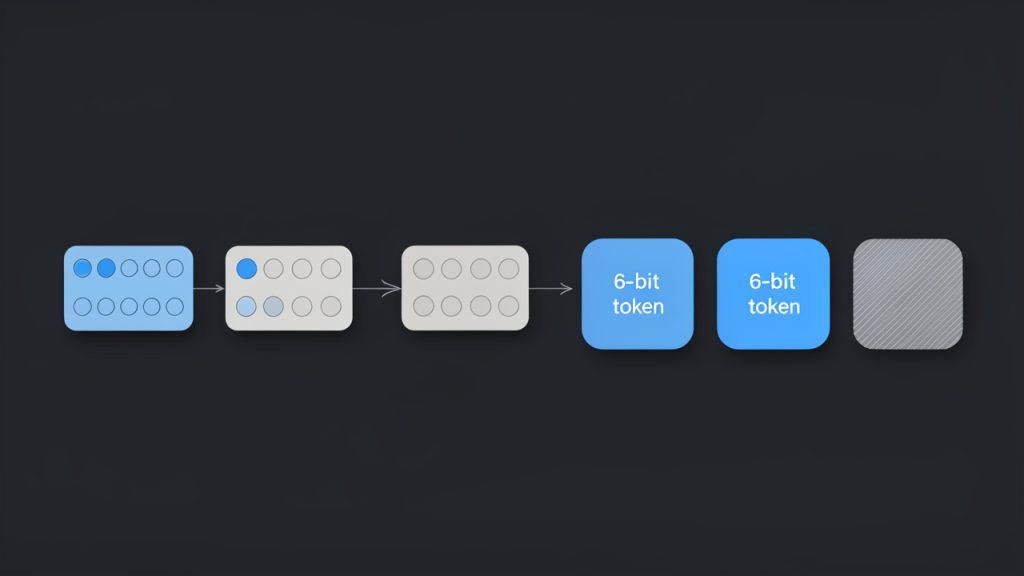
    A quick technical note helps here. Base64 takes data and splits it into 6-bit chunks, then maps each chunk to a character from a 64-character alphabet. If the original data length does not divide evenly, Base64 uses padding, usually =, to complete the output.

    Why Base64 exists: binary-to-text transport and common use-cases

    Many older and modern systems handle text more reliably than raw binary. Base64 solves that compatibility problem. It lets images, attachments, tokens, and other binary content travel through channels that expect text.

    That is why you see Base64 in APIs, HTML data URIs, email attachments, certificate files, and authentication tokens. It is not encryption, and it is not compression. It is simply an encoding format.

    The trade-off is size. Base64 makes data about 33% larger than the original. That sounds inefficient, and it is, but the benefit is portability and predictable transport.

    Where you commonly see Base64

    You will often run into Base64 in places where systems need to embed or move data without worrying about binary corruption. A common example is an image embedded directly into HTML or CSS using a data URI, such as data:image/png;base64,....

    Developers also see Base64 in API payloads, particularly when binary files are sent in JSON. Security-related tools use it in JWT tokens, though those use the URL-safe variant. Email systems use Base64 for attachments and MIME parts, and certificate-related formats may contain Base64-encoded blocks inside text files.

    If a string is long, contains only letters, digits, +, /, _, -, and maybe =, there is a fair chance you are looking at Base64 or one of its close variants.

    How Base64 encoding works (brief technical overview)

    The algorithm in steps: grouping, 6-bit chunks, mapping to alphabet, padding

    The process is easier to understand if you think in layers. Original text is first stored as bytes. Those bytes are grouped in sets of 3, which gives 24 bits. Base64 then splits those 24 bits into 4 groups of 6 bits each.

    Each 6-bit value maps to one Base64 character. That is how 3 bytes become 4 text characters.

    For example, the text Hi becomes the Base64 string SGk=. The trailing = appears because Hi is only 2 bytes, not 3, so the output needs padding to complete the final block.

    Diagram showing the Base64 encoding process: 3 input bytes (24 bits) grouped together, split into four 6-bit chunks, each mapped to a Base64 character. Include an example: ASCII for 'Hi' (0x48 0x69) shown as bytes, padded with zeros to make 24 bits, resulting 6-bit values, mapped to characters 'S', 'G', 'k', '=' with the '=' shown as padding. Annotate '3 bytes -> 4 chars', '6-bit chunks', and 'padding when input length ≠ multiple of 3'.

    Base64 alphabet and variants

    Standard Base64 uses this character set: uppercase letters, lowercase letters, digits, +, and /. Padding is done with =.

    A very common variant is Base64URL, used in URLs and JWTs. It replaces + with - and / with _. It also often omits padding. That small change matters, because a standard decoder may reject URL-safe input unless you normalize it first.

    Another variation appears in MIME email content, where line breaks may be inserted every 76 characters. If you copy encoded data from an email, those line breaks usually need to be removed before decoding.

    Side-by-side comparison of Base64 alphabets/variants: left column labeled 'Standard Base64' showing characters A–Z a–z 0–9 + / and '=' padding; right column labeled 'Base64URL' replacing '+' with '-' and '/' with '_' and noting 'padding often omitted'. Include a small note/arrow showing how to normalize URL-safe to standard (+/ and add padding) before decoding.

    Common pitfalls: padding, line breaks, character set assumptions

    Many Base64 decoding errors come from tiny formatting issues. Missing padding is common in JWTs and URL-safe strings. Embedded whitespace or line breaks are common in emails and certificates. Data URI prefixes are common in web contexts.

    Another frequent issue is not Base64 itself, but the character encoding of the decoded bytes. You may decode the Base64 correctly and still see gibberish if the output is not UTF-8 text. It could be Latin-1, UTF-16, compressed data, or even a binary file.

    That is why Base64 to text conversion is really a two-step interpretation. First decode the Base64. Then determine what the resulting bytes actually represent.

    How to convert Base64 to text: quick methods

    Online tools and one-click converters

    For non-sensitive data, a browser-based converter is the fastest route. Paste the Base64 string, decode it, and inspect the result.

    Tools on domains such as base64.guru, www.base64decode.org, and www.utilities-online.info are commonly used for quick checks. They are convenient, but convenience comes with a warning. If the string may contain tokens, personal data, customer records, API secrets, or private messages, avoid random online tools and decode locally instead.

    If your input begins with a data URI prefix like data:text/plain;base64,, remove everything before the comma first. Most good tools handle this automatically, but not all do.

    Browser devtools and console

    If you want a local method in the browser, open developer tools and use JavaScript in the console. This works well for short text strings.

    const input = "SGVsbG8gd29ybGQ=";
    const cleaned = input.replace(/^data:[^,]+,/, "").replace(/s+/g, "");
    const text = decodeURIComponent(
      Array.from(atob(cleaned), c => "%" + c.charCodeAt(0).toString(16).padStart(2, "0")).join("")
    );
    console.log(text);
    

    For a URL-safe string, normalize it first.

    const input = "SGVsbG8td29ybGQ";
    const normalized = input
      .replace(/-/g, "+")
      .replace(/_/g, "/")
      .padEnd(Math.ceil(input.length / 4) * 4, "=");
    
    console.log(atob(normalized));
    

    The first example handles UTF-8 text more reliably than a plain atob() call. That matters when the decoded text includes non-English characters.

    Command-line options on Linux and macOS

    On Unix-like systems, the built-in base64 command is often enough.

    echo 'SGVsbG8gd29ybGQ=' | base64 --decode
    

    If the input may contain whitespace or a data URI prefix, clean it first.

    echo 'data:text/plain;base64,SGVsbG8gd29ybGQ=' | sed 's/^data:[^,]*,//' | tr -d 'nrt ' | base64 --decode
    

    To normalize a URL-safe string:

    s='SGVsbG8td29ybGQ'
    s=$(printf "%s" "$s" | tr '_-' '/+')
    pad=$(( (4 - ${#s} % 4) % 4 ))
    s="${s}$(printf '=%.0s' $(seq 1 $pad))"
    printf "%s" "$s" | base64 --decode
    

    If base64 behaves differently on your system, openssl is another option.

    echo 'SGVsbG8gd29ybGQ=' | openssl base64 -d -A
    

    The -A flag helps when line breaks are involved.

    Windows PowerShell

    PowerShell makes Base64 decoding straightforward for text.

    $input = "SGVsbG8gd29ybGQ="
    $bytes = [Convert]::FromBase64String($input)
    $text = [System.Text.Encoding]::UTF8.GetString($bytes)
    ### $text
    

    To handle a URL-safe string and missing padding:

    $input = "SGVsbG8td29ybGQ"
    $normalized = $input.Replace('-', '+').Replace('_', '/')
    switch ($normalized.Length % 4) {
      2 { $normalized += "==" }
      3 { $normalized += "=" }
    }
    $bytes = [Convert]::FromBase64String($normalized)
    [System.Text.Encoding]::UTF8.GetString($bytes)
    

    To remove a data URI prefix:

    $input = "data:text/plain;base64,SGVsbG8gd29ybGQ="
    $cleaned = $input -replace '^data:[^,]+,', ''
    [System.Text.Encoding]::UTF8.GetString([Convert]::FromBase64String($cleaned))
    

    Programming examples: Python, JavaScript, Java, C#

    If you are building the conversion into an app or script, use the language’s standard library where possible.

    Python:

    import base64
    
    s = "SGVsbG8gd29ybGQ="
    cleaned = s.split(",", 1)[-1].strip()
    decoded = base64.b64decode(cleaned)
    print(decoded.decode("utf-8"))
    

    Python with URL-safe Base64:

    import base64
    
    s = "SGVsbG8td29ybGQ"
    cleaned = s.split(",", 1)[-1].strip()
    padding = "=" * (-len(cleaned) % 4)
    decoded = base64.urlsafe_b64decode(cleaned + padding)
    print(decoded.decode("utf-8"))
    

    JavaScript in Node.js:

    const input = "SGVsbG8gd29ybGQ=";
    const cleaned = input.replace(/^data:[^,]+,/, "").replace(/s+/g, "");
    const text = Buffer.from(cleaned, "base64").toString("utf8");
    console.log(text);
    

    Java:

    import java.nio.charset.StandardCharsets;
    import java.util.Base64;
    
    String input = "SGVsbG8gd29ybGQ=";
    String cleaned = input.replaceFirst("^data:[^,]+,", "").replaceAll("\s+", "");
    byte[] decoded = Base64.getDecoder().decode(cleaned);
    String text = new String(decoded, StandardCharsets.UTF_8);
    System.out.println(text);
    

    C#:

    using System;
    using System.Text;
    
    string input = "SGVsbG8gd29ybGQ=";
    string cleaned = System.Text.RegularExpressions.Regex.Replace(input, @"^data:[^,]+,", "");
    byte[] bytes = Convert.FromBase64String(cleaned);
    string text = Encoding.UTF8.GetString(bytes);
    Console.WriteLine(text);
    

    Step-by-step: Decode Base64 to readable text securely

    Step 1: Identify if string is Base64

    A Base64 string often has a recognizable pattern. It usually contains only letters, digits, +, /, _, -, and optional = padding. It may be very long and may not contain obvious words.

    A quick heuristic is useful, but not perfect. Some ordinary strings can accidentally match the Base64 character set. The best test is to try decoding with a strict decoder and see whether the result makes sense.

    Step 2: Clean the input

    Before decoding, remove anything that does not belong to the encoded payload. That includes data URI prefixes, line breaks, spaces, tabs, and sometimes enclosing quotes.

    If you are dealing with JWTs or URL parameters, convert - back to + and _ back to /. Then restore missing = padding if needed so the length becomes a multiple of 4.

    Step 3: Choose a safe tool

    If the string may contain credentials, customer records, signed tokens, internal logs, or confidential documents, decode it offline using your terminal or a local script.

    Online converters are fine for test strings and harmless samples. They are not a good home for secrets. The same principle applies to screenshots, browser sync, and clipboard history. Sensitive data has a way of traveling farther than expected.

    Step 4: Decode and interpret the result

    Once decoded, inspect the output carefully. If it is readable text, you are done. If it looks scrambled, the issue may be the text encoding rather than the Base64.

    UTF-8 is the most common encoding, but not the only one. Tools like file on Linux or libraries such as chardet in Python can help identify likely encodings.

    echo 'SGVsbG8gd29ybGQ=' | base64 --decode | file -
    
    import chardet, base64
    data = base64.b64decode("SGVsbG8gd29ybGQ=")
    print(chardet.detect(data))
    

    Step 5: Troubleshooting common errors

    If you see invalid character errors, the input may contain whitespace, a data URI prefix, or URL-safe characters that were not normalized.

    If decoding succeeds but the output looks like random symbols, the data may not be text at all. It could be an image, a PDF, compressed bytes, or another encoded layer. In some cases, it is text in a different character set, such as UTF-16 or ISO-8859-1.

    Examples: Real-world Base64-to-text conversions

    Decoding a data URI

    Suppose you have this input:

    data:text/plain;base64,SGVsbG8sIHdvcmxkIQ==

    Remove the prefix and decode the rest. The result is:

    Hello, world!

    If the data URI says image/png instead of text/plain, the decoded output is binary image data, not readable text. That distinction matters.

    Extracting a message from a Base64 email part

    An email body or attachment section may include:

    VGhhbmsgeW91IGZvciB5b3VyIG9yZGVyLg==

    That decodes to:

    Thank you for your order.

    In real emails, line breaks are often inserted automatically. Remove them before decoding.

    Decoding a JWT payload

    JWTs are split into three parts separated by dots. The middle part is the payload and usually uses Base64URL, not standard Base64.

    A payload like:

    eyJzdWIiOiIxMjM0NTY3ODkwIiwibmFtZSI6IkpvaG4gRG9lIiwiaWF0IjoxNTE2MjM5MDIyfQ

    decodes to JSON text like:

    {"sub":"1234567890","name":"John Doe","iat":1516239022}

    This is useful for inspection, but decoding a JWT is not the same as validating it. Anyone can decode it. Trust requires signature verification.

    Recovering text from logs or config files

    You might find a config value like:

    YXBpX2tleT1kZW1vMTIz

    Decoded, this becomes:

    api_key=demo123

    That can be helpful in troubleshooting, but it also shows why Base64 should never be treated as a security feature. It only obscures content, it does not protect it.

    Security, privacy, and integrity considerations

    Never paste secrets into untrusted online tools

    This is the most important practical rule. A Base64 string may contain passwords, private tokens, invoices, identity data, or full file contents. If you paste it into an online converter, you may be sharing that information with a third party.

    Use browser tools, local scripts, or terminal commands whenever the data matters. For businesses and freelancers, that small habit reduces avoidable risk.

    Malicious payloads and why decoding may be risky

    Decoded content is not always harmless text. It could be JavaScript, a macro-enabled document, an executable, or compressed malware. Decoding alone does not execute content, but opening the resulting file might.

    If the decoded output is not clearly text, treat it like an unknown file. Save it carefully, inspect it in a controlled environment, and scan it before opening.

    Verifying integrity

    Base64 does not prove authenticity or integrity. It only changes representation.

    If you need to know whether decoded data is genuine, look for checksums, digital signatures, or protocol-level verification. With JWTs, that means validating the signature using the correct key and algorithm. Reading the payload is easy. Trusting it is a separate step.

    Handling encoded files safely

    When Base64 wraps a file, decode it to disk only if necessary. Then use antivirus or sandbox tools if the origin is uncertain.

    For teams handling customer uploads, logs, or attachments, a simple policy helps: decode locally, inspect file type, scan, then open.

    Advanced topics and troubleshooting

    When decoding yields gibberish

    If the result is unreadable, several things may be happening. The decoded bytes may use the wrong character set. The content may be compressed. Or the string may be encoded more than once.

    A classic clue for gzip-compressed data is the magic byte sequence 1f 8b after decoding. In that case, you must decompress after Base64 decoding.

    echo 'H4sIAAAAA...' | base64 --decode | gunzip
    

    Detecting and handling double-encoded data

    Sometimes Base64 is applied twice. After the first decode, you get another Base64-looking string instead of meaningful text.

    If the first decoded result still matches Base64 patterns and decodes cleanly again, you may be dealing with double-encoded data. This shows up in logs, migrations, and systems where multiple layers try to “safely” wrap the same value.

    Base64 vs other encodings

    Base64 is not the only text-friendly encoding. Hex is simpler and easier to debug by eye, but it doubles size. Base32 is useful in some interoperability contexts. Base58 avoids visually confusing characters and is popular in blockchain-related systems.

    For general binary-to-text transport, Base64 remains the default because it balances efficiency and compatibility well.

    Performance and size considerations

    Base64 increases storage and transfer size by roughly one-third. For occasional values, that is minor. For large attachments or high-volume APIs, it matters.

    Encoding and decoding are fast, but moving oversized payloads through JSON or email still adds cost. If performance is important, prefer direct binary transfer where the system supports it.

    Tools and resources: recommended utilities and references

    The best tools are usually the ones already on your machine. Terminal utilities such as base64, openssl, and PowerShell’s [Convert]::FromBase64String() are reliable and private. For application code, use the standard libraries in Python, Node.js, Java, and .NET rather than hand-rolled decoders.

    If you need an online converter for harmless sample data, choose well-known sites and avoid anything that asks for sign-in, permissions, or uploads unrelated metadata. Examples people commonly use include base64.guru and base64decode.org, but local decoding is still the safer default.

    For authoritative references, start with RFC 4648 for Base64 and Base64URL rules. For JWT behavior, consult RFC 7519. For email-related line wrapping and content transfer details, MIME standards remain the key reference point.

    FAQ: quick answers to common reader questions

    Is Base64 encryption?

    No. Base64 is encoding, not encryption. Anyone can decode it with basic tools.

    Why does decoding sometimes produce strange characters?

    Usually because the decoded bytes are not UTF-8 text, or because the content is binary, compressed, or encoded again. The Base64 decode may be correct even if the displayed text is not.

    Can I safely share Base64-encoded strings?

    Only if you would also be comfortable sharing the underlying content. Base64 does not meaningfully protect sensitive information.

    How do I detect if a string is Base64 programmatically?

    The most dependable method is to try decoding with validation enabled, then inspect whether the result is expected. Pattern matching helps, but it is only a heuristic.

    Conclusion and best-practices checklist

    Base64 to text conversion is easy once you know what to look for. Clean the input, identify the right variant, decode with a trusted local tool, and then interpret the output using the correct text encoding. If something looks wrong, the issue is often padding, URL-safe characters, MIME line breaks, or non-UTF-8 output.

    Use online converters only for non-sensitive samples. For everything else, decode locally and inspect carefully. If your next step is practical, start with the method that matches your environment: browser console, terminal, PowerShell, or a short script in your preferred language.