JNTZN

Tag: note-taking

  • Free Productivity Tools That Actually Save Time

    Free Productivity Tools That Actually Save Time

    Time is expensive, but most people do not lose it in dramatic ways. They lose it in tiny fragments, a few minutes spent searching for a file, another ten switching between tabs, another half hour trying to remember what should happen next. That is why free productivity tools matter. The right ones do not just save money, they reduce friction, protect focus, and make work feel lighter.
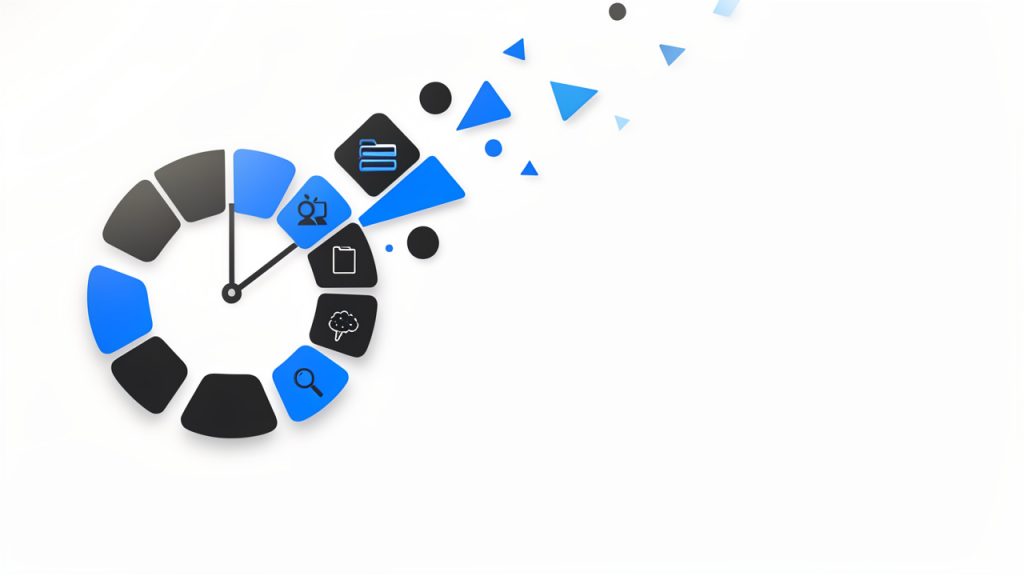
    A visual metaphor for fragmented time: a clock face broken into many small pieces or lots of tiny clock icons scattered, each labeled with brief distractions (e.g., 'searching for a file', 'tab switching', 'remembering next step'), conveying how minutes add up into lost time.

    For small business owners, freelancers, developers, and anyone trying to do more with limited resources, the appeal is obvious. You want software that is easy to adopt, flexible enough to support real work, and free enough to test without a procurement process or a long commitment. The challenge is not finding tools. It is finding the right tools, using them well, and avoiding a stack so cluttered that your productivity system becomes another source of stress.

    What are free productivity tools?

    Free productivity tools are apps, platforms, and online services designed to help individuals or teams organize work, manage time, communicate, automate routine tasks, and store information, all without an upfront cost. In practical terms, these tools cover everything from task managers and calendar apps to note-taking systems, cloud storage, writing assistants, collaboration platforms, and automation utilities.

    The word free deserves a closer look. Some tools are truly free with generous features for personal use or small teams. Others operate on a freemium model, which means the core product is available at no cost, while advanced features sit behind a paid plan. That distinction matters because a tool that feels perfect today can become restrictive once your client load grows or your business starts collaborating across a larger team.

    Productivity itself is often misunderstood. It is not about cramming more tasks into the day. It is about using your time, attention, and energy with greater intention. A good free productivity tool supports that goal by making priorities visible, reducing repetitive work, and helping you move from idea to execution with less effort.

    For a freelancer, that might mean a simple project board that keeps client work from slipping through the cracks. For a small business owner, it could be a shared document system that prevents version confusion. For a developer, it may be a lightweight automation or note system that keeps context organized across projects. The category is broad, but the purpose is consistent, better output with less wasted motion.

    Key aspects of free productivity tools

    Usability matters more than feature count

    One of the biggest mistakes people make is choosing tools based on long feature lists rather than real-world usability. A productivity app can be powerful on paper and still fail in daily use if it is cluttered, slow, or hard to understand. In most cases, the best free productivity tools are the ones you can start using in minutes, not the ones that require hours of setup before they become useful.

    That is especially true for solo users and small teams. When you are already managing clients, deadlines, or product work, you do not need another system that demands constant administration. A clean interface, fast search, and sensible defaults often create more value than dozens of advanced options you may never touch.

    Free does not always mean fully free

    There is a practical trade-off behind most free plans. Some tools limit storage. Others cap integrations, user seats, project boards, automation runs, or history length. These limits are not necessarily a problem, but they should be understood early. A tool can still be an excellent choice if its free tier aligns with your actual workflow.

    The smartest approach is to evaluate free tools not by what they hide, but by what they genuinely enable. If a task manager gives you enough projects, reminders, and views to run your week smoothly, then it is doing its job. If a note app lets you capture and retrieve information quickly, that may be all you need. The goal is not to get enterprise software for free. The goal is to get meaningful utility without paying before you are ready.

    Integration can make or break your workflow

    A productivity tool rarely works in isolation. Your calendar connects to meetings, your notes connect to tasks, your files connect to client work, and your communication tools connect to everything. That is why integration is one of the most overlooked aspects of choosing free productivity tools.

    When tools work well together, they reduce duplication. You stop copying deadlines from one place to another. You stop hunting for attachments across email, chat, and cloud folders. Even a basic level of integration can save significant time over a month.

    For developers and technical users, this can extend into APIs, webhooks, and lightweight automations. For non-technical users, it might simply mean choosing tools that offer calendar syncing, browser extensions, or cloud file support. Either way, the underlying principle is the same, less manual transfer means fewer mistakes and more focus.

    Collaboration features are increasingly essential

    Even solo professionals collaborate constantly. You may share drafts with clients, exchange feedback with contractors, or coordinate timelines with partners. That is why many of the best free productivity tools now include commenting, shared workspaces, permission controls, and live editing.

    This shift is important because productivity is no longer just personal. It is operational. A tool that works only for you but creates confusion for everyone around you can become a bottleneck. A free plan that supports lightweight collaboration often delivers more value than a more advanced app designed purely for individual use.

    Security and reliability should not be ignored

    When software is free, people sometimes assume the stakes are lower. In reality, if a tool stores client notes, financial drafts, passwords, project plans, or business files, reliability matters a great deal. Look for tools with strong reputations, regular updates, transparent privacy policies, and export options.

    The ability to export your data is especially important. Free tools are useful, but lock-in is not. If your needs change, you should be able to move your notes, tasks, or files without rebuilding everything from scratch. Portability is a quiet feature, but it becomes critical the moment a free plan no longer fits.

    Different categories solve different bottlenecks

    It helps to think of free productivity tools by the problem they solve, not just by their app category. Some reduce cognitive load by giving you a trusted place to capture tasks and ideas. Others reduce administrative work through scheduling, templates, and automation. Some improve execution by keeping projects visible. Others improve communication by centralizing conversations and documents.

    A simple comparison makes this easier to evaluate:

    Category What It Helps With Best For Common Free Plan Limits
    Task Management Tracking to-dos, deadlines, priorities Freelancers, small teams, personal planning Limited projects, automations, or team seats
    Note-Taking Capturing ideas, meeting notes, documentation Writers, developers, consultants Storage caps, restricted collaboration
    Calendar and Scheduling Time blocking, appointments, meeting coordination Service businesses, consultants, remote workers Booking limits, branding, fewer integrations
    Cloud Storage File access, sharing, backup Small businesses, distributed teams Limited storage space
    Communication Tools Messaging, quick coordination, updates Remote teams, client-facing businesses Message history limits, user caps
    Automation Tools Repetitive task reduction, workflow triggers Power users, developers, operations-focused teams Limited runs, fewer app connections

    This is why no single tool can solve productivity by itself. If your bottleneck is poor planning, a note-taking app will not fix it. If your bottleneck is repetitive admin, a calendar app alone will not help much. Good tool selection starts with honest diagnosis.

    How to get started with free productivity tools

    Start with your biggest source of friction

    The best way to adopt free productivity tools is to avoid building a full system all at once. Instead, begin with the part of your work that feels most consistently frustrating. That might be missed deadlines, scattered notes, scheduling chaos, or the feeling that important tasks are living in five different places.

    When you identify that friction clearly, tool selection becomes simpler. You are no longer asking, “What is the best productivity app?” You are asking, “What tool can reduce this specific problem?” That question produces better decisions and faster results.

    For example, if you repeatedly forget follow-ups, choose a task manager with reminders before adding anything else. If meetings consume too much time, adopt a free scheduling tool. If project materials are scattered, implement a shared cloud folder and a simple naming convention. Productivity improves fastest when the solution matches the constraint.

    Keep your first setup intentionally small

    Many people sabotage tool adoption by overbuilding from day one. They create elaborate workspaces, too many tags, deeply nested folders, and complicated rules they cannot maintain. A better approach is to create a minimal structure that supports immediate use.

    A practical starter setup usually includes just a few essentials:

    1. One task hub for what needs to happen next.
    2. One note space for ideas, reference material, and meeting notes.
    3. One calendar for deadlines, appointments, and focused work blocks.
    4. One file location for documents you need to find quickly.

    This is enough to create order without adding complexity. Once the system proves useful, you can refine it gradually. That sequence matters. Stable habits should come before advanced customization.

    Evaluate tools by behavior, not branding

    A tool may be popular and still be wrong for your work style. Some people think visually and prefer boards. Others want simple lists. Some need collaborative editing. Others need offline access and strong search. The only way to judge a tool properly is to use it for actual work over several days.

    Pay attention to your own behavior. Are you returning to the tool naturally, or avoiding it? Does it reduce mental clutter, or add another layer of maintenance? Can you find what you saved last week? Do you trust it enough to stop keeping backup notes in three other places? These questions reveal more than product marketing ever will.

    A short evaluation framework can help:

    Evaluation Factor What to Ask
    Ease of Use Can I understand the interface without training?
    Daily Fit Does this match how I naturally plan and work?
    Scalability Will the free version still work a month from now?
    Collaboration Can clients, teammates, or partners use it easily?
    Portability Can I export data if I need to switch later?

    This kind of review keeps you grounded. It shifts the decision from novelty to usefulness.

    Build habits around the tool, not dependence on it

    A tool helps only when it supports a repeatable habit. A task manager, for instance, becomes valuable when you check it at a consistent time, capture tasks immediately, and review priorities before work starts. Without those behaviors, even excellent software produces weak outcomes.

    That is why getting started with free productivity tools should include a routine. Spend a few minutes each morning reviewing priorities. End the day by clearing inboxes, updating task status, and scheduling the next important action. Keep it short and sustainable. Consistency beats sophistication.

    The most productive users often have surprisingly simple systems. Their edge comes from trust. They know where tasks go. They know where notes live. They know how to recover context quickly. Free tools can absolutely support this level of clarity, as long as the workflow remains disciplined.

    Avoid the trap of tool collecting

    There is a hidden cost to free software: because it is easy to try, it is also easy to accumulate. You install one app for notes, another for tasks, another for bookmarks, another for documents, and soon your system is fragmented. This feels productive at first because setup creates the illusion of progress. But too many tools create decision fatigue and information loss.

    A useful rule is to add a new tool only when it replaces confusion or manual work. If it does not clearly solve a problem, it is probably a distraction. Fewer tools, used consistently, almost always outperform a bloated stack full of overlapping functions.

    Think in workflows, not apps

    The most effective way to use free productivity tools is to see them as part of a workflow. A lead comes in, gets added to your notes or CRM. A task is created. A meeting is scheduled. Documents are stored in one place. Follow-up happens on a defined date. Each tool supports one stage of movement.

    This mindset is especially valuable for small businesses and freelancers. When your process is clear, tools become interchangeable parts rather than sources of dependency. You can test a free tool confidently because you understand what job it is supposed to perform. That makes upgrades, replacements, and simplification much easier over time.
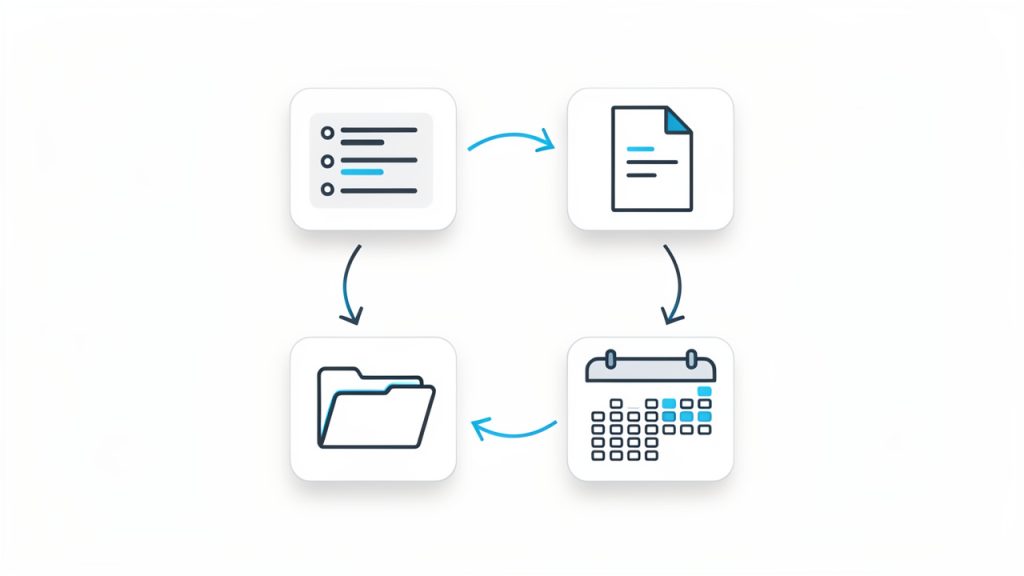
    A clear workflow diagram showing four connected boxes/icons: Tasks → Notes → Calendar → File Storage, with arrows indicating flow between them and small labels like 'create', 'schedule', 'store', 'reference' to show how the tools interact in a simple loop.

    Conclusion

    Free productivity tools are not just budget-friendly alternatives. When chosen carefully, they are powerful systems for reducing friction, improving visibility, and helping work move forward with less effort. The key is not using the most tools. It is using the right ones, in a way that supports your real workflow.

    Start with one bottleneck, choose one or two tools that solve it well, and build simple habits around them. Once your system feels trustworthy, expand only where needed. That approach keeps your stack lean, your processes clear, and your productivity grounded in results rather than software experimentation.

  • Note-Taking Tools: Capture, Organize, and Retrieve Ideas

    Note-Taking Tools: Capture, Organize, and Retrieve Ideas

    The hardest part of managing ideas is rarely the ideas themselves. It is the friction between capturing them, organizing them, and finding them again when they matter. That is why note taking tools have become essential infrastructure for developers, students, knowledge workers, and anyone trying to operate with less mental clutter and more precision.

    A good note system does more than store text. It becomes an external memory layer, a lightweight project tracker, a reference library, and often a thinking environment. The gap between a quick scratchpad and a structured knowledge base is where most modern note taking tools compete, and where the right choice can change daily workflow more than another messaging app or calendar ever will.

    What are note taking tools?

    Note taking tools are software applications designed to capture, structure, retrieve, and synchronize information across devices and workflows. At the simplest level, they replace paper notebooks and sticky notes. At a more advanced level, they function as personal knowledge management systems, supporting tags, links, databases, templates, collaboration, and automation.

    The category is broad because note taking itself is not a single activity. One user needs a fast place to jot meeting points. Another wants markdown-based documentation for technical work. A third wants a searchable archive of research, clipped web pages, and project decisions. The best note taking tools are built to handle one or more of these jobs without introducing so much complexity that the tool becomes the work.

    For developers, the value is especially clear. Notes often include API references, debugging observations, architecture decisions, sprint planning details, and reusable snippets. In that context, a note taking tool is not just a repository of text. It is part of the development environment, sitting somewhere between documentation, task management, and long-term memory.

    The market has evolved accordingly. Some tools focus on speed and simplicity, offering instant capture and minimal formatting. Others are designed for deep knowledge organization, using backlinks, graph views, or nested structures. Still others emphasize team collaboration, making them suitable for shared project spaces and lightweight internal wikis.

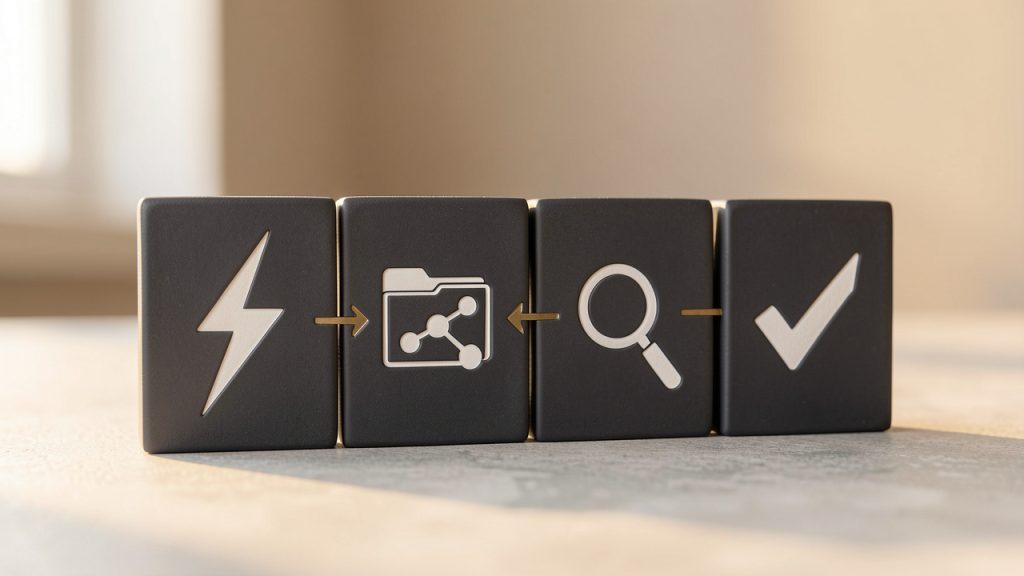
    A useful way to understand the category is to view note taking tools through four functional layers. The first is capture, where information enters the system. The second is organization, where notes are classified or connected. The third is retrieval, where search and navigation determine whether stored information remains useful. The fourth is action, where notes connect to tasks, projects, and decisions. Tools that perform well across all four layers tend to remain valuable over time.

    A clean, simple flow diagram showing the four functional layers as stacked or sequential blocks: Capture -> Organization -> Retrieval -> Action. Each block has a small icon (e.g., lightning bolt for capture, folder/tag/linked nodes for organization, magnifying glass for retrieval, checklist/arrow for action) and arrows indicating information flow between them.

    Key aspects of note taking tools

    Capture speed and low-friction input

    The first quality that separates effective note taking tools from forgettable ones is capture speed. If opening the app, creating a note, and typing the first line takes too long, users default to temporary workarounds. They send themselves messages, open random text files, or trust memory, which usually fails under pressure.

    Fast capture matters because note-taking often happens in unstable contexts. A developer notices an edge case during testing. A manager hears a useful idea in a meeting. A researcher finds a source worth preserving. In each case, the note tool must behave like a reliable buffer between fleeting input and durable knowledge.

    This is why mobile widgets, keyboard shortcuts, browser extensions, voice input, and quick-add commands are not minor features. They directly affect adoption. A tool that supports frictionless intake earns trust because it reduces the delay between thought and storage.

    Organization models and information architecture

    Once notes accumulate, structure becomes more important than formatting polish. Different note taking tools use different organizational models, and each model reflects a theory about how people think. Some rely on folders and subfolders. Others emphasize tags. Some add backlinks and bidirectional relationships, allowing notes to behave more like a graph than a filing cabinet.

    Folders work well when the content has a stable hierarchy, such as client documentation or course materials. Tags are more flexible when information belongs to multiple contexts at once. Linked-note systems are powerful when the goal is idea discovery, synthesis, or long-term knowledge development.

    The trade-off is predictable. The more flexible the structure, the more discipline the user must apply. A rigid folder tree can feel limiting but remains easy to understand. A highly networked note system can be powerful but risks devolving into a web of inconsistent links. The best note taking tools provide enough structure to maintain order while preserving enough freedom to support real work.

    A comparative illustration with three panels: (1) a hierarchical folder tree (filing cabinet) labeled "Folders", (2) a tag cloud with overlapping tags labeled "Tags", and (3) a network graph of interconnected nodes labeled "Backlinks / Graph". Include a small caption under each panel summarizing trade-offs (e.g., "stable hierarchy", "flexible multi-context", "idea discovery").

    Search, retrieval, and resurfacing

    A note that cannot be found is operationally equivalent to a note never taken. That makes retrieval quality one of the most important evaluation criteria. Search should be fast, tolerant of partial memory, and rich enough to filter by title, tag, date, content type, or workspace.

    Advanced retrieval goes further. Some tools support saved searches, backlinks, semantic suggestions, or contextual resurfacing. That matters because users rarely remember where a note lives. They remember fragments, such as a phrase, a meeting date, or the project it was related to. Good retrieval systems are designed around that reality.

    For technical users, search becomes even more critical when notes contain code references, version information, command history, and architecture discussions. In these cases, note taking tools can replace hours of repeated investigation. The ability to locate the exact observation made three weeks ago during debugging is a genuine productivity gain, not a convenience feature.

    Markdown, formatting, and developer friendliness

    Many developers prefer note taking tools that support Markdown, plain text storage, and exportable formats. The reason is not aesthetic. It is about portability, durability, and control. Notes that live in accessible formats are easier to migrate, script, version, and back up.

    Rich text editors appeal to users who value visual formatting and ease of use. They are often better for collaborative documents and polished internal pages. Plain text or markdown-first systems are often better for technical workflows, especially when users want to integrate notes with git repositories, static documentation, or local-first workflows.

    This is one of the clearest fault lines in the category. Some note taking tools behave like document editors. Others behave more like a layer on top of files. Neither approach is universally superior. The better choice depends on whether the priority is presentation, collaboration, customization, or long-term control over data.

    Cross-device sync and offline reliability

    A note system only works if it is available where work happens. That makes cross-device synchronization a baseline requirement for many users. Desktop access is important for deep work. Mobile access matters for capture. Web access can be essential in restricted environments or on shared machines.

    Reliability matters as much as feature breadth. Sync conflicts, slow updates, and partial note loads damage trust quickly. A note taking tool should feel consistent across platforms, especially when users move between laptop, phone, and tablet throughout the day.

    Offline access is similarly important. Notes are often needed while traveling, in low-connectivity spaces, or during outages. Tools that support local caching or local-first storage give users a stronger sense of control and reduce dependence on constant connectivity.

    Collaboration and shared knowledge

    While many note taking tools begin as personal systems, the strongest products increasingly support shared work. Team notes, meeting records, engineering decisions, onboarding guides, and process documentation often benefit from living in a collaborative environment rather than isolated personal notebooks.

    This shifts the requirement set. Collaboration introduces permissions, version history, comments, page sharing, and sometimes database-style structures. The tool must support both clarity and governance. Informal notes can coexist with structured team knowledge, but only if the workspace can scale without becoming chaotic.

    For teams, a note platform often becomes a lightweight wiki. That is particularly useful for fast-moving technical groups that need accessible documentation but do not want the overhead of a formal documentation stack for every internal process. In that space, tools that balance speed with shared structure tend to perform best.

    Security, privacy, and data ownership

    Not all notes are equal. Some are disposable reminders. Others contain confidential business information, research, credentials, or intellectual property. Because of that, security and privacy should not be treated as secondary considerations when evaluating note taking tools.

    Encryption, access controls, compliance posture, and export capability all matter. So does data ownership. Users should understand whether notes are stored locally, in the cloud, or both, and whether they can be exported in usable formats without lock-in. For developers and organizations, this question often determines whether a tool is merely convenient or strategically viable.

    A practical evaluation framework helps. The table below compares the major dimensions that usually matter most.

    Evaluation Area What to Look For Why It Matters
    Capture Quick add, mobile input, browser clipping, shortcuts Reduces friction and improves consistency
    Organization Folders, tags, links, templates, databases Determines long-term scalability
    Search Full-text search, filters, saved queries Makes notes reusable, not just stored
    Format Markdown, rich text, export support Affects portability and editing style
    Sync Fast cross-device updates, offline mode Ensures access everywhere work happens
    Collaboration Shared spaces, comments, permissions Supports teams and project documentation
    Security Encryption, backups, access control Protects sensitive information
    Extensibility Integrations, APIs, automation Connects notes to broader workflows

    Different tools emphasize different strengths. A minimalist app may excel at rapid capture but fall short on collaboration. A workspace platform may be ideal for team documentation but feel heavy for personal thinking. A local-first markdown tool may appeal strongly to developers but require more setup and discipline.

    That is why the best note taking tools are not simply the most feature-rich. They are the ones aligned with the user’s information behavior. The more closely the tool matches the way a person captures, organizes, and retrieves knowledge, the more likely it is to become part of daily workflow.

    How to get started with note taking tools

    Start with use case, not brand

    Many people choose note taking tools by looking at feature checklists or popularity rankings first. That usually leads to avoidable switching later. A better starting point is to define the primary workload. Is the tool meant for quick capture, technical documentation, research organization, meeting notes, or team collaboration?

    This matters because each use case imposes different requirements. A developer maintaining architecture notes may value markdown support, backlinks, and local storage. A manager coordinating meetings may value templates, calendar integration, and sharing. A student may care most about searchable notebooks, annotation support, and cross-device access.

    The first decision should be functional. Once that is clear, vendor choice becomes easier. Instead of asking which app is best in general, the user asks which app is best for this specific operating model.

    Build a small system before building a big one

    A common mistake is over-designing note architecture on day one. Users create elaborate folder structures, complex tagging taxonomies, and nested templates before they have enough real notes to understand what structure is needed. The result is maintenance overhead without practical benefit.

    A better method is to begin with a simple operating structure and let patterns emerge. One notebook for active work, one for reference, and one for archive is often enough to start. Tags can be added later when repeated themes become clear. Links can emerge naturally as knowledge grows. This incremental approach prevents the tool from becoming a classification project.

    For many users, successful adoption depends less on the perfect structure and more on a stable routine. The goal is not to build a museum of notes. The goal is to create a system that gets used consistently under real conditions.

    Use templates where repetition exists

    Templates are one of the most practical features in modern note taking tools, especially for recurring workflows. Meeting notes, sprint retrospectives, daily logs, research summaries, bug reports, and one-on-one agendas all benefit from standardized structure.

    The benefit is not just speed. Templates improve note quality by reducing omission. A meeting template can prompt decisions, owners, and deadlines. A debugging template can prompt reproduction steps, observed behavior, attempted fixes, and final resolution. Over time, this consistency makes notes easier to search and compare.

    For technical teams, templates also improve institutional memory. Repeated formats create stable records. They help turn notes from private fragments into reusable operational assets.

    Connect notes to workflow, not just storage

    Many note collections fail because they remain disconnected from action. Notes are taken, saved, and forgotten. The strongest systems connect note taking tools to ongoing work, which means tying them to tasks, projects, calendars, repositories, or team processes.

    A project note should contain context, decisions, next steps, and relevant links. A meeting note should lead to action items. A research note should connect to related topics or implementation plans. When notes remain linked to execution, they become a living system rather than passive storage.

    This is also where integrated workspaces can help. A platform such as Home can be useful when users want note capture and organization to sit closer to daily operations instead of living in an isolated app. When notes, references, and active work exist in the same environment, context switching drops and information becomes easier to act on.

    Review and prune regularly

    A note system that only accumulates will eventually become noisy. Regular review keeps the signal strong. This does not require aggressive deletion. It means archiving stale material, merging duplicates, and elevating high-value notes into more permanent reference pages.

    A lightweight review cycle often works best. Weekly review can focus on active notes and unfinished ideas. Monthly review can focus on structure, taxonomy, and archives. This creates a feedback loop where the note taking tool continues to reflect current priorities rather than becoming a pile of digital sediment.

    The following sequence is enough for most users starting from scratch:

    1. Define the primary use case for the note system.
    2. Choose one tool that matches that workflow instead of testing many at once.
    3. Create a minimal structure with only a few top-level categories.
    4. Capture notes daily and review patterns after two to four weeks.
    5. Add templates or tags only where repetition clearly exists.

    This approach works because it avoids premature optimization. It lets real usage shape the system, which is usually more durable than trying to predict every category in advance.

    Compare tool types before committing

    The category becomes easier to navigate when viewed by operating style rather than by individual product names. The table below summarizes the main patterns.

    Tool Type Typical Strength Common Limitation Best For
    Minimalist note apps Fast capture, low complexity Limited structure and collaboration Personal reminders, quick notes
    Markdown-first tools Portability, developer control, extensibility Higher setup friction Developers, technical documentation
    Workspace-style platforms Collaboration, databases, shared knowledge Can feel heavy for simple note taking Teams, project hubs, internal wikis
    Research-focused tools Clipping, annotation, source organization Less suited to general task flow Students, researchers, analysts
    Local-first tools Privacy, offline access, ownership Variable sync and sharing maturity Privacy-conscious users, power users

    Choosing between these types is often more important than choosing between brands inside the same type. Once a user identifies the operating model that fits, the field narrows quickly.

    Conclusion

    The best note taking tools do not just help people write things down. They reduce cognitive load, preserve context, and make information usable across time. That requires more than a clean editor. It requires effective capture, scalable organization, reliable search, strong sync, and enough flexibility to match the way real work unfolds.

    For developers and efficiency-focused users, the right note taking tool often becomes part of the core stack. The smartest next step is simple: identify the main use case, choose one tool that fits it, and build a small system that can survive daily use. If the goal is to connect notes more closely with actual work, collaborative context, and organized execution, exploring a workspace like Home can be a practical place to start.