JNTZN

Tag: site speed

  • Shopify SEO: A Practical Guide to Boost Search Traffic

    Shopify SEO: A Practical Guide to Boost Search Traffic

    Shopify SEO can quietly make or break an online store. You can have strong products, clean branding, and competitive pricing, but if your store does not appear when people search, growth becomes expensive and unpredictable.

    That is why search optimization matters so much for Shopify merchants. Good SEO helps your products, collections, and content show up for the right shoppers at the right moment. It reduces your dependence on paid ads, builds long-term visibility, and attracts visitors who are already looking for what you sell. If you run a small business, freelance for ecommerce clients, or build stores as a developer, understanding SEO for Shopify is one of the highest-leverage skills you can invest in.

    What Is Shopify SEO?

    Shopify SEO is the process of improving a Shopify store so it can rank better in search engines like Google. That includes technical improvements, content optimization, site structure, internal linking, product page quality, and user experience. The goal is simple, help search engines understand your store and help real people find exactly what they need.

    What makes SEO on Shopify different from general SEO is the platform itself. Shopify gives store owners a fast, hosted ecommerce system with many built-in features, but it also comes with structural conventions that affect optimization. URL patterns, themes, collection architecture, duplicate content risks, and app-related performance issues all play a role. In other words, the fundamentals of SEO still apply, but the way you implement them on Shopify has its own nuances.

    For most store owners, Shopify is a strong starting point. It handles hosting, security, and mobile responsiveness in many themes, and it covers a lot of technical basics out of the box. That lowers the barrier to entry. At the same time, easy setup can create a false sense of completion. A store can be launched quickly and still be poorly optimized for search.

    The real value of SEO for Shopify stores is not just ranking for broad terms. It is about matching search intent. A well-optimized store attracts shoppers who are comparing products, researching options, or ready to buy. That makes search traffic especially valuable because it often arrives with purpose.

    Key Aspects of Shopify SEO

    The most important part of Shopify SEO is keyword targeting, but not in the old-fashioned sense of stuffing phrases everywhere. Modern optimization starts by understanding what your customers actually type into search. Some searches are broad and informational, such as people learning about a type of product. Others are commercial, where users are comparing options. The most valuable ecommerce searches tend to be transactional, where the person already knows what they want and is close to buying.

    A keyword-intent funnel: three-tiered funnel labeled Informational → Commercial/Comparison → Transactional. Each tier shows the page types that match that intent (top: blog posts/guides; middle: collections/category pages; bottom: product pages) and example search queries for each stage.

    On Shopify, this means each page should have a clear role. Your homepage usually targets branded or broad category terms. Collection pages often target category-level searches. Product pages should focus on specific product names and high-intent variations. Blog content can support the rest by capturing informational searches and guiding readers toward products.

    Another major aspect is site architecture. Search engines favor stores that are easy to crawl and easy to understand. If your products are buried under confusing navigation, scattered into overlapping collections, or connected with weak internal links, both users and search engines will struggle. A clean Shopify structure helps distribute authority across pages and makes it easier for search engines to discover what matters most.

    A strong architecture usually starts with sensible categories and collections. Think of your store like a physical shop. If everything is tossed into random aisles, shoppers leave frustrated. If the layout is intuitive, they browse longer and buy faster. Search engines respond to that same clarity because it helps them interpret topical relevance and page relationships.

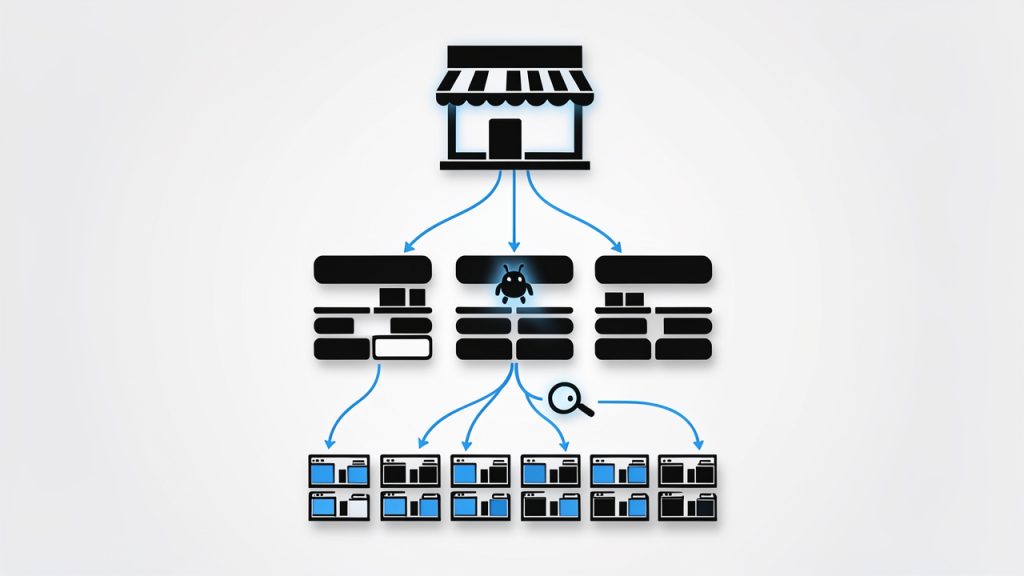
    A schematic 'store as a shop' site-architecture diagram: a storefront (homepage) at the top, branching into category/collection aisles, each aisle leading to product shelves (product pages). Include arrows showing internal linking between collections and products and a crawler icon tracing an easy path down the hierarchy to illustrate crawlability and distribution of authority.

    On-page optimization is another core pillar. This includes title tags, meta descriptions, headings, image alt text, page copy, and internal links. On a Shopify store, many merchants stop at adding a product title and price. That is not enough. Product pages need unique descriptions, useful details, and language that reflects how shoppers search. Collection pages also need real copy, not just a grid of products. Even a short, thoughtful introduction can help clarify the theme of the page.

    Technical SEO matters too, especially on ecommerce sites where page counts grow quickly. Shopify handles some technical essentials well, but store owners still need to pay attention to crawlability, indexation, canonicalization, redirects, schema support, and site speed. Themes with heavy scripts, oversized images, and too many apps can slow down the experience, which hurts both rankings and conversions.

    Content also plays a bigger role than many Shopify merchants expect. If your store only contains product and collection pages, you may be missing opportunities to rank for educational or comparison-based searches. Helpful articles, buying guides, care instructions, and use-case content can bring people into your ecosystem earlier in the buying journey. This kind of content also supports internal linking and topical authority.

    User experience overlaps with SEO more than ever. Search engines increasingly reward pages that satisfy visitors. If a page loads slowly, looks cluttered on mobile, or fails to answer the query clearly, it may struggle to perform even if the keywords are present. On Shopify, design and SEO should not be treated as separate conversations. A polished theme that hides important content, or a stylish layout that slows down the site, can work against your search visibility.

    The table below shows how the main parts of SEO for Shopify fit together:

    SEO Area What It Covers Why It Matters for Shopify Stores
    Keyword Strategy Search intent, product terms, category terms, content topics Helps each page target the right audience and query type
    Site Structure Navigation, collections, internal linking, hierarchy Makes the store easier to crawl and easier to shop
    On-Page SEO Titles, descriptions, headings, copy, alt text Improves relevance and click-through potential
    Technical SEO Speed, canonicals, redirects, indexing, mobile performance Prevents hidden issues that limit rankings
    Content Marketing Blog posts, guides, FAQs, educational pages Expands reach beyond direct product searches
    User Experience Mobile usability, page clarity, conversion flow Supports both rankings and sales outcomes

    How to Get Started With Shopify SEO

    The best way to start is with an SEO audit of your existing store. Even a small store can accumulate avoidable issues quickly. You may have duplicate product descriptions, missing title tags, oversized images, weak collection copy, or pages that do not align with what people are searching for. Before chasing new traffic, it helps to understand what is already blocking performance.

    Start by reviewing your core pages manually. Look at the homepage, top collections, best-selling products, and any blog posts already getting traffic. Ask a simple question for each page: What search intent is this page meant to serve? If the answer is unclear, the page likely needs stronger focus. SEO gets much easier when every important page has a defined purpose.

    Next, build a keyword map. This does not need to be overly complicated, especially for a small business. Assign one primary keyword theme to each major page, then support it with related variations. For example, a collection page might target a category phrase, while the products inside it target specific branded or feature-based searches. The key is to avoid making multiple pages compete for the same term unless there is a very good reason.

    After that, improve your on-page elements. Your title tags should be descriptive and compelling, not just stuffed with keywords. Your meta descriptions should invite clicks. Product pages should include original copy that explains benefits, features, dimensions, materials, shipping relevance, and use cases. Collection pages should have a short introduction that helps search engines understand the page and helps users confirm they are in the right place.

    Images deserve more attention than they usually get. On Shopify stores, product imagery often carries both commercial and SEO value. Compress files so pages load faster, use clear filenames, and write alt text that accurately describes the image. Alt text should support accessibility first, but it can also reinforce page relevance when written naturally.

    If your store has multiple collections and filtering options, pay attention to duplicate content. Shopify can generate different paths to similar pages, which can create confusion for search engines if left unmanaged. That is one reason technical review matters. Canonical signals, internal linking consistency, and careful handling of filtered or tag-based pages help keep your SEO focused.

    Content creation is often the next layer of growth. Once core commercial pages are optimized, add content that answers real questions your audience has. A Shopify store selling skincare, for example, could publish guides about ingredient types, routine order, or product selection by skin concern. A furniture store could create measurement guides, styling tips, or material comparisons. This content is not just for traffic. It can move readers toward products and strengthen the authority of your store overall.

    A practical starting sequence looks like this:

    1. Audit the store for technical, content, and structure issues.
    2. Map keywords to homepage, collections, products, and blog content.
    3. Optimize key pages with stronger titles, copy, headings, and images.
    4. Improve speed and mobile usability by reducing unnecessary app and media weight.
    5. Publish supporting content that targets informational and commercial questions.

    One of the most common mistakes is trying to optimize every product page first, especially on large catalogs. That approach often burns time without creating meaningful momentum. A better strategy is to focus on the pages with the highest business impact. Usually that means your main collections, flagship products, and strongest category opportunities. Once those are performing, you can expand outward.

    It is also important to set realistic expectations. SEO for Shopify is not an overnight fix. Search growth usually comes from consistent improvements compounded over time. You may see technical wins quickly, especially if there are major issues holding the site back. But most ranking gains come from better page quality, stronger internal structure, and content that proves relevance over weeks and months.

    Measurement matters here. Track impressions, clicks, rankings, and conversions, not just traffic volume. More visitors are not useful if they do not buy or engage. The best Shopify SEO strategy connects search visibility to business outcomes. That means watching how optimized pages influence revenue, assisted conversions, and customer acquisition efficiency.

    For developers and freelancers working on Shopify stores, there is another important layer, implementation discipline. Theme changes, app installs, template edits, and collection logic can all affect SEO. A technically sound store today can lose rankings after a redesign if redirects break, content disappears, or JavaScript bloats performance. SEO should be part of every development workflow, not a cleanup task after launch.

    Conclusion

    SEO for Shopify is not about gaming search engines. It is about building a store that is clear, fast, useful, and aligned with the way customers search. When keyword strategy, site structure, content, and technical health work together, your store becomes easier to discover and easier to trust.

    The smartest next step is to audit your most important pages and improve them one by one. Start with your collections, best-selling products, and overall site structure. Once that foundation is solid, expand into content and deeper technical refinement. That steady approach is what turns Shopify SEO from a vague marketing task into a dependable growth channel.

  • Practical WordPress SEO: A Step-by-Step Guide

    Practical WordPress SEO: A Step-by-Step Guide

    If your website looks good but still struggles to attract traffic, the problem is rarely just the design. More often, it is discoverability. A well-built WordPress site can still remain invisible in search results if the underlying SEO basics are weak, inconsistent, or missing entirely.

    That is why understanding SEO for WordPress matters so much. WordPress gives you a strong foundation, but it does not automatically make your site rank. You still need the right structure, content strategy, technical setup, and ongoing optimization. The good news is that WordPress is one of the most SEO-friendly platforms available, which makes it ideal for small business owners, freelancers, developers, and anyone who wants practical results without unnecessary complexity.

    This guide breaks down what WordPress SEO really means, which elements have the biggest impact, and how to get started in a way that is manageable and effective. Whether you are launching a new site or trying to improve an existing one, the goal is simple: help search engines understand your content, and help the right people find it.

    What Is WordPress SEO?

    WordPress SEO is the process of improving a WordPress website so it performs better in search engines like Google. That includes making your site easier to crawl, easier to understand, faster to load, and more useful to human visitors. Good SEO is not about gaming an algorithm. It is about aligning your site with what search engines are trying to reward, which is relevance, clarity, and quality.

    Many people assume WordPress handles SEO automatically. That idea is only partly true. WordPress does provide a cleaner starting point than many other website platforms. It supports customizable permalinks, responsive themes, blogging functionality, and a flexible ecosystem of plugins. Those features make optimization easier, but they do not replace strategy.

    A useful way to think about SEO for WordPress is to separate the platform from the practice. WordPress is the vehicle, SEO is how you drive it. You can have a powerful platform and still make poor decisions about site structure, content, or page speed. On the other hand, a modest WordPress site with focused content and solid technical setup can outperform larger competitors.

    Search engine optimization on WordPress typically touches four areas: technical SEO, on-page SEO, content quality, and user experience. These areas overlap more than most beginners expect. For example, a fast mobile page improves user satisfaction, and it also helps search visibility. Clear headings help readers scan a page, and they also help search engines interpret topical relevance.

    Key Aspects of WordPress SEO

    Site Structure and Crawlability

    One of the most important foundations of WordPress SEO is a clean site structure. Search engines need to discover your pages, understand how they relate to each other, and determine which ones matter most. If your site is cluttered with unnecessary archives, duplicate pages, broken links, or confusing navigation, you make that job harder.

    A strong WordPress structure starts with logical page organization. Your main services, categories, and important resources should be easy to reach in just a few clicks. Internal linking also plays a major role here. When one page naturally links to another related page, you create pathways for both users and search engines. That improves context and can distribute authority across your site.

    Permalinks deserve attention too. WordPress lets you customize your URL format, and this is more important than it sounds. A short, descriptive URL is easier to trust, easier to share, and easier for search engines to interpret. A page called /local-seo-services/ communicates far more clearly than a URL filled with dates or random parameters.

    A clear site-structure diagram showing a homepage at the top, main category/service pages beneath it, individual content pages/blog posts under those categories, and internal links between related pages. Include a small sitemap icon and an example of a clean permalink (e.g., /local-seo-services/) to emphasize readable URLs.

    Content Optimization

    Content is where most SEO gains are won or lost. A WordPress site can be technically polished and still underperform if the content is thin, vague, or built around the wrong topics. Strong content optimization starts with understanding what your audience is actually searching for, then creating pages that answer those needs clearly and completely.

    That means every important page should have a distinct purpose. A homepage targets broad brand intent. A service page targets a specific solution. A blog post might answer a question, compare options, or explain a process. When pages overlap too much, they compete with one another. When they are focused, they become easier to rank.

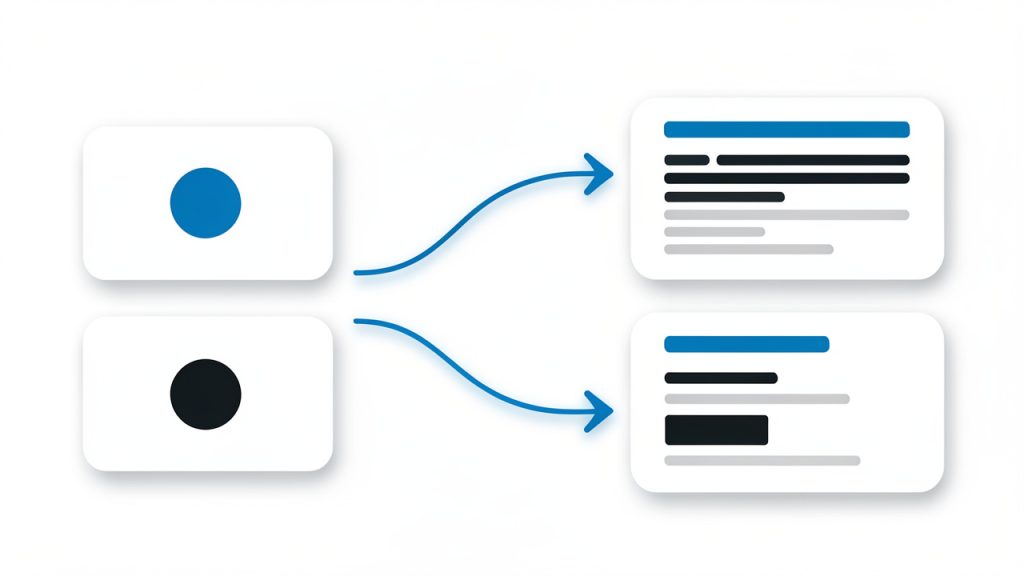
    A visual that matches search intent to page types: e.g., an intent column (informational, navigational, transactional) with arrows to example page formats (blog post/guide, homepage/brand page, service/product page). Show best practices like distinct page purpose, titles/headings, and meta descriptions.

    Titles, headings, and meta descriptions also matter. They help frame the page for both search engines and users. Your target phrase should appear naturally in the title and supporting headings, but stuffing keywords into every line is counterproductive. Modern SEO rewards topical depth and readability, not repetition.

    Good content also means updating pages over time. Search intent changes, competitors improve, and statistics go out of date. Pages that once ranked well can slowly slide if they are not maintained. Treat content as an asset that needs refinement, not as a one-time task.

    Technical Performance

    Technical SEO can sound intimidating, but for most WordPress site owners, it comes down to a few practical areas. Speed, mobile usability, indexing, and clean code output are the big ones. If a page loads slowly, shifts around while loading, or works poorly on a phone, that weakens both user trust and search performance.

    Themes and plugins often have a direct impact here. A visually impressive theme that loads excessive scripts may hurt performance more than it helps conversions. The same goes for installing too many plugins without a clear purpose. Every addition should earn its place.

    Caching, image compression, lazy loading, and reliable hosting make a major difference. So does keeping WordPress core, themes, and plugins updated. A neglected site can develop errors, security issues, and performance problems that quietly undermine SEO. Technical health is not glamorous, but it is often the reason one site outranks another with similar content quality.

    User Experience and Engagement

    Search engines increasingly reward pages that satisfy users. That does not mean Google can read minds, but it can detect useful signals. If visitors land on your page and immediately leave because it is slow, confusing, or unhelpful, that is a problem. If they stay, explore, and engage, that usually indicates stronger relevance.

    This is why user experience belongs in any serious conversation about WordPress SEO. Readable formatting, clear navigation, strong calls to action, and mobile-friendly layouts all contribute to performance. Even simple changes such as shorter paragraphs, clearer subheadings, and better spacing can improve how people interact with your content.

    There is also a branding dimension here. A polished, trustworthy site tends to earn more backlinks, more shares, and more conversions. SEO does not exist in isolation. It is connected to how credible your business appears online. In that sense, optimization is not just about rankings. It is about making your website more effective overall.

    Plugins and SEO Tools

    WordPress plugins can simplify many SEO tasks, but they should support your strategy, not define it. An SEO plugin can help you edit title tags, generate XML sitemaps, set canonical URLs, and manage indexing settings. Those are real advantages, especially for small teams without technical staff.

    Still, no plugin can compensate for weak content or a poor site structure. Some site owners become overly dependent on traffic-light scores or plugin recommendations without understanding the bigger picture. A green indicator is not a ranking guarantee. It is just a prompt based on limited rules.

    The smartest approach is to use plugins to handle repetitive technical details while keeping your attention on content quality, user intent, and business goals. In other words, let tools assist the work, not replace judgment.

    How to Get Started With WordPress SEO

    Begin With the Essentials

    If you are starting from scratch, the first priority is to make sure your WordPress site is technically visible to search engines. That includes checking that your site is not set to discourage indexing, choosing a clean permalink structure, installing a reputable SEO plugin, and submitting your sitemap through Google Search Console.

    At the same time, review your theme and hosting setup. A slow host or bloated theme can create SEO problems before you publish a single page. It is easier to build on a solid foundation than to repair one later. Think of it like opening a physical store. Location, signage, and accessibility matter before foot traffic ever arrives.

    A simple starting checklist can help:

    1. Set clean permalinks that use readable page names.
    2. Install an SEO plugin to manage metadata and sitemaps.
    3. Connect Google Search Console to monitor indexing and performance.
    4. Check mobile usability and speed before expanding your content.
    5. Create core pages first, such as homepage, services, about, and contact.

    Build Content Around Search Intent

    Once the basics are in place, focus on content that matches what your audience is searching for. This is where many WordPress sites either gain traction or stall. Writing random blog posts may fill your site with pages, but traffic grows faster when each piece serves a real purpose.

    If you are a freelancer, that might mean service pages for each offering plus articles that answer common client questions. If you run a small business, it may mean local landing pages, product explanations, or guides that support your sales process. Developers might create tutorials, comparisons, or technical explainers that attract highly targeted visitors.

    Search intent should shape both the topic and the format. A person searching for “best accounting software for freelancers” expects comparison content. Someone searching for “bookkeeping services near me” has transactional intent. When your page matches that expectation, it performs better.

    Strengthen On-Page SEO Without Overdoing It

    On-page optimization is where you help search engines understand the topic of each page. In WordPress, that usually means refining the title tag, heading structure, image alt text, internal links, and meta description. These are small elements individually, but together they create clarity.

    The key is natural optimization. Use your main keyword in a way that sounds human. Include related terms where relevant. Organize the page with meaningful headings. Add internal links to related posts or service pages. Avoid the outdated habit of forcing the same phrase into every paragraph.

    This is especially important for SEO on WordPress because plugins can sometimes encourage checkbox behavior. Readers do not care whether a plugin score says 92 out of 100. They care whether the page answers their question quickly and convincingly. Search engines increasingly reward the same thing.

    Prioritize Performance and Maintenance

    SEO is not a one-time project. WordPress sites need ongoing care. Broken links appear. Plugins conflict. Pages slow down over time. Content ages. Rankings shift. The sites that maintain visibility are usually the ones that treat SEO as an operating habit rather than a launch task.

    That does not mean you need to obsess daily. It means setting a rhythm. Review Search Console data, update old content, improve pages with high impressions but low clicks, and audit site speed periodically. Small consistent improvements often outperform occasional major overhauls.

    The table below highlights where beginners should focus first and what tends to have the biggest practical impact.

    SEO Area Why It Matters Best First Action Common Mistake
    Site Structure Helps search engines crawl and understand your pages Create simple navigation and logical page hierarchy Publishing too many overlapping pages
    Content Quality Drives relevance and rankings Write pages around real user questions and needs Targeting keywords without matching intent
    On-Page SEO Clarifies page topics Optimize titles, headings, and internal links Keyword stuffing
    Technical Performance Affects speed, mobile usability, and indexing Choose quality hosting and optimize images Using a heavy theme and too many plugins
    Tracking and Maintenance Helps you improve over time Use Search Console and update content regularly Setting everything up once and ignoring it

    Think Long Term, Not Just Quick Wins

    It is tempting to approach WordPress SEO as a hunt for hacks. Most shortcuts either do not work or do not last. Sustainable results usually come from doing ordinary things consistently well: publishing useful content, improving site speed, clarifying page topics, and building a trustworthy brand.

    This matters especially for small businesses and independent creators. You may not have the authority of a massive publisher, but you can be more specific, more helpful, and more aligned with your audience. In many niches, that is exactly what earns rankings.

    If your site is new, expect momentum to build gradually. Search visibility often compounds. One strong page leads to a few rankings. Those rankings bring data, links, and confidence. That helps the next pages perform better. WordPress is a strong platform for this kind of growth because it is flexible enough to scale as your content strategy matures.

    Conclusion

    WordPress gives you an excellent foundation for search visibility, but the platform alone is not the strategy. Effective SEO for WordPress comes from combining technical reliability, clear structure, useful content, and a strong user experience. When those pieces work together, your site becomes easier to find and more persuasive once people arrive.

    Your next step is simple. Audit what you already have. Check your structure, improve a few key pages, fix obvious technical issues, and build new content around real search intent. You do not need to perfect everything at once. In WordPress SEO, steady improvement is often what creates the biggest long-term gains.

  • Technical SEO: A Practical Guide for Small Sites

    Technical SEO: A Practical Guide for Small Sites

    Technical SEO is often the difference between a website that could rank and a website that actually does. You can publish great content, write compelling sales copy, and build a strong brand, but if search engines struggle to crawl, understand, or index your pages, your visibility will stall before your strategy even has a chance to work.

    For small business owners, freelancers, and developers, that reality can feel frustrating. Technical SEO sounds intimidating, and many guides make it seem like you need an engineering team to fix anything. In practice, the foundation is simpler than it looks. Once you understand how your site is discovered, rendered, indexed, and measured, technical search optimization becomes much more manageable.

    What Is Technical SEO?

    Technical SEO is the part of search engine optimization that focuses on how well a website is built for search engines to access and process. It is less about writing keywords into page copy and more about making sure your site can be crawled efficiently, loaded quickly, understood clearly, and served securely.

    A useful way to think about technical SEO is to compare it to a storefront. Your branding, products, and sales messaging are what customers see when they walk in. Technical SEO is the lighting, the door, the floor plan, and the signage outside. If the entrance is blocked, the lights flicker, and no one can find the address, even a great business inside will underperform.

    A storefront analogy: two side-by-side shop fronts. Left: blocked entrance, poor signage, flickering lights, cluttered interior (represents bad technical SEO). Right: clear door, bright lighting, visible address, tidy interior with customers (represents good technical SEO).

    At its core, technical search optimization helps search engines answer four essential questions about your site. Can they find your pages? Can they access them reliably? Can they understand what those pages are about? And can they trust the experience enough to show them to users? When the answer is yes, your content has a much better chance of ranking.

    A simple flow diagram showing how search engines discover and process pages: discovery (sitemap + links) → crawl (bot follows links, fetches resources) → render (browser/JS rendering) → index (content stored with metadata) → serve in search results. Include icons for sitemap, robots.txt, search bot, browser window, and index/database.

    This is why technical SEO matters for more than large enterprises. A local service business, a portfolio site, an online store, or a blog can all gain from better site structure, faster load times, clean indexing signals, and mobile-friendly design. These are not abstract improvements. They influence visibility, user experience, and ultimately conversions.

    Key Aspects of Technical SEO

    Technical SEO covers several moving parts, but they work toward the same goal: making your website easy for search engines and users to navigate. Some factors matter more than others depending on your site size and platform, but the main pillars are consistent across almost every project.

    Crawlability and Indexability

    Before a page can rank, a search engine needs to crawl it and then decide whether to index it. Crawlability refers to whether bots can reach your content. Indexability refers to whether that content is eligible to appear in search results.

    Problems often happen when important pages are buried deep in the site structure, blocked by robots instructions, redirected unnecessarily, or marked with tags that tell search engines not to index them. Even a beautifully designed page becomes invisible if search engines cannot reach it properly.

    This is where internal linking plays a big role. A page that is linked naturally from navigation, category pages, and relevant content is easier to discover than a page that only exists in a forgotten corner of the site. In technical SEO, structure is not decoration. It is infrastructure.

    Site Speed and Performance

    A slow website hurts both rankings and conversions. Users are impatient, especially on mobile devices, and search engines know that page experience affects satisfaction. Technical SEO therefore includes performance optimization, not as a vanity metric but as a core usability issue.

    Fast websites usually have cleaner code, optimized images, efficient caching, fewer render-blocking resources, and better hosting. Even small gains can matter. If your pages load a second or two faster, bounce rates often improve, and visitors are more likely to stay long enough to take action.

    Performance also connects to technical stability. A site that loads inconsistently, shifts content while rendering, or becomes unusable during script execution creates friction. Search engines increasingly evaluate these experience signals because they reflect real-world quality, not just backend neatness.

    Mobile Friendliness

    Most websites now live in a mobile-first world. Search engines primarily evaluate the mobile version of a site when determining how content should be indexed and ranked. That means your mobile layout cannot be treated as a secondary experience.

    Technical SEO includes responsive design, readable text sizing, tappable navigation, usable forms, and layouts that do not break on smaller screens. It also means ensuring that the mobile version contains the same essential content and metadata as the desktop version.

    For small businesses, this is especially important because many high-intent searches happen on phones. A person looking for a nearby service, comparing prices, or reading reviews is often doing it on mobile. If the site is technically clumsy on that device, search visibility and lead quality both suffer.

    URL Structure and Site Architecture

    Good technical SEO makes a website easier to understand at a glance. Clear URLs, logical navigation, and sensible page hierarchy help both users and search engines interpret how your content is organized.

    A strong site architecture usually keeps important pages close to the homepage, groups related topics together, and avoids creating too many thin or duplicative paths. This matters because search engines use internal relationships to understand topical relevance and page importance.

    Clean URL structures also reduce confusion. A concise address that reflects the page topic is easier to crawl, easier to share, and easier to trust. It will not magically improve rankings on its own, but it supports clarity across the whole site.

    XML Sitemaps and Robots Directives

    An XML sitemap acts like a roadmap for search engines. It helps highlight the pages you want crawled and indexed, especially on larger sites or sites with pages that are not easily discovered through links alone.

    Robots directives serve a different purpose. They help control crawler access and page-level indexing behavior. Used correctly, they keep search engines focused on valuable content. Used carelessly, they can hide critical pages from search entirely.

    This is one of the most common technical SEO trouble spots. A site redesign, plugin conflict, or staging setup can accidentally leave noindex tags or disallow rules in place. That kind of simple mistake can wipe out organic traffic quickly, which is why regular checks matter.

    Duplicate Content and Canonicalization

    Duplicate or near-duplicate content is common, especially on ecommerce sites, blogs with tag archives, filtered category pages, or CMS platforms that generate multiple URL versions for the same content. Search engines can usually handle some duplication, but too much ambiguity weakens signals.

    Canonical tags help indicate which version of a page should be treated as the preferred one. They do not force search engines to obey, but they provide an important signal when multiple URLs contain substantially similar content.

    This is not only about avoiding penalties, because the issue is usually not punitive. It is about preventing dilution. If backlinks, internal links, and crawl attention are spread across several versions of the same page, ranking potential becomes fragmented.

    Structured Data and Search Understanding

    Structured data helps search engines interpret page content more precisely. It adds context to elements like products, reviews, articles, FAQs, organizations, and local business details. In some cases, it can also support enhanced search result displays.

    Think of structured data as labeling the parts of your site in a language machines understand clearly. A human visitor can infer that a line of text is a product price or review rating. Search engines benefit when that information is explicitly marked up.

    For businesses, this can improve how pages are understood and occasionally how they appear in search. It does not replace strong content or site quality, but it strengthens clarity, which is a recurring theme across technical SEO.

    HTTPS and Site Security

    Security is a baseline expectation now. HTTPS encrypts data between the user and the site, helps build trust, and supports a safer browsing experience. Search engines have long treated HTTPS as an important standard.

    A site that still mixes secure and non-secure elements can trigger browser warnings, broken assets, or trust issues. That creates a technical and business problem at the same time. People are less likely to submit a form, make a purchase, or stay on a site that looks unsafe.

    Security also extends beyond certificates. A technically healthy site is updated, monitored, and protected from preventable vulnerabilities that can lead to spam, malware, or indexing problems.

    Broken Links, Redirects, and Status Codes

    Every website changes over time. Pages are removed, product lines shift, URLs are updated, and old content gets retired. Technical SEO ensures those changes do not leave behind broken paths.

    Broken internal links create a poor user experience and waste crawl attention. Poorly handled redirects can slow navigation, confuse search engines, and weaken page equity. Understanding status codes such as 200, 301, 404, and 500 helps you diagnose whether pages are working, moved, missing, or failing.

    This is one of the most practical areas to audit because the fixes are often straightforward. Updating links, removing redirect chains, and restoring key pages can produce quick gains in both usability and crawl efficiency.

    Core Web Vitals and Real User Experience

    Core Web Vitals measure aspects of speed, responsiveness, and visual stability. While they are only one part of the larger ranking picture, they are useful because they tie technical quality to actual user experience.

    A page that appears quickly, responds promptly, and does not jump around while loading feels trustworthy and polished. That matters to users, and it matters to search engines because their job is to recommend satisfying results.

    For many site owners, Core Web Vitals are best seen as a prioritization tool rather than an obsession. You do not need perfection on every metric to benefit from technical SEO. You need a site that performs reliably well enough to remove friction.

    A Simple View of the Main Areas

    Area What It Affects Common Problems Why It Matters
    Crawling Discovery of pages Blocked resources, poor internal links Search engines cannot rank what they cannot find
    Indexing Eligibility for search results Noindex tags, duplicate URLs Valuable pages may never appear in search
    Performance Speed and user experience Heavy images, slow hosting, excess scripts Slow sites lose traffic and conversions
    Mobile usability Accessibility on phones and tablets Broken layouts, tiny text, hard-to-use forms Mobile-first indexing makes this essential
    Architecture Site understanding and navigation Deep page structure, messy URLs Better structure improves discoverability
    Structured data Content interpretation Missing or invalid markup Helps search engines understand page meaning
    Security Trust and safe access Missing HTTPS, mixed content Users and search engines expect secure browsing

    How to Get Started With Technical SEO

    The biggest mistake beginners make is assuming technical SEO begins with advanced tools and complicated fixes. It usually begins with observation. You need to understand how your website behaves before you try to optimize it.

    Start by looking at your site the way a search engine might. Can your important pages be reached through clear navigation? Do they load quickly on mobile? Are there duplicate versions of the same page? Are there obvious broken links or strange redirects? This first pass often reveals more than people expect.

    Begin With a Technical Audit

    A technical SEO audit is simply a structured review of your website’s health. The goal is not to create a giant report for its own sake. It is to identify the issues most likely to hold back visibility and prioritize them by impact.

    For a small business site or portfolio, the first audit should focus on the essentials. Check whether the site is indexable, whether there are crawl errors, whether HTTPS is working correctly, and whether key pages can be found within a few clicks. Then review speed, mobile usability, and obvious duplicate content issues.

    If you run a larger site, the audit becomes more layered. You may need to evaluate faceted navigation, pagination, orphan pages, log files, JavaScript rendering, or parameter handling. But the principle remains the same. Fix what prevents search engines from accessing and understanding your best content first.

    Focus on High-Impact Fixes First

    Not every technical issue deserves immediate attention. Some warnings are minor. Others can quietly suppress an entire site. Good technical SEO is as much about prioritization as diagnosis.

    If your site accidentally blocks search engines, that is urgent. If your product pages load slowly because of oversized images, that is also high value to fix. If a small markup field is missing on a low-traffic page, it probably matters less in the short term.

    A practical sequence often looks like this:

    1. Fix indexing blockers, so important pages can appear in search.
    2. Improve crawl paths, through stronger internal linking and cleaner architecture.
    3. Resolve major speed and mobile issues, that hurt user experience.
    4. Clean up duplicates, redirects, and metadata signals, to improve clarity.

    This order works because it aligns effort with business results. A perfectly marked-up page means little if it is not indexable in the first place.

    Use Tools Without Becoming Tool-Dependent

    Technical SEO tools are helpful, but they should support judgment, not replace it. A crawler can flag duplicate titles. A performance tool can identify heavy assets. A search console can surface indexing issues. These are valuable signals, but they still need interpretation.

    For example, a tool may report dozens of redirected URLs. That is not automatically a crisis. Some redirects are necessary and healthy. The real question is whether they create chains, loops, or unnecessary delays on important pages.

    The most effective site owners use tools to validate what they suspect, uncover what they missed, and track progress over time. They do not chase every red warning symbol as if it carries equal weight.

    Match Technical Work to Your Platform

    A WordPress site, a Shopify store, a custom web app, and a static portfolio site all present different technical SEO realities. Your platform determines how much control you have over URLs, metadata, structured data, performance, and rendering behavior.

    This matters because the best advice is always contextual. On one platform, image compression and plugin cleanup might deliver the biggest gains. On another, the priority may be JavaScript rendering or template-driven duplicate content. Technical SEO is not one-size-fits-all, even when the underlying principles stay the same.

    If you are a developer, this is an advantage. You can often solve structural problems at the template or framework level instead of patching them page by page. If you are a business owner using a website builder, your focus should be on the settings and content architecture you can control consistently.

    Build Good Habits Into Ongoing Maintenance

    Technical SEO is not a one-time repair job. Sites evolve, content changes, plugins update, and redesigns introduce risk. The healthiest websites treat technical maintenance as a recurring process rather than an emergency response.

    That does not mean constant tinkering. It means checking key signals regularly. Monitor indexing trends, crawl errors, page speed, broken links, and mobile usability after meaningful site changes. If traffic drops unexpectedly, technical causes should be one of the first places you investigate.

    A simple monthly review can prevent much larger problems later. This is especially important for small teams that do not have a dedicated SEO specialist watching every deployment.

    Common Early Priorities for Most Sites

    Priority What to Check First Typical Outcome
    Indexing health Important pages are not blocked or noindexed Pages become eligible to rank
    Site speed Large images, weak hosting, heavy scripts Faster pages and better engagement
    Mobile usability Responsive layout, readable text, easy navigation Better performance on mobile-first indexing
    Internal linking Key pages linked from menus and relevant content Improved crawlability and page discovery
    URL consistency Duplicate versions, trailing slash issues, HTTP/HTTPS conflicts Cleaner ranking signals
    Redirect cleanup Broken pages and redirect chains Stronger user experience and crawl efficiency

    Conclusion

    Technical SEO is not glamorous, but it is foundational. It ensures that the work you put into content, branding, and marketing is not wasted by preventable technical friction. When your site is fast, crawlable, secure, mobile-friendly, and logically structured, search engines can do their job more effectively, and users can too.

    The best next step is to audit your site with fresh eyes and fix the biggest blockers first. Focus on accessibility, indexing, performance, and structure before chasing smaller refinements. Once the technical foundation is solid, every other SEO effort becomes more likely to pay off.