

A plain text message can expose more than most people realize. Client notes, password hints, contract details, API keys, internal plans, and personal information often get copied into emails, chats, and documents without a second thought. That convenience is useful, but it also creates risk. If you need to encrypt text online free, the good news is that modern web tools make the process fast, accessible, and practical for everyday use.
For small business owners, freelancers, developers, and productivity-focused users, text encryption is no longer a niche security task. It is a simple habit that helps protect sensitive content before it is shared or stored. The real challenge is not whether free online encryption exists, it is knowing what it actually does, when to trust it, and how to use it without creating a false sense of security.
What is Encrypt text online free?
At its core, encrypt text online free means using a web-based tool to convert readable text into an unreadable format that can only be restored with the correct key, password, or method. In simple terms, encryption scrambles your message so that even if someone intercepts it, they cannot understand it without authorization. The original readable message is often called plaintext, and the scrambled result is called ciphertext.
This matters because not all text protection works the same way. Some online tools only encode text, which changes its format but does not truly secure it. Others perform real encryption using established cryptographic methods. That difference is critical. If you are protecting financial details, confidential business notes, customer information, or login-related content, you need actual encryption, not just a cosmetic transformation.
Free online text encryption tools are popular because they remove friction. You do not need to install software, configure complex settings, or learn command-line utilities just to protect a short message. In many cases, you paste your text into a browser, choose a password or encryption option, and generate encrypted output in seconds. For quick workflows, that ease is valuable.
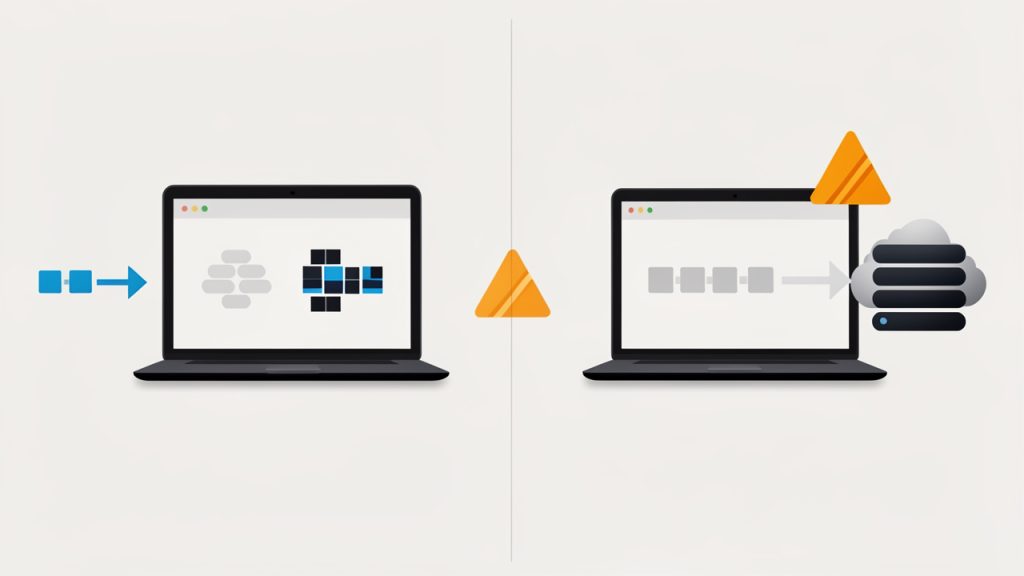
Still, convenience should not replace judgment. The phrase encrypt text online free sounds simple, but the safety of the process depends on how the tool handles your data. Some services process everything locally in your browser, which means your text may never leave your device. Others send the content to a server for processing. That distinction can dramatically affect privacy and trust.
Encryption versus encoding versus hashing
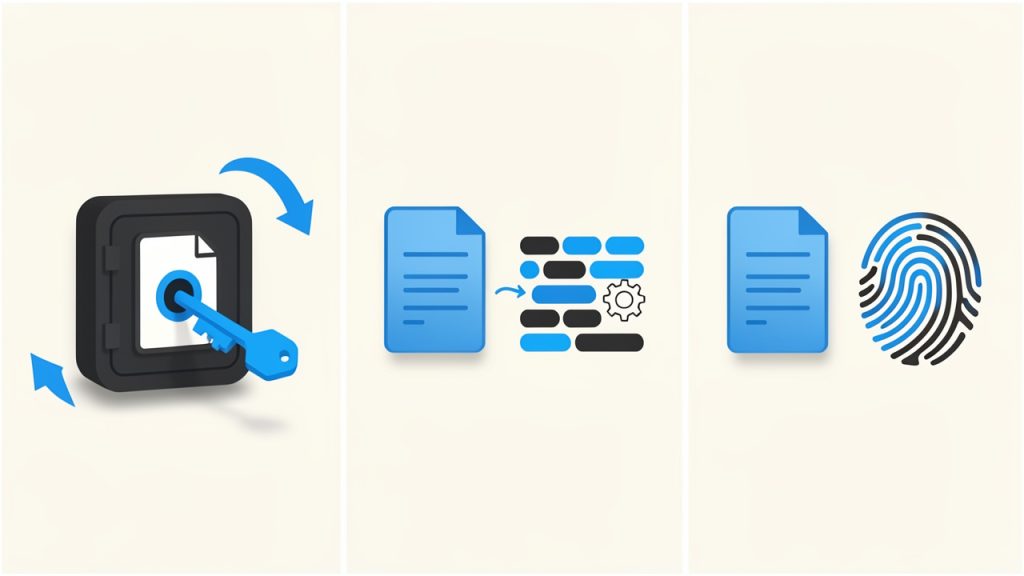
People often use these terms interchangeably, but they solve different problems. Encryption is reversible with the right key or password, which makes it suitable when you want to protect a message and later recover it. Encoding is mostly about formatting data for compatibility, such as converting text into another representation. It is not security. Hashing creates a one-way fingerprint and is used to verify data or store passwords more safely, but it is not designed to restore the original text.
A useful analogy is this. Encoding is like changing a document into a different file format. Hashing is like creating a unique fingerprint of the document. Encryption is like placing the document in a locked safe. If your goal is confidentiality, only the safe analogy fits.
Why people use online text encryption
The use cases are broader than many expect. A freelancer might encrypt contract notes before sending them over a messaging app. A small business owner may protect sensitive instructions shared with a remote assistant. A developer may want to secure an API secret in transit. Even an individual sending personal details to a family member may want more than plain text privacy.
This is why free tools remain attractive. They serve immediate, practical needs without requiring a budget approval or an IT department. When the tool is well designed and transparent about how it works, it can be an efficient way to add a meaningful layer of protection.
Key Aspects of Encrypt text online free
Choosing the right free online encryption method is not just about clicking the first result in a search engine. The quality of the tool, the security model, and your intended use all matter. A polished interface means little if the service stores your message on a server or uses weak cryptography behind the scenes.
The most important factor is whether the encryption happens client-side, inside your browser. When that is the case, the text is transformed on your device before anything is transmitted. This reduces the risk of exposure. It also means the provider may never see your original message, which is exactly what privacy-conscious users want.
Some services process everything locally in your browser, which means your text may never leave your device. Others send the content to a server for processing. That distinction can dramatically affect privacy and trust.
Browser-based encryption is often the safest online option
When a tool performs encryption in the browser, it behaves more like a local app than a remote processor. That does not make it automatically perfect, but it is generally better than a service that asks you to trust its servers with your raw text. For business users handling confidential material, this distinction should be near the top of the checklist.
You should also look for transparency. Reputable tools usually explain what encryption standard they use, whether the process is local, and whether they store any submitted content. If a website is vague about all three, caution is warranted. Security should be visible, not assumed.
Strong passwords still matter
Even the best encryption algorithm can be undermined by a weak password. If your encrypted text is protected with something obvious like “123456,” “companyname,” or a predictable phrase, the security benefit drops fast. The encryption system may be strong, but the lock is only as useful as the key you choose.
A good password for text encryption should be long, unique, and difficult to guess. Passphrases are often easier to remember and stronger than short passwords filled with predictable substitutions. If you are encrypting something genuinely sensitive, create a fresh passphrase for that specific exchange instead of reusing one from another account or app.
Free does not always mean private
Many people assume “free” simply refers to price. In reality, free services often operate on trade-offs. Some may show ads, collect analytics, log activity, or monetize traffic indirectly. That does not automatically make them unsafe, but it does mean you should read carefully before using them for anything important.
A free text encryption tool can be excellent if it limits data collection, processes text locally, and avoids storing content. On the other hand, a free tool that lacks transparency may create more risk than convenience. For sensitive business communications, the right free option is one that minimizes trust requirements.
Usability matters more than people think
Security tools fail when they are too awkward to use. If the process is confusing, users make mistakes. They may copy the wrong text, forget the password, store the key in the same message thread, or abandon encryption altogether because it slows them down. Good tools strike a balance between security and clarity.
That balance is especially important for small teams and solo professionals. A tool that works in seconds and does not require technical expertise is far more likely to become a consistent habit. Consistency, in practice, often matters as much as technical strength.
Common features to compare
If you are evaluating online options, these are the features worth comparing at a glance:
- Encryption location: Determines whether your text is exposed to a server, prefer in-browser or client-side encryption.
- Password protection: Controls who can decrypt the text, prefer custom, strong passphrase support.
- Transparency: Shows whether the tool explains its methods, prefer clear documentation and privacy details.
- Storage policy: Affects whether your message may be retained, prefer no text storage or temporary local handling.
- Ease of use: Reduces user error and speeds up workflow, prefer simple interfaces with clear steps.
- Device compatibility: Helps when working across teams and platforms, prefer tools that work on desktop and mobile browsers.
When online encryption is appropriate, and when it is not
Free online encryption is ideal for short messages, notes, temporary sharing, and quick protection in a browser-first workflow. It is particularly useful when you need speed and do not want to install software on every device. For routine operational privacy, that can be enough.
It is less ideal for highly regulated data, long-term secrets, or mission-critical business records that require strict compliance controls. In those cases, dedicated security tools, encrypted file vaults, or enterprise communication systems may be more appropriate. The right question is not “Is online text encryption good or bad?” It is “Is it appropriate for this kind of information?”
How to Get Started with Encrypt text online free
Getting started is straightforward, but doing it well requires a little discipline. The first step is understanding what kind of text you are trying to protect and how sensitive it is. A draft note to yourself is one thing. Client account details or private credentials are something else entirely. The more sensitive the text, the more selective you should be about the tool and your process.
Before using any online service, check whether it states that encryption happens locally in your browser. Then verify that the site uses HTTPS and provides a clear explanation of its privacy approach. These are not advanced technical checks. They are practical signs that the tool takes security seriously.
A simple process for first-time users
Most people can begin with a short workflow like this:
- Choose a reputable tool: Prefer a browser-based service with clear privacy and encryption information.
- Paste only the necessary text: Avoid including extra details that do not need protection.
- Create a strong passphrase: Use a long, unique phrase that you do not reuse elsewhere.
- Generate the encrypted text: Confirm that the output is unreadable and properly copied.
- Share the passphrase separately: Never send the encrypted text and the password in the same message thread.
That final point is where many users slip. Encrypting a message and then sending the password in the same email defeats much of the purpose. If possible, send the passphrase through a different channel, such as a phone call, secure chat, or separate messaging platform.
Practical examples in everyday work
Imagine a freelancer sending a private project brief that contains pricing, timelines, and internal strategy notes. Instead of pasting everything into a standard email, they encrypt the text first and send the ciphertext. Then they call the client or send the passphrase through a different app. The process takes a minute, but it meaningfully reduces exposure if the email is forwarded or intercepted.
A developer might use a free online text encryption tool to protect a temporary configuration string while coordinating with a teammate. A small business owner could use it to send private HR notes or account recovery details during an urgent handoff. These are not theoretical security exercises; they are ordinary moments where plain text is unnecessarily risky.
Mistakes to avoid
Most problems with online text encryption come from process errors rather than cryptography. Users may forget the passphrase, use a weak one, trust an unverified tool, or store the decrypted text carelessly after receiving it. Encryption protects content in transit or at rest, but it cannot help once the text is copied into an unsecured note or left open on a shared device.
Another common mistake is assuming all scrambled-looking text is secure. Some websites offer obfuscation, encoding, or novelty “cipher” transformations that look impressive but provide little real protection. If a tool does not clearly describe actual encryption, treat it with skepticism.
A quick trust checklist
Before you use any service to encrypt text online free, look for these signs:
- Local processing: The website says encryption happens in your browser.
- Clear privacy policy: It explains whether any text is stored or transmitted.
- Recognized methods: It names established encryption approaches instead of vague claims.
- Secure connection: The site uses HTTPS and appears professionally maintained.
This short review can save you from the biggest mistake of all, trusting a tool simply because it appears high in search results.
Building a secure habit
The real value of text encryption comes from turning it into a repeatable habit. If you handle sensitive information often, set a personal rule for when encryption is required. Maybe it applies to client identifiers, account details, legal drafts, private pricing, or any internal planning document that would be problematic if exposed.
Habits reduce decision fatigue. Instead of debating each time whether a message is “sensitive enough,” you create a threshold and follow it consistently. For busy professionals, that kind of system is far more reliable than relying on memory or instinct.
Conclusion
Using a tool to encrypt text online free is one of the simplest ways to improve digital privacy without adding much friction to your workflow. It helps protect confidential notes, business communications, and personal information from unnecessary exposure. The key is choosing a tool that encrypts in the browser, uses clear privacy practices, and lets you protect your message with a strong passphrase.
Your next step is simple. Pick a reputable browser-based encryption tool, test it with non-sensitive text first, and build a habit around using it for information that should never travel as plain text. A few extra seconds of care can prevent a surprising amount of risk.