JNTZN

Tag: content strategy

  • How to Learn SEO for Free — A Practical Starter Guide

    How to Learn SEO for Free — A Practical Starter Guide

    SEO can feel like a locked door when you are running a business, building a freelance career, or shipping products with a small team. You know search traffic matters, but every path seems to lead to expensive courses, vague advice, or complicated jargon that makes a simple goal feel unnecessarily hard.

    The good news is that you can learn SEO for free and still build real, useful skills. You do not need to become a search engineer or buy a premium toolkit on day one. What you need is a practical understanding of how search works, what content deserves to rank, and how to improve your website step by step.

    If your goal is to attract more visitors, get more qualified leads, or simply stop guessing why your pages are invisible in Google, this guide will give you a clear starting point. You will learn what free SEO learning actually means, which fundamentals matter most, and how to build momentum without wasting time.

    What Is Free SEO Learning?

    To learn SEO for free in a meaningful way is not just about consuming random articles or watching isolated tutorials. It means building a working knowledge of search engine optimization through no-cost resources, hands-on practice, and repeatable habits. You are not paying with money, but you are investing attention, consistency, and curiosity.

    SEO itself is the process of helping search engines understand your content and trust its value enough to show it to the right people. At a basic level, that involves three things. First, your website needs to be technically accessible.
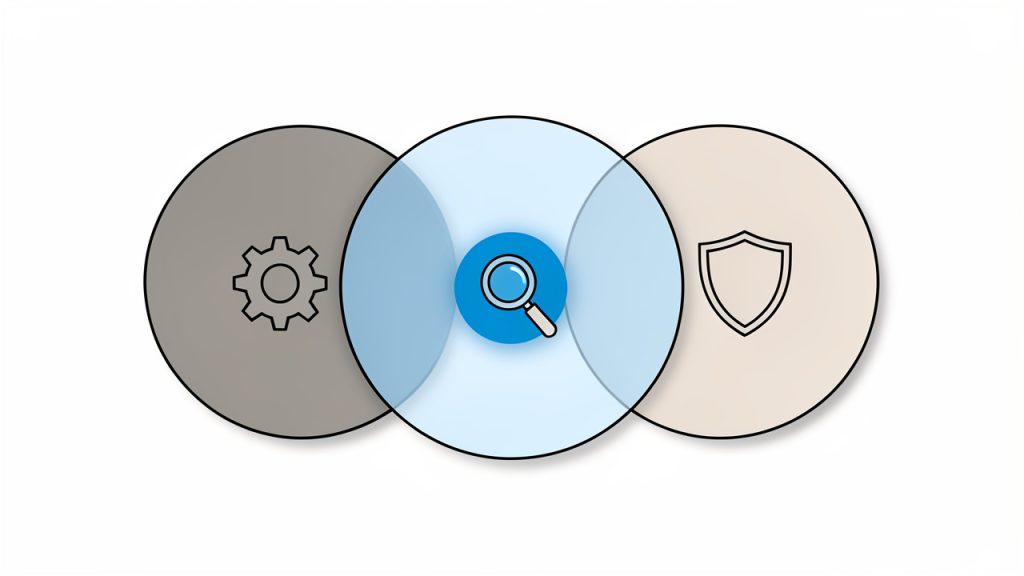
    A clean, simple diagram showing the three fundamental SEO areas as three overlapping circles labeled: 'Technical accessibility' (crawlability, speed, mobile), 'Content & intent match' (relevant, useful pages), and 'Authority & trust' (links, credibility). Highlight the overlap as the ideal SEO sweet spot.

    Second, your content needs to match what people are actually searching for. Third, your site needs to demonstrate credibility and usefulness over time.

    Free SEO learning works best when you treat it like a craft, not a shortcut. Many beginners imagine SEO as a bag of tricks, but the strongest results usually come from fundamentals. A fast website, a clear site structure, helpful content, relevant keywords, and a good user experience will outperform clever hacks in the long run.

    That is especially important for small business owners and freelancers. You may not have a dedicated marketing team, but you do have something powerful: proximity to your audience. You likely understand your customers’ real questions, objections, and needs better than a large company does. SEO rewards that insight when you turn it into useful pages.

    Key Aspects of Learning SEO for Free

    Understanding Search Intent

    One of the first ideas you should understand is search intent. This is the reason behind a search query. When someone types “best invoicing software for freelancers,” they are probably comparing options. When they type “how to send an invoice,” they need education. When they search for a brand name, they likely want a specific website.

    If you ignore intent, your content may be technically optimized but still fail to rank or convert. A page can include the right words and still be the wrong answer. Free SEO education often starts with keywords, but keywords only become useful when paired with intent. That is what helps you create pages that feel relevant instead of forced.

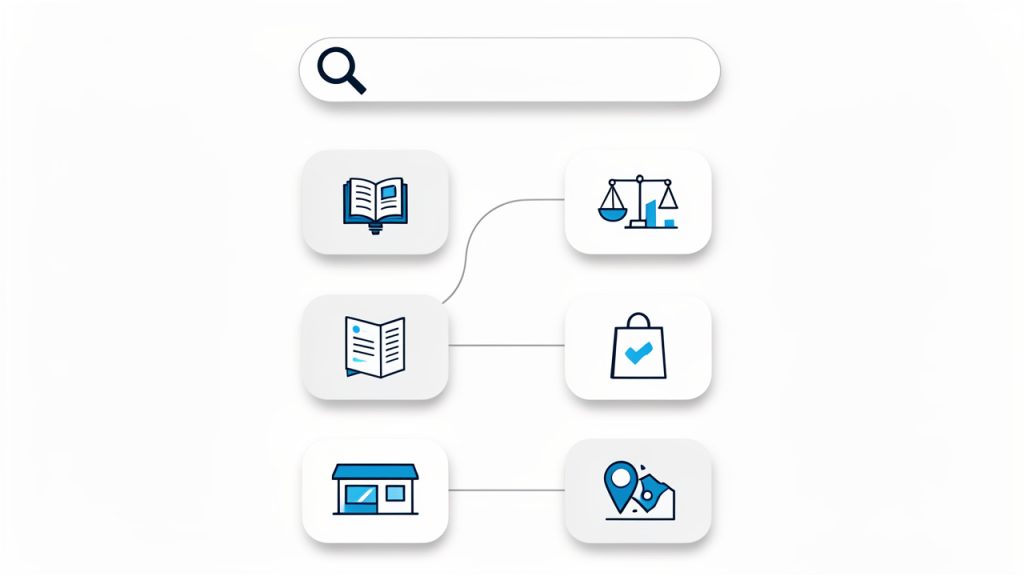
    A simple way to think about search intent is to imagine Google as a matchmaker. Its job is to connect the searcher’s need with the page most likely to satisfy it.

    A playful 'matchmaker' illustration showing Google as a matchmaker matching different search queries (e.g., 'best invoicing software for freelancers', 'how to send an invoice', 'brand name') to the correct page types (comparison, how-to, homepage/brand page).

    The more clearly your content serves that need, the stronger your SEO foundation becomes.

    Learning Keyword Research Without Paid Tools

    Keyword research sounds advanced, but the free version is surprisingly accessible. You can start with Google autocomplete, the “People also ask” section (People also ask), related searches, community forums, Reddit discussions, YouTube suggestions, and your own customer conversations. These sources reveal how people phrase problems in the real world.

    This matters because beginners often write in company language, not customer language. A developer might say “authentication workflow,” while a user searches “how to log in safely.” A consultant might say “client acquisition system,” while a freelancer searches “how to get more clients.” SEO improves when your wording reflects the audience’s mental model.

    Paid tools can speed up research later, but they are not required to learn the skill. In the beginning, your job is to notice patterns. Which questions come up repeatedly? Which phrases suggest buying intent? Which topics deserve a dedicated page instead of a passing mention in a blog post? Free keyword research teaches judgment, and judgment is more valuable than software.

    Creating Content That Deserves to Rank

    Content is often described as king, but useful content is what actually matters. Search engines are trying to surface pages that solve problems clearly, accurately, and efficiently. That means your writing should not just mention a topic. It should help the reader do something, understand something, or decide something with more confidence.

    For a small business, this might mean service pages that answer pricing questions, explain the process, and address common objections. For a freelancer, it could mean portfolio pages, case studies, and educational posts that show expertise. For a software product, it might include landing pages, tutorials, comparisons, and documentation that target specific user needs.

    Strong SEO content usually has a clear structure, a narrow purpose, and concrete value. It avoids fluff. It gives examples. It anticipates follow-up questions. If a page feels like it was written primarily to rank, readers can sense that quickly. If it feels like it was written to help, it tends to perform better over time.

    On-Page SEO Fundamentals

    Once you have a topic and a search intent in mind, on-page SEO helps you present that page clearly. This includes the title, headings, URL, internal links, image alt text, and the natural use of relevant terms throughout the content. Think of on-page SEO as packaging. It does not replace substance, but it helps search engines and readers understand the substance faster.

    A good page title should be specific and readable. Headings should organize the page logically instead of stuffing in awkward keyword variations. Internal links should connect related pages so users can explore naturally and search engines can understand your site architecture.

    One common mistake is over-optimizing. Repeating a phrase unnaturally does not make a page stronger. It usually makes the page worse. Modern SEO is less about density and more about relevance, clarity, and coverage. If your page answers the topic comprehensively and uses natural language, you are already moving in the right direction.

    Technical SEO Without the Intimidation

    Technical SEO can sound like a specialist field, and at the highest level it is. But beginners do not need to master server logs or JavaScript rendering to make progress. The free path starts with a few practical checks: can search engines crawl your pages, do your pages load quickly enough, is the site mobile-friendly, and can users navigate it easily?

    A technically healthy site is like a clean storefront. People can enter, find what they need, and move around without friction. Search engines respond well to that same clarity. If your site is slow, confusing, or full of broken links, great content has a harder time performing.

    Free tools from Google can help here. Google Search Console shows how your site appears in search, which pages are indexed, and where problems may exist. PageSpeed Insights gives performance feedback. These tools may look dense at first, but even a basic understanding will improve your decision-making.

    (For clarity, “technically accessible” is a crucial early check, since crawlability and mobile usability determine whether search engines can even find your content: https://jntzn.com/fr/outils/validateur-html/)

    Authority, Trust, and Links

    SEO is not just about what is on your website. It is also about how the web perceives your website. Backlinks, which are links from other sites to yours, can act like trust signals. Not all links are equal, and beginners often get distracted by quantity. In reality, relevance and credibility matter much more than volume.

    If a respected local organization links to your small business, that can be far more meaningful than dozens of random low-quality links. If an industry blog cites your guide because it is genuinely useful, that is a strong signal. Free SEO learning should include this principle early: earn trust by being worth referencing.

    For most beginners, the best link strategy is not aggressive outreach at first. It is creating pages that are actually linkable. Original insights, clear how-to guides, local resource pages, useful tools, and strong case studies all increase the odds of natural mentions.

    How to Get Started With SEO for Free

    Begin With One Website and One Goal

    The fastest way to learn SEO for free is to apply it to a real project. That could be your business website, your freelance portfolio, a side project, or even a small niche blog. Theory sticks better when it has a place to live.

    Choose one clear goal. You might want more inquiries for a service, more traffic to a product page, or better visibility for a local offering. A focused goal makes SEO easier to understand because you can connect your actions to actual outcomes.

    Without a clear objective, beginners often collect information endlessly and never implement anything. SEO rewards practice. You will learn more from improving five pages on a real site than from reading fifty disconnected tips.

    Set Up the Essential Free Tools

    You do not need a large stack of software to begin. A small set of free tools is enough to build awareness and track progress.

    1. Google Search Console: Monitor search performance, indexing, and keyword visibility.
    2. Google Analytics: Understand user behavior and traffic sources.
    3. Google PageSpeed Insights: Review performance and mobile usability signals.
    4. Google Trends: Explore topic interest and seasonal search patterns.

    These tools are useful because they help you replace assumptions with evidence. Instead of asking, “Why is this page not working?” you can start asking better questions. Is it indexed? Is it getting impressions but no clicks? Is the title weak? Is the page too slow? Better questions lead to better SEO.

    Learn by Studying Search Results

    One of the most underrated free SEO habits is simply studying the search results page. Search your target topic and look closely at what ranks. Are the top results guides, product pages, comparison posts, category pages, or videos? Are they broad or highly specific? Do they target beginners or advanced readers?

    This is one of the clearest ways to understand intent. Search results are not random. They reveal what Google currently believes satisfies that query. If all top results are tutorials, trying to rank a sales page may be an uphill battle. If the results are local service pages, publishing a general blog post may not be the best fit.

    Treat the results page like market research. It shows the standard you need to meet and the gaps you may be able to fill.

    Build a Simple Content Plan

    A free SEO strategy becomes manageable when you turn it into a small publishing plan. You do not need a massive content calendar. You need a realistic rhythm and a sensible structure.

    Start with your core pages first. These are the pages closest to business value, such as service pages, product pages, category pages, or key landing pages. After that, create supporting content that answers questions related to those pages. This helps both users and search engines understand your topical relevance.

    The relationship between page types is easier to see in a simple framework:

    Page Type Primary Purpose Example Topic SEO Benefit
    Core page Convert high-intent visitors Web design services for local businesses Targets commercial searches
    Supporting guide Educate and attract earlier-stage visitors How much does a small business website cost? Builds topical relevance
    Case study Prove results and credibility How a redesign increased leads by 40% Strengthens trust
    FAQ page Address objections and details Website timelines, pricing, revisions Captures long-tail queries

    This structure helps you avoid random publishing. Each page supports a broader goal, and your website starts to feel more coherent.

    Practice Basic On-Page Improvements

    If your website already exists, you can learn a lot by improving what is there before creating something new. Review a few pages and ask whether the title is clear, whether the headings are useful, whether the page answers the main question quickly, and whether related pages are internally linked.

    Often, free SEO gains come from clarity rather than complexity. A stronger headline, better structure, more specific language, and a cleaner introduction can improve both rankings and conversions. Many pages underperform not because the topic is wrong, but because the execution is thin or confusing.

    Think of each page as a conversation with a busy visitor. If they land on the page, can they immediately tell they are in the right place? Can they find the answer without scrolling through filler? Can they take a next step easily? These are SEO questions as much as UX questions.

    Track Progress Without Obsessing Over Daily Rankings

    SEO moves slowly compared with paid advertising, and that is where many beginners lose patience. If you learn SEO for free, you also need to learn how to interpret progress realistically. Rankings can fluctuate. Traffic can be seasonal. New pages may take time to settle.

    A better early signal is whether your pages are being indexed, earning impressions, and gradually showing up for more relevant queries. Search Console is especially useful here. It lets you see whether Google is beginning to associate your pages with the topics you intended.

    Focus on trends over weeks and months, not hours and days. SEO is more like fitness than flipping a switch. Consistent effort compounds, but not always on a visible timeline.

    Common Mistakes Beginners Make

    Chasing Tricks Instead of Fundamentals

    One of the biggest mistakes is looking for loopholes instead of learning principles. Quick-win videos and checklist-style advice can be useful, but they often create the illusion that SEO success comes from tiny hacks. In practice, fundamentals win more often than tricks.

    A page that loads quickly, matches search intent, demonstrates expertise, and satisfies the reader is hard to beat. A page that merely copies formatting patterns and stuffs in keywords rarely performs for long. If you are learning SEO for free, put your energy into understanding why something ranks, not just what it looks like.

    Publishing Content Without a Clear Purpose

    Another common error is creating content because “blogging is good for SEO.” That is too vague to be helpful. Every page should have a job. It should target a specific topic, solve a clear problem, and connect logically to your business or project.

    Random content can increase workload without increasing results. Purposeful content, even in smaller volumes, builds authority more effectively. Ten strategic pages can outperform one hundred disconnected posts.

    Ignoring the Website Experience

    SEO is not only about getting the click. It is also about what happens after the click. If visitors land on your site and feel lost, frustrated, or unconvinced, your content may struggle to build momentum.

    This is why design, readability, navigation, trust signals, and mobile usability all matter. Search engines are trying to reward useful experiences, not just keyword relevance. If your site is difficult to use, SEO eventually feels harder than it needs to be.

    A Practical Free SEO Learning Path

    If you want a straightforward roadmap, keep your first month simple. Do not try to master every branch of SEO at once. Build confidence by connecting a few core ideas and applying them repeatedly.

    A beginner-friendly learning path looks like this:

    1. Understand search intent by studying what already ranks for your target topics.
    2. Do basic keyword research using Google suggestions, related searches, and real customer questions.
    3. Improve or create one page that clearly matches a valuable query.
    4. Set up Google Search Console and monitor impressions, clicks, and indexing.
    5. Repeat the process on related pages, using what you learn each time.

    This sequence works because it mirrors how SEO actually grows. You observe, create, measure, refine, and repeat. That loop teaches more than passive consumption ever will.

    Conclusion

    You can absolutely learn SEO for free, and for many small businesses, freelancers, and builders, that is the smartest place to begin. Free learning forces you to understand the essentials: search intent, useful content, on-page clarity, technical accessibility, and patient iteration.

    The next step is simple. Pick one website, one audience problem, and one page to improve this week. Set up the free tools, study the search results, and make a page more useful than it was yesterday. That is how SEO starts making sense, and how free learning turns into real growth.

  • Practical Content Optimization Tips to Boost Traffic and Conversions

    Practical Content Optimization Tips to Boost Traffic and Conversions

    Great content does not fail because the ideas are weak. It usually fails because the presentation is weak. A page can be helpful, accurate, and well written, yet still underperform if it is hard to scan, mismatched to search intent, or missing the signals that help readers and search engines understand its value.

    That is why smart content optimization matters. For small business owners, freelancers, developers, and productivity-focused teams, improving existing content is often faster and cheaper than constantly creating new pages. A few deliberate changes can lift rankings, increase engagement, and turn a neglected article into a reliable traffic and conversion asset.

    What tips for content optimization really mean

    Content optimization is the process of improving a piece of content so it performs better for both human readers and search engines. That includes refining structure, sharpening relevance, improving readability, aligning with user intent, and strengthening on-page SEO elements such as headings, metadata, internal links, and keyword usage.

    The phrase “tips for content optimization” sounds simple, but the practice is more strategic than it first appears. Optimization is not just sprinkling keywords into a paragraph. It is about making the page more useful, more focused, and easier to consume. Search engines increasingly reward pages that satisfy user needs clearly and efficiently, so optimization now sits at the intersection of SEO, UX, and editorial quality.

    For many site owners, the biggest shift is this, optimization is not a one-time task. Search intent changes, competitors improve, and older content becomes stale. Pages that once ranked well can slip simply because they no longer answer the question as effectively as newer alternatives.

    Why optimization matters more than publishing volume

    Many people assume growth comes from publishing more. In reality, publishing without optimization often creates a library of underperforming content. You end up with dozens of pages competing for attention, but only a few generating meaningful results.

    Optimized content gives each page a stronger chance of ranking, retaining visitors, and moving people toward action. If you run a small business website, this can mean more service inquiries. If you are a freelancer, it can mean more qualified leads. If you are building a developer-focused blog or tool site, it can mean more product signups and stronger brand trust.

    The difference between writing and optimizing

    Writing creates the first version. Optimization improves its effectiveness. A writer may produce a thoughtful 1,200-word article. An optimizer asks harder questions. Does the title match what people search for? Does the introduction confirm relevance fast enough? Are the headings useful? Is the page answering the right question at the right depth?

    This distinction matters because many weak pages are not badly written. They are simply unfocused. Optimization brings clarity. It helps every section earn its place.

    Key aspects of effective content optimization

    The best tips for content optimization start with a mindset shift. You are not editing for style alone. You are improving performance. That means measuring a page by how well it satisfies intent, supports discovery, and encourages action.

    Match search intent before anything else

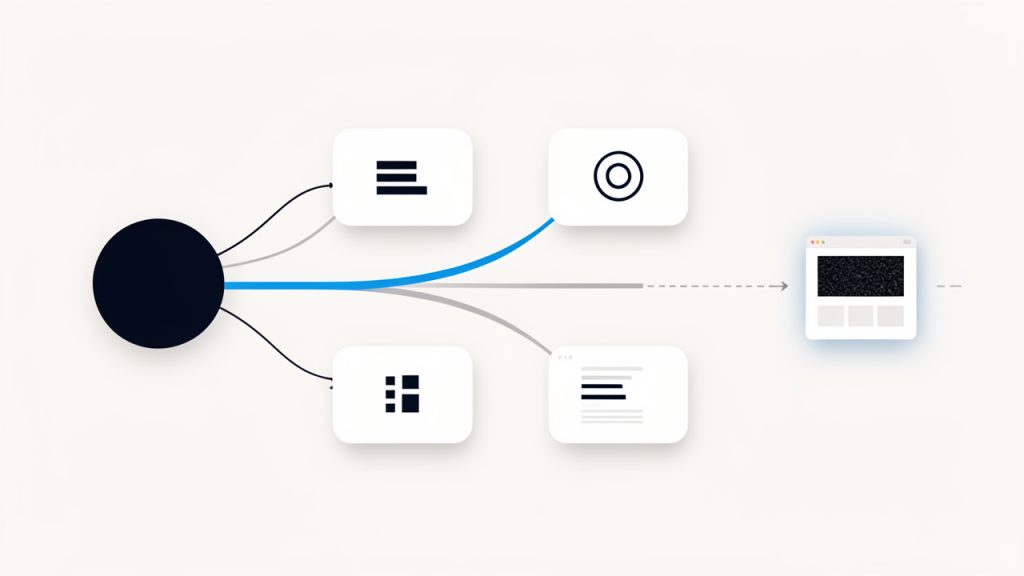
    If a page misses search intent, almost nothing else will save it. Search intent is the reason behind the query. Someone searching for advice on improving blog performance may want practical steps, not a dense theory lesson. Someone searching for a product comparison may not want a long opinion piece.

    Flow diagram showing a user query branching into different intent types, with examples of matching and mismatching pages

    A strong page signals intent match almost immediately. The title sets expectations. The introduction confirms the topic. The body delivers the format users want, whether that is a tutorial, checklist, explainer, or comparison. When content underperforms, intent mismatch is often the first issue to inspect.

    A useful way to think about this is to imagine the page as an answer in a conversation. If the user asks, “How do I improve my content?” and your page responds with brand history, general marketing philosophy, and vague advice, the conversation breaks down. Optimization restores alignment.

    Improve readability and scannability

    Most people do not read web content line by line. They scan first, decide whether the page feels useful, and then commit attention. This is why formatting is not cosmetic. It directly affects performance.

    Split illustration showing two versions of the same article page: left side dense blocks of text, right side well-structured and easy to scan

    Readable content uses clear headings, short paragraphs, descriptive subheadings, and strong opening sentences. Dense blocks of text create friction. Even good ideas get ignored when they look hard to consume. On the other hand, a well-structured page makes the reader feel progress. That sense of ease increases time on page and reduces bounce risk.

    See research on how users read on the web for more on readability and scannability.

    Scannability also helps search engines interpret the hierarchy of your information. A clear heading structure makes it easier to understand which ideas are primary and which support them.

    Use keywords naturally, not mechanically

    One of the most important tips for content optimization is also one of the most misunderstood. Keywords matter, but awkward keyword stuffing harms trust and readability. The goal is not to force an exact phrase into every section. The goal is to use the topic language naturally, in places where it helps clarify relevance.

    That means your primary keyword should appear in the title area, early in the article, in at least one subheading where it fits naturally, and throughout the copy in a way that feels organic. Related terms should appear as well, because they help establish topic depth. If you are writing about optimizing content, words like readability, search intent, internal linking, metadata, click-through rate, and engagement naturally belong in the discussion.

    Think of keywords as signals, not decorations. They should strengthen clarity, not interrupt it.

    Strengthen titles, meta descriptions, and introductions

    A page can rank and still disappoint if no one clicks it. That is where titles and meta descriptions matter. A strong title combines relevance with a clear benefit. It tells readers what they will get and why the page is worth opening.

    The introduction has a similar job once the click happens. It must confirm quickly that the visitor is in the right place. If the first paragraph feels generic, overly broad, or slow to reach the point, readers may leave before they ever reach your best insights.

    Optimization often begins here because these elements shape both visibility and engagement. Better titles improve click-through potential. Better openings improve retention.

    Build strong internal linking

    Internal links are one of the most overlooked ways to optimize content. They help search engines discover related pages and understand topical relationships, but they also guide human readers toward useful next steps.

    A page about optimizing content should naturally connect to related resources such as keyword research, content briefs, editorial workflows, analytics, or on-page SEO. These links extend the user journey and help distribute authority across the site.

    The key is relevance. Random or excessive linking creates noise. Strategic linking creates pathways.

    Update for freshness and accuracy

    Some content loses rankings simply because it feels old. Statistics become outdated. Screenshots no longer match current tools. Search results shift. Competitor content becomes more complete.

    Refreshing content is often more efficient than rewriting from scratch. Update examples, replace old claims, improve weak sections, and add current context where needed. If the topic evolves quickly, freshness can be a major advantage.

    For businesses and solo creators with limited time, this is one of the highest-return habits. Instead of producing ten new weak pages, improve three existing ones that already have some traction.

    Optimize for action, not just attention

    Traffic is useful, but attention without action has limits. A page should lead readers somewhere meaningful, even if the goal is modest. That next step could be reading a related guide, joining a mailing list, trying a tool, booking a consultation, or exploring a service page.

    Optimization should support that movement subtly. Calls to action work best when they feel like a logical extension of the reader’s progress. If someone has just learned how to improve their content structure, a next step around auditing their current pages feels natural. If the CTA feels unrelated or premature, it weakens the experience.

    How to evaluate a piece of content before optimizing it

    Before making changes, it helps to diagnose the page clearly. Optimization is more effective when you know whether the issue is visibility, relevance, readability, engagement, or conversion.

    Start with performance signals

    Look at how the page performs in search and on site. Impressions tell you whether search engines are surfacing it. Click-through rate suggests whether the title and description are compelling. Time on page, scroll depth, and bounce patterns hint at whether the content delivers on its promise.

    A page with high impressions but low clicks likely has a packaging problem. A page with decent clicks but weak engagement may have a content quality or intent issue. A page with strong traffic but no conversions might need better internal links or stronger calls to action.

    Compare the page against current search results

    Search results reveal what Google currently believes satisfies the query. Review the top-ranking pages and study their patterns. Are they more practical, more detailed, more current, or better structured? Do they use clearer headings? Are they answering adjacent questions your page ignores?

    This exercise is not about copying competitors. It is about understanding the standard your page must meet. If every top result includes examples, templates, or specific frameworks and your content stays abstract, that gap matters.

    Audit the reader experience

    Read your page like a busy visitor, not like its creator. The first question is simple, does it feel easy to use? If the answer is no, optimization should address that before anything else.

    The table below highlights common content problems and the optimization response that usually helps.

    Common Issue What It Looks Like Likely Impact Better Optimization Move
    Weak title Generic or vague headline Lower click-through rate Rewrite for clarity, relevance, and benefit
    Slow introduction Takes too long to address the topic Higher bounce rate Confirm value and intent in the first paragraph
    Poor structure Long blocks with few subheadings Low readability Break into logical sections with descriptive H3s
    Keyword stuffing Repetitive phrases that sound forced Lower trust, weaker UX Use natural phrasing and related terms
    Thin coverage Surface-level advice only Lower rankings and engagement Add examples, detail, and practical context
    Outdated information Old stats, stale examples, obsolete steps Declining trust and rankings Refresh facts, tools, and references
    Weak internal links No useful next steps Lower page depth and conversions Add relevant links to connected resources

    How to get started with content optimization

    Getting started does not require a giant content team or expensive software. What you need is a repeatable process. The most practical tips for content optimization are the ones you can apply consistently, even with limited time.

    Begin with high-potential pages

    Not every page deserves immediate attention. Start with content that already has some visibility, relevance, or business value. These are usually pages that rank on page two, attract impressions without many clicks, or bring traffic without converting.

    This approach works because optimization compounds existing momentum. A page already close to performing well often responds faster to improvements than a brand-new post with no history.

    A simple prioritization framework can help:

    1. Traffic opportunity: Find pages with impressions but weak rankings.
    2. Business value: Focus on pages tied to offers, services, or lead generation.
    3. Content quality gap: Identify pages that are useful but clearly underdeveloped.
    4. Freshness need: Update pages with outdated examples, stats, or advice.

    Rewrite the first 200 words carefully

    The opening of a page does a disproportionate amount of work. It tells readers whether to stay, tells search engines what the page is about, and shapes how the rest of the content will be interpreted.

    A strong opening quickly identifies the problem, states the promise, and establishes relevance. It should not wander. If your article takes five paragraphs to explain why the topic matters, optimization should begin there.

    For example, if your page is about improving website copy, start with the common frustration, traffic without results, content that ranks poorly, or pages that feel invisible. Then explain what the reader will gain from the article. This immediate clarity makes the rest of the page easier to trust.

    Refine headings so they carry meaning

    Headings should do more than break up text. They should guide the reader through the logic of the page. Vague headings like “Overview” or “More Tips” are rarely helpful. Specific headings improve usability because they let readers spot the section they need.

    Good headings also improve SEO by making the topic map clearer. If a reader scans only the subheadings and still understands the flow of the article, the structure is doing its job.

    Add depth where readers need it most

    One common mistake is trying to make every section equally long. Optimization is more effective when depth is added strategically. Expand the sections that answer key questions, remove filler, and sharpen transitions so the page feels purposeful.

    Depth does not mean padding. It means providing the explanation, example, or nuance that turns advice into guidance. If you say “improve readability,” show what that means. Discuss paragraph length, heading use, sentence rhythm, and formatting choices. Specificity builds authority.

    Use examples to make advice actionable

    Abstract advice is easy to forget. Concrete examples stick. If you recommend better titles, show the difference between a weak title and a stronger one. If you discuss internal links, describe where they naturally fit and why.

    Examples reduce ambiguity. They also make content more useful for mixed audiences. A freelancer may apply the advice to a portfolio blog, while a small business owner may adapt it to service pages. The principle becomes transferable.

    Optimize visual support thoughtfully

    Visuals can improve comprehension, especially in longer guides. Screenshots, diagrams, charts, and simple process graphics help break up text and make abstract ideas easier to grasp.

    Use visuals only where they support understanding, not as decoration. A content audit workflow, for instance, may benefit from a simple diagram. A table comparing weak and strong optimization choices can be more effective than paragraphs alone.

    Improve old content in rounds

    Trying to perfect a page in one sitting can be inefficient. A better approach is to optimize in rounds. The first round addresses intent, structure, and obvious quality issues. The second improves SEO elements such as title, metadata, and internal links. The third focuses on conversion paths and freshness updates.

    This method is especially useful for lean teams. It turns optimization into a manageable system instead of a large, irregular project.

    Practical tips for content optimization that deliver results

    Some tactics matter more than others. The strongest improvements usually come from a combination of editorial clarity and technical relevance.

    Focus on one primary topic per page

    Pages often underperform because they try to answer too many different questions at once. A broad article that jumps between strategy, tools, analytics, and social media promotion may dilute its relevance.

    A focused page performs better because the message is clearer. Readers understand what the page is about. Search engines do too. If you have several related ideas, connect them with internal links instead of forcing them into one bloated article.

    Write for humans first, then tighten for search

    SEO writing works best when it begins with genuine clarity. Draft naturally, then optimize the language. This produces content that sounds trustworthy and readable while still sending strong relevance signals.

    When editing, look for opportunities to make important terms more visible without sounding repetitive. Add them where they help, especially in headings, opening lines, and image alt text if applicable. Remove them where they create friction.

    Reduce friction in every section

    Each section of a page should answer a clear question or move the reader forward. If a paragraph repeats what has already been said, it creates friction. If a section exists only because “blog posts need length,” it weakens the page.

    Optimization often means cutting as much as adding. Cleaner content usually performs better than longer but diluted content. Readers appreciate momentum. So do search engines trying to determine whether a page is sharply relevant.

    Support claims with experience or evidence

    Authority grows when advice feels grounded. You do not always need formal studies, but you do need substance. That can come from experience, examples, observed patterns, or reliable data where appropriate.

    If you claim that stronger intros improve engagement, explain why. If you say internal linking helps page performance, describe the mechanism. Readers respond well to content that shows reasoning, not just recommendations.

    Revisit content after publication

    Publishing is not the finish line. One of the most underrated tips for content optimization is simply to review performance after a reasonable period and make improvements based on actual behavior.

    A post may attract a different audience than expected. A heading may underperform. A new opportunity may appear through search queries you did not target directly. These insights are only visible after the page has time to gather data.

    Common mistakes to avoid

    Many optimization efforts fail because they focus on the wrong signals. Adding keywords without improving usefulness is one example. Making a page longer without making it better is another.

    Another common mistake is treating every page the same. A service page, tutorial, landing page, and blog article each have different goals. Optimization should reflect that. What works for an educational article may not suit a conversion-focused page.

    It is also easy to over-edit. If a page already ranks well and converts, drastic changes can backfire. Optimization should be guided by evidence, not anxiety. Improve with intent, not just activity.

    A simple workflow you can repeat

    Consistency beats intensity in content work. A basic optimization workflow helps you make steady gains without turning every page into a major project.

    Stage Main Question Primary Task Outcome
    Audit Is the page worth improving? Review traffic, rankings, and relevance Clear priority list
    Intent check Does it match what users want? Compare with current search results Better alignment
    Structural edit Is it easy to read and scan? Improve headings, paragraphs, flow Better usability
    SEO refinement Are relevance signals clear? Update title, metadata, keywords, links Stronger discoverability
    Conversion review Does it guide the next step? Add or improve CTAs and related links Better business impact
    Refresh cycle Is it still current? Update examples, facts, and context Longer performance lifespan

    If you adopt this workflow, content optimization becomes less mysterious. It turns into a process you can schedule, measure, and improve over time.

    Conclusion

    The best tips for content optimization are not tricks. They are disciplined improvements that make content clearer, more relevant, easier to read, and more useful. When you align a page with search intent, strengthen its structure, use keywords naturally, and create a better reader experience, performance tends to follow.

    Start with one page that already matters to your business. Improve the title, rewrite the introduction, sharpen the headings, and add depth where readers need it. Then review the results and repeat the process. That is how content becomes an asset instead of just another published page.

  • Google SEO Updates: What Marketers Need to Know

    Google SEO Updates: What Marketers Need to Know

    One Google update can turn a steady traffic graph into a cliff. For small businesses, freelancers, publishers, and in-house marketers, that is not just an SEO problem. It can mean fewer leads, lower sales, missed revenue targets, and uncomfortable conversations with clients or stakeholders.

    The good news is that most ranking losses after Google’s SEO updates are understandable, diagnosable, and often recoverable. The bad news is that guessing rarely works. If you want to respond well, you need to know what changed, how to confirm impact, and which fixes actually matter. This guide breaks down the recent Google search updates, what they mean for marketers, and how to build a site that holds up even when rankings get volatile.

    What Are Google Search Updates and Why They Matter

    Definition: What counts as a Google search update

    A Google search update is any meaningful change to how Google evaluates, ranks, interprets, or displays content in search results. That includes broad core updates, anti-spam systems, search quality improvements, ranking signal adjustments, and changes to search result features such as snippets, product displays, or local packs.

    Not every update arrives with a dramatic announcement. Some are public and widely discussed. Others are smaller system adjustments that only become visible when rankings shift across industries. For marketers, the important point is simple, if Google changes how it measures quality, relevance, trust, usability, or intent matching, your site can gain or lose visibility.

    Google has also become more explicit over time about rewarding people-first content, and that matters because many ranking changes are no longer just about keywords or links. They are tied to usefulness, credibility, originality, and whether a page genuinely satisfies the query.

    Types of updates: Core updates, algorithm tweaks, spam-fighting updates, and feature changes

    Core updates are the most widely watched. These are broad improvements to Google’s ranking systems and can affect sites across nearly every category. A site does not need to have done anything “wrong” to drop during a core update. More often, Google is reassessing which pages deserve to rank more prominently.

    Spam updates target manipulative behavior, including link spam, scaled low-value content, cloaking, hacked spam, and deceptive practices. If a site has relied on shortcuts, these updates can lead to sharper losses and longer recoveries.

    Helpful content and quality-focused changes evaluate whether content appears created primarily for users rather than search engines. This is where thin affiliate pages, shallow rewrites, vague listicles, and generic AI-assisted content without original value often struggle.

    Feature changes affect visibility in a different way. Your rankings may stay the same, but if Google adds more SERP features, shopping units, AI summaries, local packs, or video results, your click-through rate can still drop. In other words, ranking position is no longer the full story.

    Why updates matter for site owners, SEOs, and marketers

    Google updates matter because organic search is rarely just a traffic channel. For many businesses, it is the foundation of lead generation, brand discovery, and customer trust. A 20 percent decline in search impressions may look manageable in a dashboard, but if those impressions came from high-intent pages, the commercial damage can be far larger.

    There is also a reputation dimension. If your best pages lose prominence while weaker competitors rise, users may assume your brand is less relevant or less trustworthy. For agencies and freelancers, update periods can trigger client panic, rushed decisions, and pressure to “fix SEO” before the real cause is clear.

    That is why a calm, evidence-based process matters. The sites that weather Google’s updates best are usually not the ones chasing every rumor. They are the ones with strong content standards, clean technical foundations, and a disciplined review process.

    A Timeline of Major Google Search Updates (Last 5 Years)

    Recent years have brought a steady stream of changes, not a single turning point. Google now refines search continuously, but certain updates stand out because they reshape how marketers should think about content, UX, and authority.

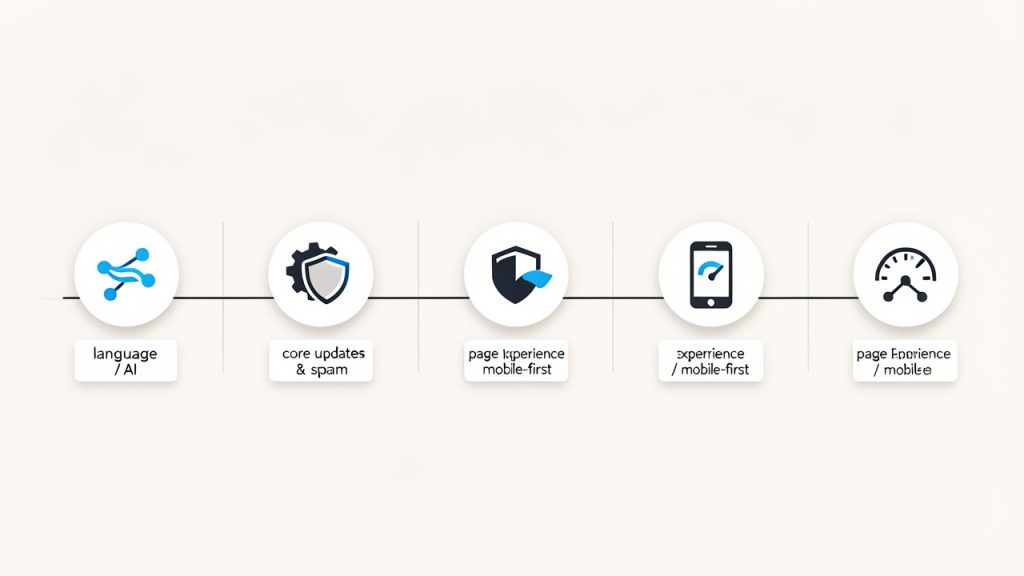
    A clean horizontal timeline spanning 2019–2024 with six labeled milestones: 2019 — BERT rollout; 2020 — Core updates & spam improvements; 2021 — Page Experience / Core Web Vitals & mobile-first indexing; 2022 — Helpful Content update; 2023 — Core & reviews updates; 2024 — Core & spam updates.

    2022 to 2024: Core updates and Helpful Content updates

    From 2022 through 2024, broad core updates remained the biggest source of ranking volatility for most publishers and businesses. During this period, Google also sharpened its emphasis on helpful, reliable, people-first content. Sites with scaled low-value pages, weak editorial standards, or recycled summaries often saw unstable visibility.

    The helpful content system changed how marketers think about content production. Publishing more pages did not guarantee more traffic. In many cases, too much mediocre content diluted site quality signals and made recovery harder after a core update.

    2021 to 2022: Page Experience, Core Web Vitals, and mobile-first indexing

    Page Experience updates brought Core Web Vitals into mainstream SEO discussion. Google clarified that great content still matters most, but performance and usability influence how competitive pages are evaluated, especially when many results are similarly relevant.

    During the same era, mobile-first indexing stopped being optional in practical terms. Google increasingly treated the mobile version of your site as the primary version for evaluation. Businesses with stripped-down mobile content, broken layouts, or slow templates often discovered that “desktop looks fine” was no longer a valid defense.

    2019 to 2020: BERT, E-E-A-T signals, and spam-fighting improvements

    BERT improved Google’s ability to understand natural language and query context. This made keyword matching more nuanced. Pages optimized around exact phrases but weak on substance became easier for Google to out-rank with more relevant, naturally written content.

    Around the same time, the industry became intensely focused on E-E-A-T, meaning experience, expertise, authoritativeness, and trust. While E-E-A-T is not a single measurable ranking factor, it reflects the quality framework Google’s evaluators use, especially for sensitive topics like health, finance, and legal content.

    Concise timeline of notable updates

    Period Update / Change What marketers should know
    2019 BERT rollout Better language understanding, less reliance on awkward exact-match optimization
    2020 Core updates and spam improvements Greater focus on relevance, trust, and content quality
    2021 Page Experience update UX and performance entered the ranking conversation more visibly
    2021 to 2022 Mobile-first indexing completion Mobile content parity became essential
    2022 Helpful Content update Content made primarily for rankings became riskier
    2023 Multiple core and reviews updates Product and review content needed stronger evidence and expertise
    2024 Core and spam updates Low-value scaled content and manipulation faced stronger pressure

    How to track Google’s official announcements and communities for real-time news

    The most reliable source is Google Search Central, including its blog and documentation. Google’s Search Liaison account is also useful for public clarification during rollout periods. These sources will not always explain every fluctuation, but they are still the best starting point.

    Industry tools such as Semrush Sensor, MozCast, and Ahrefs volatility reporting can help you see whether a ranking shift is isolated to your site or part of a wider market swing. Use them as context, not proof. Official statements tell you what Google confirms. Third-party trackers help show how turbulent the SERPs appear.

    How to Identify If an Update Affected Your Site

    Monitoring signals: traffic drops, ranking shifts, and SERP feature changes

    The first sign is usually a noticeable drop in clicks, impressions, or conversions from organic search. But that does not automatically mean a Google update is to blame. You need to compare the timing of the decline with publicly observed rollout dates and then look at which page types or keyword clusters lost visibility.

    Sometimes the ranking position changes only slightly, yet traffic falls sharply because the search results page itself changed. More ads, AI-driven summaries, video carousels, shopping boxes, or local packs can reduce clicks even when rankings stay relatively stable. That is why marketers should measure click-through rate alongside ranking and impressions.

    Tools to use: GSC, GA, rank trackers, and third-party volatility tools

    Google Search Console is your first diagnostic tool because it shows impressions, clicks, average position, and query-page relationships directly from Google. Compare the seven to fourteen days before the suspected update with the same duration after it. Segment by page group, country, device, and search appearance if available.

    Google Analytics helps you connect organic traffic changes to business outcomes. If traffic dropped but conversions stayed strong, the update may have affected top-of-funnel pages more than revenue pages. If both traffic and conversions fell together, the impact is likely more serious.

    Rank trackers such as Ahrefs, Semrush, and Moz help show whether the drop hit a small set of priority keywords or entire topic clusters. They are especially useful for spotting category-level damage, like a blog directory collapsing while service pages remain stable.

    Interpreting data: separating updates from penalties, technical issues, or seasonality

    This is where many teams make expensive mistakes. A traffic drop that happens near a known update can still be caused by a technical issue. Broken canonicals, noindex tags, template changes, redirect errors, JavaScript rendering problems, or a server outage can mimic an algorithmic loss.

    Start by ruling out controllable issues. Check indexing status in Search Console, crawl logs if you have them, robots.txt, sitemap health, deployment history, and recent CMS or plugin changes. Also compare year-over-year demand. Seasonal businesses often misread normal downturns as search penalties.

    A 5-step diagnostic flowchart/checklist for determining whether an update affected a site: Step 1: Check timing vs rollout (calendar icon); Step 2: Compare affected sections (site map icon); Step 3: Review technical changes in last 30 days (code/gear icon); Step 4: Check Search Console for manual actions/security (shield/icon); Step 5: Compare year-over-year trends (graph icon). Include a decision branch that prompts 'If technical issue found → fix and monitor' otherwise 'Proceed to content and quality review'.

    Use this short diagnostic sequence before declaring an update impact:

    1. Check timing against confirmed or widely observed Google update windows.
    2. Compare affected sections to see whether losses are sitewide or concentrated.
    3. Review technical changes made in the previous 30 days.
    4. Check manual actions and security issues in Search Console.
    5. Compare year-over-year trends to account for seasonality and market demand.

    Correlation matters, but causation matters more.

    Common Reasons Sites Lose Visibility After Updates

    Low-quality or thin content and the helpful content signal

    The most common reason for post-update losses is content that exists but does not truly deserve to rank. Thin content often looks acceptable at a glance. It may be grammatically fine, keyword-targeted, and internally linked. But it adds little original value, shows weak firsthand insight, or fails to answer the real user intent behind the query.

    A classic example is a “best tools” article compiled from manufacturer descriptions and public specs, with no testing, no comparison logic, and no real recommendation. Google increasingly evaluates whether content reflects actual experience, editorial judgment, and clear usefulness. Rewriting surface-level content into something more complete, original, and specific is often a high-impact recovery move.

    Poor user experience and Core Web Vitals problems

    Poor UX does not usually sink a great site by itself, but it can weaken competitiveness. Slow loading, layout shifts, aggressive ads, unstable mobile design, intrusive popups, and confusing navigation all reduce perceived quality.

    Core Web Vitals help quantify part of that experience. If your largest content element loads slowly, page interactions lag, or the layout jumps as assets load, users notice. So does Google. When several competing pages are similarly relevant, a faster and cleaner experience can help tip the balance.

    Spammy or manipulative backlink profiles and link devaluation

    Not every traffic drop is a penalty. In many cases, Google simply stops giving credit to links that once inflated rankings. That is link devaluation, not necessarily punishment. If a site built visibility on paid links, low-quality guest posts, private blog networks, or irrelevant directory patterns, its authority can erode sharply when Google gets better at discounting those signals.

    This is why some sites “do nothing wrong recently” and still lose rankings. The shortcuts they used years ago may finally stop working. A backlink audit should focus less on panic and more on pattern recognition. Ask whether the link profile genuinely reflects brand mentions, editorial citations, partnerships, and useful content, or whether it looks manufactured.

    Misleading or untrustworthy content and E-E-A-T issues

    For topics involving health, money, safety, or major life decisions, trust becomes non-negotiable. If your content lacks author transparency, cites no credible sources, makes exaggerated claims, or appears disconnected from real expertise, updates can expose those weaknesses.

    Improving trust signals is often less about cosmetic changes and more about editorial rigor. Named authors, expert review, updated references, transparent business information, clear contact details, and consistent reputation signals all support credibility. If you publish advice that affects people’s well-being or finances, thin authority signals are a genuine risk.

    Crawlability and indexation issues

    Sometimes a site loses visibility because Google cannot reliably crawl, render, or index key pages. These problems become more visible during or after update periods because Google may become less tolerant of inefficient or confusing site structures.

    Common issues include orphan pages, inconsistent internal linking, duplicate URLs, canonicals pointing incorrectly, thin faceted pages flooding crawl paths, and accidental noindex directives. Technical SEO rarely substitutes for quality content, but if Google cannot understand your site cleanly, even good content can underperform.

    Step-by-Step Recovery Plan After an Update

    Immediate triage: preserve traffic, revert risky changes, and communicate clearly

    When rankings drop, the first job is not to overhaul everything. It is to stabilize. Confirm the scope of the loss, protect high-converting pages, and pause any risky experiments already in motion. If you recently changed title tags, internal links, templates, or content blocks at scale, document those actions immediately.

    Communication matters just as much as diagnostics. Stakeholders often assume instant recovery is possible. It usually is not. Explain that Google’s broad search updates often require a structured review and that improvements may only be fully reflected after re-crawling, reprocessing, or even a future core update.

    Audit checklist: content, technical SEO, backlinks, and UX

    A good recovery audit does not start with random fixes. It starts with prioritization. Review the pages or directories that lost the most clicks and impressions, then assess whether the issue is primarily content quality, technical accessibility, link equity, or experience.

    Use a simple scoring model for each affected page. Rate intent match, originality, expertise signals, internal linking, page speed, mobile usability, and backlink support. This helps you avoid wasting time polishing pages that were weak across the board and better consolidated or replaced.

    Prioritizing fixes: impact versus effort

    The smartest recovery plans focus on high-impact work first. For example, improving 20 important landing pages that drive 70 percent of organic conversions is often better than updating 200 low-value blog posts. Likewise, fixing a sitewide noindex issue is obviously more urgent than refining FAQ copy.

    Priority Typical actions Why it matters
    High impact, low effort Fix indexing errors, restore removed content, repair broken internal links, improve titles Fast gains, immediate visibility protection
    High impact, medium effort Rewrite key pages, strengthen author signals, improve mobile UX, consolidate duplicate content Strong recovery potential
    High impact, high effort Rebuild weak content hubs, redesign templates, clean backlink legacy issues Strategic, often necessary for durable recovery
    Low impact Minor copy edits on low-traffic pages Useful later, rarely urgent

    Testing and measuring recovery: content rewrites, monitoring, and patience

    Recovery often takes longer than teams expect. Some technical fixes can help within days or weeks. Content quality improvements may take longer, especially after broad core updates. Google needs time to crawl, re-evaluate, and re-compare your pages against competing results.

    A realistic 30/60/90-day playbook helps keep momentum.

    Days 1 to 30 should focus on diagnosis, technical stability, and protecting key pages.

    Days 31 to 60 should focus on content rewrites, consolidation, UX improvements, and trust signals.

    Days 61 to 90 should focus on measuring results, expanding successful fixes to additional sections, and refining internal linking and supporting content.

    Success does not always look like a full rebound to previous peaks. Sometimes the first sign of recovery is improved impressions on priority pages, better average position for key queries, or stronger conversion rate from reduced but more qualified traffic.

    Long-Term SEO Best Practices to Weather Future Updates

    Focus on user-first content and satisfying search intent

    The most resilient SEO strategy is still the least glamorous one. Publish content because it helps users make progress, not because a keyword tool found volume. That means understanding intent deeply. A user searching for “best invoicing software for freelancers” does not need a padded definition article. They need comparison criteria, honest trade-offs, pricing context, and a clear recommendation path.

    User-first content also ages better. When Google’s updates refine quality evaluation, genuinely useful pages tend to hold up better than pages built around templates and formulas.

    Technical foundations: mobile-first, fast pages, secure pages, structured data

    A technically sound site is easier for Google to trust and easier for users to navigate. Mobile-first design, HTTPS, fast loading, clean markup, and structured data all contribute to clearer search interpretation and better experience.

    Structured data does not guarantee rich results, but it helps Google understand page entities and content types. Fast, stable pages also reduce friction that quietly undermines performance over time. Technical excellence is not a shortcut to rankings, but technical weakness is a recurring cause of lost visibility.

    Robust internal linking and logical site architecture

    Internal linking is one of the most underused defensive SEO assets. It helps Google discover pages, understand topic relationships, and assign importance across your site. More importantly, it helps users move naturally from broad informational content to specific commercial or actionable pages.

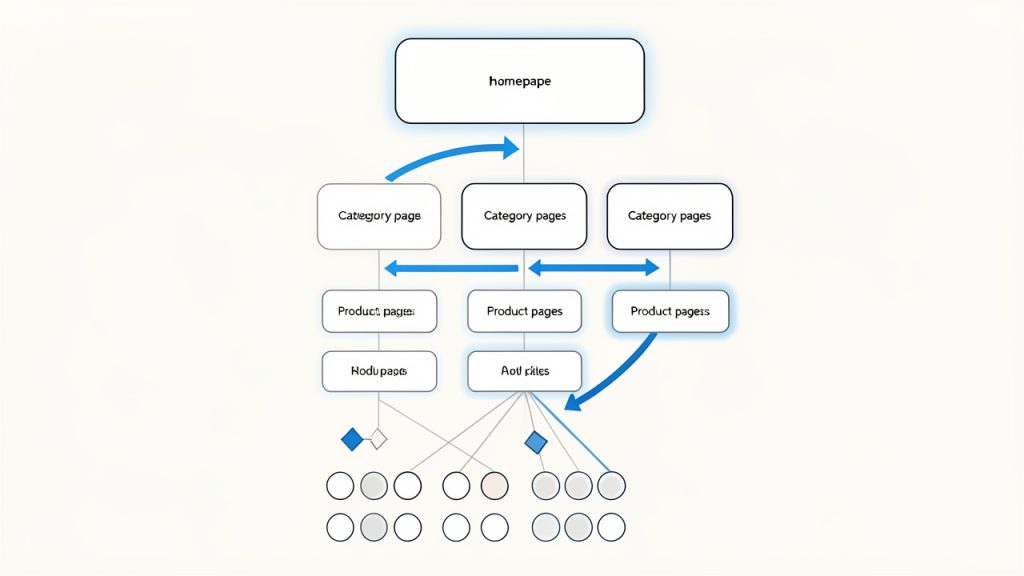
    A strong site architecture looks like a well-organized store, not a storage room. Categories are clear, related pages support each other, and high-value pages are never buried under unnecessary clicks.

    Clean backlink acquisition and disavow strategy when needed

    Good backlinks are still valuable, but the way you earn them matters. Strong links usually come from useful tools, original data, expert commentary, case studies, partnerships, and legitimately reference-worthy content.

    Disavow should not be your first reaction to every strange backlink. Google is generally good at ignoring a lot of low-quality noise. Disavow becomes more relevant when you have a known history of manipulative linking, a manual action, or clear evidence that unnatural links played a meaningful role in your profile.

    Monitoring and continuous improvement processes

    The best marketers treat SEO as an operating system, not a one-time project. Monthly reviews should track impressions, clicks, rankings, conversions, Core Web Vitals, crawl health, and content decay. Quarterly reviews should revisit content quality, topic coverage gaps, and pages that slipped despite solid technical health.

    Governance matters here. Editorial teams need standards. Developers need SEO-aware release checks. Stakeholders need realistic reporting. When responsibilities are clear, Google updates feel less like disasters and more like periodic stress tests.

    How Google Communicates Updates, Official vs Unofficial Channels

    Google’s official sources

    If you want signal before commentary, start with Google Search Central documentation, the Google Search Central Blog, and @searchliaison. These sources provide confirmed update announcements, rollout timing, clarifications, and recovery guidance.

    Google often speaks in broad principles rather than tactical specifics. That can feel frustrating, but it is still valuable. Their guidance usually points back to the same fundamentals: helpful content, technical accessibility, trust, and satisfying user needs better than alternatives.

    Community and industry sources

    Industry publications and tool providers fill in the practical gaps. Search Engine Journal, Search Engine Land, Moz, Ahrefs, and Semrush often interpret update patterns faster than official channels. Volatility trackers are especially useful during unconfirmed turbulence.

    Still, unofficial sources should inform your investigation, not dictate your decisions. Many publish sharp observations. Some also amplify speculation. The smartest approach is to compare multiple sources, then validate against your own data.

    How to interpret unofficial analyses without chasing rumors

    Use a simple filter. Ask whether the source is reporting confirmed facts, observed volatility, or theory. These are not the same thing. A chart showing SERP movement is not proof of why rankings changed. A tweet from an SEO practitioner may be insightful, but it is still anecdotal unless your own data shows the same pattern.

    Create a watchlist and alert setup that includes official Google sources, one or two major industry publications, and one volatility tracker. That keeps you informed without pulling your team into panic-driven decision making.

    Case Studies: Real Sites That Recovered (and Why)

    Case study 1: Content overhaul and authoritative revision

    An anonymized B2B software site lost roughly 38 percent of organic clicks after a broad core update. Most losses came from mid-funnel comparison articles that ranked well historically but offered generic summaries and weak differentiation.

    The recovery plan focused on rewriting the top 25 affected pages. The team added firsthand product analysis, decision criteria, clearer use-case segmentation, updated screenshots, expert commentary, and internal links to supporting resources. They also removed low-value filler and clarified authorship. Over four months, the site recovered about 27 percent of lost clicks, and conversion rate on the revised pages improved because the content became more useful, not just longer.

    Case study 2: Technical fixes and Core Web Vitals improvements

    A content-heavy publisher saw steady declines in mobile visibility during a year with multiple search updates. Investigation showed that content quality was decent, but mobile performance was poor. Largest Contentful Paint was consistently slow, ad placements caused layout shift, and template scripts delayed interaction.

    The publisher simplified above-the-fold rendering, compressed media, reduced third-party scripts, improved lazy loading, and adjusted ad behavior. Within two months, Core Web Vitals moved closer to recommended thresholds, and mobile organic traffic increased roughly 18 percent on the optimized templates. The lesson was clear, technical friction had made already-competitive pages easier to outrank.

    Case study 3: Backlink cleanup and manual action recovery

    A small affiliate site received a manual action tied to unnatural links after years of aggressive outsourced link building. The owner initially responded by buying more links, which made the situation worse.

    A proper recovery involved identifying manipulative link patterns, requesting removals where possible, documenting efforts, disavowing what remained, and cleaning up thin commercial pages that had been propped up by those links. The manual action was eventually revoked, but traffic recovery took longer because the site also needed better content and trust signals. The important lesson is that link cleanup alone rarely restores performance if the underlying site quality is still weak.

    Practical Resources and Tools

    You do not need an enterprise stack to respond well to Google’s search updates, but you do need the right combination of data sources. Search Console and Google Analytics are the foundation because they show real search and behavior data from your own site. PageSpeed Insights and Lighthouse help diagnose performance issues. Ahrefs, Semrush, and Moz can add visibility into rankings, backlinks, and SERP volatility.

    A simple operating toolkit works well for most teams:

    Tool Best use Free or paid
    Google Search Console Queries, clicks, impressions, indexing, manual actions Free
    Google Analytics Organic traffic quality, conversions, landing page performance Free
    PageSpeed Insights Real-world and lab performance insights Free
    Lighthouse Technical performance and page diagnostics Free
    Ahrefs Backlink analysis, keyword tracking, competitor visibility Paid
    Semrush Rank tracking, site audits, volatility monitoring Paid
    Moz SERP trend monitoring, link insights, update visibility Paid

    Create a lightweight dashboard that tracks weekly changes in organic clicks, impressions, average position, top landing pages, conversion rate from organic, indexed page count, and Core Web Vitals status. That gives you enough visibility to catch problems early without drowning in reports.

    For further reading, prioritize Google’s documentation on core updates, the helpful content guidance, spam policies, Search Quality Evaluator principles, and Core Web Vitals. Then use industry analyses to add interpretation and examples.

    Frequently Asked Questions About Google Search Updates

    How long after an update will traffic stabilize?

    It depends on the update type and the nature of the issue. Volatility during rollout may settle within days or weeks, but meaningful recovery after a core update often takes longer. If your fixes are substantial, improvements may appear gradually and sometimes more clearly after a later update cycle.

    Can I recover without changing content?

    Sometimes, if the issue is mainly technical or related to indexation, templates, or SERP layout changes. But if a core update exposed content quality, trust, or intent-match weaknesses, recovery usually requires meaningful content improvements.

    Are penalties permanent?

    No, not usually. Manual actions can often be resolved if you fix the issue and submit a strong reconsideration request. Algorithmic losses are also not necessarily permanent, but they require better alignment with Google’s quality expectations rather than appeals or quick tricks.

    Should I disavow low-quality links immediately?

    Not automatically. Many weak links can simply be ignored by Google. Use disavow carefully, especially if you have a history of manipulative link building or a manual action. Panic-disavowing harmless noise can waste time and create confusion.

    How do I prepare for future large updates?

    Build a better site before you need rescue. That means stronger editorial standards, cleaner technical SEO, better authorship and trust signals, ongoing content refreshes, clear internal linking, and consistent performance monitoring. Sites with sound fundamentals usually experience less dramatic swings.

    Summary and 90-Day Action Plan

    Google’s search updates are not random punishments. They are ongoing changes to how search evaluates quality, relevance, trust, and usability. For marketers, the core lesson is that reactive SEO is fragile. If your strategy depends on shortcuts, thin content, or technical neglect, each new update becomes a threat. If your site is built for users first, updates become easier to diagnose and easier to survive.

    Your next step is not to rewrite everything at once. It is to create a structured 90-day plan. In the first month, confirm whether an update actually affected you, rule out technical issues, and identify the sections that lost the most value. In the second month, improve the pages and templates most tied to leads, sales, or authority. In the third month, expand successful fixes, strengthen internal linking, and measure whether impressions, rankings, and conversions are moving in the right direction.

    A practical success scorecard should track organic clicks, impressions, average position, conversion rate, Core Web Vitals health, indexed page count, and recovery of top landing pages. Keep reviewing monthly. Google will keep updating search. The marketers who win are the ones who keep improving before the next wave arrives.

  • Google Ranking Factors: What Matters for SEO in 2026

    Google Ranking Factors: What Matters for SEO in 2026

    If your search traffic feels unpredictable, it is usually not because Google is random. It is because modern SEO is multi-layered. A page can be relevant but untrusted, fast but thin, or well-written but poorly linked. In 2026, the sites that win are not chasing secret tricks, they are aligning with the systems Google uses to judge relevance, quality, trust, and usability.

    That is why understanding the factors that influence Google rankings still matters so much. Not because there is a magic checklist with 200 toggles, but because some signals carry far more weight than others. If you know which ones actually move the needle, you can stop wasting time on outdated myths and focus on the work that compounds.

    This guide takes an evidence-based view of Google’s ranking systems. It separates strong signals from weak ones, explains what is likely correlation versus causation, and shows how small businesses, freelancers, and lean teams can prioritize. The big picture is simple, content relevance, E-E-A-T, technical SEO, page experience, links, and strong on-page signals remain the pillars of search visibility.

    Introduction: Why Understanding Google Ranking Factors Matters

    What we mean by ranking factors, and why Google keeps them opaque

    When people talk about ranking factors, they usually mean the signals and systems Google uses to decide which pages deserve to appear for a given search. Some are direct and obvious, such as whether a page is crawlable, what its title says, and how well its content matches the query.

    Google is intentionally vague about the full recipe. That makes sense. If every signal and weighting were public, search would be easier to manipulate. So instead, Google provides guidance through Search Central documentation, quality rater guidelines, public statements, and broad updates. SEO professionals then combine that guidance with testing, patents, and correlation studies to build practical models of what matters.

    That means one important thing for 2026, you should treat most SEO advice as directional, not absolute. If someone claims a single ranking factor explains all performance changes, they are almost certainly oversimplifying.

    How this article is different: evidence-based, prioritized, and practical

    A lot of content about ranking signals is just a long list. That is rarely useful. Most businesses do not need 87 disconnected tips. They need to know what to fix first, what to ignore, and how to measure results without fooling themselves.

    The more helpful way to think about SEO is as a stack. At the bottom is technical accessibility. On top of that sits content relevance and search intent. Then come trust and authority signals, followed by user experience and off-page reputation. If the lower layers are broken, the higher ones do less work.

    Quick takeaway: the top categories that influence ranking

    For most websites, the most important categories are still the same, but their interaction is tighter than before. Google’s systems are better at understanding language, better at detecting unhelpful content, and better at distinguishing genuine expertise from polished fluff.

    If you remember only one thing, remember this: the best rankings usually come from pages that satisfy search intent clearly, sit on technically sound websites, demonstrate real expertise, earn credible links, and provide a friction-free experience.

    How Google Determines Relevance: Content and Query Matching

    Understanding intent: informational, navigational, transactional, and commercial

    Google’s first job is not to reward the “best website” in the abstract, it is to return the best answer for this query right now. That starts with intent. Some searches are informational, such as “how to prune roses.” Some are navigational, like searching for a brand or website by name. Others are transactional or commercial, where the searcher wants to buy, compare, or evaluate.

    This is where many pages fail. A business writes a sales page and tries to rank it for an informational query. Or it publishes a blog post for a clearly transactional keyword. Even excellent content can underperform if it mismatches intent.

    A simple test helps here. Look at the current top 10 results. If most results are guides, Google sees that query as informational. If most are product pages, local listings, or category pages, the intent is commercial or transactional. In practice, search results tell you what Google believes users want.

    Semantic matching and the role of natural language models

    Modern search is not driven by exact-match keywords alone. Systems influenced by models like BERT and MUM help Google interpret nuance, context, entities, relationships, and phrasing. In plain English, Google is much better at understanding what a search means, not just what words it contains.

    That changes how you should write. Instead of obsessing over repeating a phrase, build content around the topic comprehensively. If someone searches for “best running shoes for knee pain,” Google expects content that discusses cushioning, support, foot strike, fit, terrain, and perhaps medical caveats. A page that mentions the exact phrase ten times but misses the deeper context will struggle.

    Older SEO language often referred to latent semantic indexing in a loose way. The useful takeaway is still valid even if the terminology is often misused, cover related concepts naturally, because relevance is broader than exact wording. For more on the underlying tech, see natural language models.

    Topical authority vs. single-page optimization

    A single page can rank well, but whole-site context matters more than many site owners realize. If your site has one article on bookkeeping and nothing else, it may have a harder time outranking a site with an entire, coherent accounting content hub.

    Topical authority is built when multiple strong pages cover a subject from complementary angles. A freelancer’s site might create a cluster around website performance, including guides on image compression, Core Web Vitals, hosting choices, and speed audits. Each page supports the others. Internal links reinforce the theme. The site starts to look credible for that subject overall.

    This does not mean you need hundreds of articles, it means your content should form intentional clusters, not isolated posts.

    E-E-A-T (Experience, Expertise, Authoritativeness, Trustworthiness): Practical Steps

    What E-E-A-T means in practice and how Google evaluates it

    E-E-A-T is not a single technical ranking factor you can toggle on, it is a framework Google uses to think about quality, especially for sensitive topics. The extra “E” stands for Experience, which reflects whether content appears to come from firsthand use or real-world involvement.

    In practice, E-E-A-T shows up through many signals. Does the article demonstrate lived knowledge? Is the author identifiable? Are claims supported? Is the site reputable in its niche? Does it look safe and transparent? This matters most for YMYL topics like health, finance, legal advice, and safety, but it affects all niches to some degree.

    A recipe blog with actual tested instructions, original photos, and practical notes demonstrates experience better than generic rewritten content. A cybersecurity article written by a named practitioner with real incident examples feels more authoritative than anonymous summary text.

    Author and site signals: bios, credentials, and transparency

    If your content affects decisions, money, or wellbeing, author transparency is no longer optional. Clear author pages, bios, credentials, editorial standards, and contact details help users and search systems interpret trustworthiness.

    You do not need to manufacture prestige, you need to surface legitimate expertise clearly. If you are a local contractor, explain your years in business, certifications, service area, and the types of projects you complete. If you are a freelance developer, show your portfolio, technical stack, and published work.

    The same applies at the brand level. Who is behind this site should never be a mystery.

    Content quality checks: accuracy, sourcing, and freshness

    High-ranking content is often not just well written, it is reliable. That means statistics are current, claims are sourced where appropriate, definitions are precise, and pages are updated when facts change.

    Freshness matters unevenly. A page on tax deductions for 2026 needs regular updates. A page explaining canonical tags may remain valid for longer. The goal is not constant editing for its own sake, the goal is maintaining accuracy where the topic demands it.

    Trust signals: secure sites, contact info, reviews, and legal pages

    Trust is partly editorial and partly operational. An HTTPS site, visible contact details, return or refund policies, privacy pages, review management, and clear customer support pathways all matter. They may not work like a single ranking lever, but together they reduce ambiguity.

    For many smaller websites, basic trust gaps are surprisingly common. Missing business addresses, no policy pages, thin About sections, and anonymous authors quietly weaken credibility.

    A concise E-E-A-T implementation checklist looks like this:

    Area What to include Why it matters
    Author pages Bio, experience, credentials, links to profiles Supports expertise and transparency
    Editorial signals Review process, update dates, sources Improves perceived quality and accuracy
    Business trust Contact page, policies, business details Reinforces legitimacy
    Reputation Reviews, mentions, third-party references Supports authority beyond your own site

    Technical SEO Essentials That Still Matter

    Crawlability and indexability: robots.txt, sitemaps, canonicalization

    Technical SEO is still foundational because Google cannot rank what it cannot reliably crawl, understand, or index. Many ranking problems are not content problems at all, they are access problems.

    Start with the basics. Important pages should not be blocked in robots.txt. XML sitemaps should be clean and current. Canonical tags should point to the preferred version of a page, not create conflicting signals. If you have faceted navigation, duplicate URLs, parameter-based pages, or paginated archives, canonicalization becomes especially important.

    For international sites, hreflang also matters. Done correctly, it helps Google serve the right language or regional version. Done poorly, it creates confusion. It is a precision tool, not a decorative add-on.

    Some are direct and obvious, such as whether a page is crawlable, what its title says, and how well its content matches the query.

    Structured data and schema: what to use and how it helps

    Structured data does not guarantee rankings, but it can improve how Google interprets content and may unlock rich results. Product, FAQ, Article, Review, Organization, LocalBusiness, and Breadcrumb schema are among the most useful formats for many sites.

    Think of schema as labeling the parts of your content clearly. It helps search engines identify entities, page types, and relationships. For e-commerce sites, product schema can support price, availability, and review visibility. For local businesses, LocalBusiness schema reinforces location and service information.

    Mobile-first indexing and responsive design

    Mobile-first indexing is not new anymore. It is the standard environment. Google primarily evaluates the mobile version of content, so any mismatch between desktop and mobile experiences is risky.

    Responsive design remains the safest default. Content should be equivalent across devices, navigation should be usable on small screens, and interactive elements should not break or shift unpredictably. If your mobile page hides critical content or loads far more slowly than desktop, rankings can suffer indirectly through weaker experience and crawl interpretation.

    Site architecture and URL structure for SEO

    A good site structure makes content easier to crawl and easier to understand. It also helps users find related material naturally. Important pages should be reachable within a few clicks from core navigation or hub pages.

    URLs should be readable, stable, and descriptive. That does not mean stuffing them with keywords. It means avoiding meaningless strings and designing logical paths. A clear hierarchy often improves both internal linking and topical organization.

    Page Experience and User Signals

    Core Web Vitals explained, and suggested targets

    Core Web Vitals remain relevant because they measure visible aspects of usability. In 2026, the key metrics most site owners should watch are LCP for loading performance, INP for interaction responsiveness, and CLS for visual stability.

    A helpful benchmark is to keep LCP under 2.5 seconds, INP under 200 milliseconds, and CLS under 0.1 for the majority of real users. These are not the only UX metrics that matter, but they are useful because they reflect how a page actually feels.

    A fast site will not outrank a far better page on relevance alone. But between two similarly relevant pages, better performance and usability can help, especially when poor experience becomes a drag on engagement.

    Other UX signals: speed, mobile usability, interstitials

    Page experience is broader than Core Web Vitals. Mobile usability issues, intrusive interstitials, broken layouts, inaccessible design, and bloated pages all create friction. Google has said page experience is one signal among many, but the practical effect can be larger when usability problems are severe.

    For example, a slow local service page with a giant pop-up and hard-to-tap buttons may not just frustrate users, it may also reduce conversions, increase abandonment, and weaken the quality of traffic signals over time.

    Behavioral metrics: what we know, and what we do not

    Click-through rate, dwell time, and pogo-sticking are often discussed as ranking factors. The truth is more nuanced. Google does use interaction data in various ways, but simplistic claims like “higher dwell time directly equals higher rankings” are not reliable.

    What matters for practitioners is this, if searchers consistently prefer a result, stay engaged, and do not bounce back immediately, that usually indicates stronger satisfaction. Those patterns may align with better rankings, but they are not clean, standalone levers. Improve user satisfaction because it improves the product, not because you are chasing a single hidden metric.

    How to measure and improve page experience

    Use Search Console for Core Web Vitals reporting, PageSpeed Insights for lab and field data, and Lighthouse for diagnostics. Then prioritize fixes that affect templates or high-traffic pages first.

    The most common wins include properly sized images, modern image formats, font loading improvements, reduced third-party scripts, better caching, lazy loading below-the-fold assets, and eliminating layout shifts caused by ads or unreserved media space.

    Backlinks and Off-Page Authority

    Why links still matter: relevance, authority, and anchor text

    Backlinks are still among the strongest signals associated with rankings because they act as reputation markers. A link from another site is not just a pathway, it is a form of endorsement, especially when it comes from a relevant, trusted source.

    Not all links are equal. A contextual link from a respected industry publication is worth far more than dozens of low-quality directory links. Relevance matters. So does the linking page’s authority, the surrounding context, and the diversity of linking domains.

    Anchor text also helps, but it should look natural. Over-optimized anchor profiles can create risk. Healthy link profiles usually contain branded, topical, and generic anchors in a realistic mix.

    Quality vs. quantity: how to evaluate link value

    SEO tools use metrics like Domain Authority, Domain Rating, and similar scores. These can be useful for comparison, but they are third-party estimates, not Google metrics. Treat them as rough indicators, not truth.

    A strong link usually combines several qualities, the linking site is real and active, the page is relevant, the link is editorially placed, and the referral makes sense for humans. Ten such links can outperform hundreds of weak ones.

    Natural link building strategies that scale

    The most sustainable link acquisition is content-based and relationship-driven. Useful original research, calculators, templates, local resources, expert commentary, and data-backed guides tend to attract links more naturally than generic blog posts.

    For smaller teams, the best scalable strategy is often to create genuinely linkable assets and then promote them thoughtfully. A local accountant might publish a state-specific small business tax checklist. A developer might create a free performance audit template. These assets are far more pitchable than “10 tips” articles.

    Spammy links, link schemes, and disavow considerations

    Buying manipulative links at scale, joining obvious link exchanges, or building private networks can still backfire. Google is better at ignoring many low-quality links than it once was, but active manipulation remains risky.

    Disavow is not a routine maintenance habit for most sites. It is typically reserved for cases where there is a real history of spammy link building or a manual action concern. For many businesses, the smarter move is to stop building bad links and focus on earning better ones.

    On-Page Optimization Best Practices

    Title tags, meta descriptions, and headings

    On-page optimization still matters because it helps Google and users interpret page focus quickly. Title tags are especially important. A strong title aligns with search intent, includes the topic naturally, and gives a reason to click.

    Meta descriptions do not usually act as direct ranking factors, but they can improve click appeal. Good headings make content easier to scan and help create semantic structure.

    Here is a simple comparison:

    Element Best practice Common mistake
    Title tag Clear topic + intent + concise value Keyword stuffing or vagueness
    Meta description Compelling summary matching the query Generic boilerplate
    H1/H2s Logical structure reflecting user questions Repetitive, awkward keyword use

    Content structure: scannability, headings, lists, and multimedia

    Well-structured content is easier to process for both people and machines. Short sections, descriptive subheadings, useful examples, tables where appropriate, and relevant visuals all support comprehension.

    Example of a well-structured SEO article with clear headings and supporting visuals

    This does not mean every page should look identical. A product page, a tutorial, and a local landing page should each be structured differently according to intent. The goal is not formula, the goal is clarity.

    Keyword strategy in the age of semantic search

    Keyword research still matters, but modern strategy starts with topics and intent rather than exact-match repetition. Use your primary phrase naturally in titles, headings, and introductory copy when it fits. Then support it with related subtopics, synonyms, and entity-rich language.

    For example, if your focus is on factors that affect Google rankings, it is natural to also discuss search intent, topical authority, backlinks, crawlability, page experience, and trust signals. That gives the page semantic depth.

    Image optimization and alt text

    Images contribute to both SEO and accessibility. File names, compression, dimensions, surrounding context, and alt text all help. Alt text should describe the image meaningfully, not stuff keywords unnaturally.

    For e-commerce and visual businesses, strong image optimization can also support visibility in image search and improve performance metrics.

    Local and Personalization Signals

    Google Business Profile best practices

    For local businesses, your Google Business Profile often matters as much as your website. Complete every meaningful field, choose accurate categories, keep hours current, upload original photos, and publish updates when relevant.

    The profile should reinforce what the website says, not contradict it. Services, service areas, phone numbers, and business descriptions should be consistent and credible.

    NAP consistency, local citations, and reviews

    NAP stands for name, address, and phone number. Consistency across your website, Google profile, directories, and citations helps reduce ambiguity. Reviews also play a major role in local prominence and trust.

    Ethical review collection is straightforward. Ask real customers at the right moment, make the process easy, and never incentivize fake feedback. The review content itself often adds helpful relevance signals, especially when customers mention services or locations naturally.

    Local ranking factors and personalized search

    Local visibility typically depends on relevance, proximity, and prominence. Relevance is how well your business matches the query. Proximity is how close you are to the searcher or searched area. Prominence includes reputation, reviews, mentions, and local authority.

    Personalization adds another layer. Search results can vary by location, search history, device, and context. That is why rank tracking should be interpreted carefully. What matters is not just average position, but qualified local visibility that leads to calls, visits, and leads.

    Special Considerations: E-commerce, News, and YMYL Pages

    E-commerce SEO: product pages, schema, and conversion-focused content

    E-commerce pages need more than manufacturer descriptions. Strong product pages combine unique copy, specifications, FAQs, reviews, comparison context, shipping information, and clean structured data.

    Thin category pages and duplicate product text remain common problems. If your store looks interchangeable, Google has little reason to prefer it. Rich, helpful product content improves both rankings and conversions.

    News and freshness signals

    For news-oriented content, freshness can matter dramatically. Timeliness, clear publication and update dates, strong technical delivery, and original reporting all help. AMP is no longer the center of this conversation the way it once was. Modern fast mobile performance matters more than any specific framework.

    YMYL content: higher standards for trust

    YMYL pages are held to a higher bar because the stakes are higher. If your content could affect someone’s health, finances, legal decisions, or safety, shallow or anonymous content is much less likely to perform well.

    This is where E-E-A-T moves from helpful to essential. Expert review, citations, transparent authorship, and ongoing maintenance are table stakes.

    Measuring What Matters: KPIs, Tools, and Reporting

    Primary KPIs

    The most useful SEO KPIs connect visibility to business outcomes. Rankings matter, but only for priority queries. Traffic matters, but only if it is qualified. Impressions, clicks, conversions, assisted conversions, and revenue or lead value paint a fuller picture.

    A good dashboard usually blends Search Console data with analytics and conversion tracking. That helps you see whether improved rankings are actually producing better business results.

    Tools of the trade

    Search Console remains essential for queries, indexing, and coverage insights. Analytics tools help with behavior and conversion tracking. PageSpeed Insights and Lighthouse help with performance diagnostics. Third-party tools like Ahrefs, Moz, and Semrush are useful for backlink analysis, keyword research, and competitive comparisons.

    None of these tools is the truth by itself. The value comes from combining them.

    How to set up an SEO experiment and measure impact

    The best way to avoid guesswork is to test changes deliberately. Pick a page group, define one meaningful change, set a baseline, and compare results over a realistic timeframe. If you rewrite title tags, do not also redesign the template and update internal links on the same day unless you are comfortable losing attribution clarity.

    A simple experiment process looks like this:

    1. Choose a page set with similar intent and traffic patterns.
    2. Change one variable such as title structure, internal links, or content depth.
    3. Measure pre/post performance using clicks, impressions, CTR, rankings, and conversions.
    4. Allow enough time for re-crawling and volatility to settle before drawing conclusions.

    Attribution and tying SEO to business outcomes

    SEO often assists conversions rather than closing them immediately. A user might discover your site through a guide, return via branded search, and convert later. That is why last-click reporting alone tends to undervalue organic search.

    Tie SEO reporting to lead quality, assisted conversions, sales influenced, and pipeline contribution where possible. That shifts the conversation from vanity metrics to business impact.

    A Prioritized SEO Action Plan: What to Tackle First

    Low-effort, high-impact fixes

    Most small teams should begin with technical and on-page issues that block existing value. Fix indexing errors, improve titles on high-impression pages, strengthen weak internal links, compress oversized images, and update outdated high-potential content first.

    These tasks are attractive because they improve pages that already have some visibility. You are not starting from zero, you are removing friction from assets Google already knows.

    Mid-term initiatives

    Once the basics are stable, build content hubs around core services or topics. Improve comparison and bottom-funnel pages. Launch linkable assets. Refine page templates for better UX and structured data.

    This is also the right stage for more intentional backlink campaigns, especially if your site has good content but limited off-page authority.

    Long-term investments

    The strongest long-term ranking advantages come from brand trust, topical depth, and product quality. If people search for your brand by name, mention you in articles, review you positively, and spend time with your best content, your SEO position becomes more defensible.

    Search performance often becomes a lagging indicator of deeper business quality. Better products, clearer positioning, and stronger customer satisfaction eventually show up in organic search.

    Here is a practical 90-day plan for lean teams:

    Timeframe Focus Example actions Effort
    Days 1 to 30 Fix foundations Indexing audit, title updates, image compression, internal linking cleanup Low to medium
    Days 31 to 60 Improve key pages Refresh top articles, add schema, strengthen service pages, improve mobile UX Medium
    Days 61 to 90 Build authority Publish a content hub, create one linkable asset, start outreach, request reviews Medium to high

    Maintenance cadence

    SEO is not a one-time project. Monthly reviews should cover indexing issues, traffic shifts, and page experience alerts. Quarterly reviews should assess content freshness, link growth, and conversion trends. Annual reviews should revisit site structure, content gaps, and brand positioning.

    Common Myths and Misconceptions About Google Ranking Factors

    Debunking overhyped signals

    Some signals are consistently overvalued. Exact-match domains can still be descriptive, but they are not a shortcut. Meta keywords are obsolete for Google search. Word count is not a ranking factor in isolation. Publishing more often does not guarantee authority.

    These ideas persist because they contain a grain of historical truth, but in modern SEO, they are weak compared with relevance, quality, trust, and authority.

    Correlation vs. causation in SEO studies

    Industry studies are useful, but they often show patterns, not proof. High-ranking pages may have more backlinks, longer content, or stronger engagement. That does not always mean copying one surface trait will reproduce the result.

    Better pages tend to accumulate multiple strengths at once. That is why SEO strategy should be holistic, not superstitious.

    AI-generated content and thin content penalties

    AI is not automatically a problem, low-value content is. If AI helps a real expert draft, organize, summarize, or scale production responsibly, that can be fine. If it produces bland, generic, inaccurate pages with no original insight, it is unlikely to perform well for long.

    The useful test is simple, would this page deserve to rank even if the reader never knew how it was created? If the answer is no, the problem is quality, not tooling.

    Conclusion and Next Steps

    The factors that shape Google rankings in 2026 are not mysterious, but they are interconnected. Relevance comes first, trust validates it, technical SEO enables it, page experience supports it, links amplify it. When those elements work together, rankings become much more durable.

    Your next step should be practical. Audit your site through that exact lens. First, confirm Google can crawl and index the right pages. Then improve the pages already closest to page one by sharpening intent match, trust signals, and internal links. After that, invest in deeper topical coverage and stronger authority building. That sequence is usually where real SEO momentum starts.

    Appendix: Quick Reference, Ranking Factors Cheat Sheet

    The most useful cheat sheet is one you can apply quickly. Think in three priority tiers: must-fix, should-fix, and nice-to-have.

    Must-fix items include crawlability errors, accidental noindex tags, duplicate canonicals, broken mobile layouts, weak titles on key pages, missing trust pages, and thin pages targeting valuable queries.

    Should-fix items include structured data improvements, content freshness updates, stronger author bios, internal linking gaps, page speed improvements on top landing pages, review generation systems, and cluster development around priority topics.

    Nice-to-have items include deeper rich result enhancements, advanced experimentation programs, broader digital PR campaigns, and secondary multimedia optimization once primary constraints are solved.

    For ongoing learning, the most authoritative sources remain Google Search Central documentation, Google Search Central YouTube updates, public statements from Google representatives, and carefully interpreted industry research from respected SEO platforms. Use third-party studies for pattern recognition, but let your own testing guide decisions.

    A few core terms from this guide are worth remembering. Crawlability is whether search engines can access your pages. Indexability is whether they can store and serve them in results. Canonicalization is the process of signaling the preferred version of duplicate or near-duplicate content. E-E-A-T refers to experience, expertise, authoritativeness, and trustworthiness. Core Web Vitals are user-centric performance metrics tied to loading, responsiveness, and visual stability. Topical authority describes depth and breadth of coverage within a subject area.

    If you want a working checklist, turn this guide into one. Start with ten high-value pages, score each against relevance, E-E-A-T, technical health, UX, internal links, and backlink support, then fix the weakest layer first. That is a far better use of time than chasing mythical ranking hacks.

    Additional resources:

  • How to Rank on Google: A Practical Guide for Small Sites

    How to Rank on Google: A Practical Guide for Small Sites

    How your business appears on Google can change everything. A page that ranks well brings in qualified traffic day after day, while a page buried on page three might as well not exist.

    If you have been trying to figure out how to rank on Google, the good news is that the process is not magic, and it is not reserved for giant brands with massive budgets. Google wants to show users the most relevant, trustworthy, and helpful result, which creates an opportunity for small businesses, freelancers, developers, and solo creators who are willing to publish genuinely useful content and build a technically sound website.

    The challenge is that most SEO advice is either too vague or too complicated. One side says, “just create great content.” The other drowns you in audits, jargon, and endless checklists. The real path sits in the middle, you need the right content, the right structure, and the right signals of quality. When those pieces work together, rankings become much more achievable.

    Three interlocking gears (or pillars) labeled “Content,” “Technical,” and “Signals/Authority” with arrows showing they must work together. Emphasize balance — if one gear is weak, the system falters. Clean, simple icons for each gear (e.g., document for content, speed/bolt for technical, link/star for signals).

    What It Means to Rank on Google

    Ranking on Google means your page appears prominently in the search results for a query that your audience types in. If someone searches for “best invoicing software for freelancers” or “how to speed up a WordPress site,” Google compares thousands or millions of pages and chooses which deserve the top positions.

    That decision is based on many factors, but the core principle is simple. Google tries to match search intent with the most useful result. A page ranks well when it answers the right question, in the right format, with enough authority and a good enough user experience to deserve visibility.

    This is where many site owners get stuck. They often focus on what they want to say, instead of what the searcher wants to find. Those are not always the same thing. If a user wants a step-by-step guide and lands on a sales page, Google notices that mismatch through engagement signals and relevance patterns over time.

    Ranking Is Not Just About Keywords

    Keywords still matter, but they are no longer the whole game. Years ago, you could repeat a phrase enough times and have a decent shot at ranking. Today, Google is much better at understanding topic relationships, synonyms, and user expectations.

    That means if you want to rank on Google, you should not obsess over exact-match repetition. You should focus on topical depth, clarity, and relevance. A page about local SEO for plumbers should naturally mention service areas, Google Business Profile optimization, reviews, citations, and nearby search intent. That breadth tells Google the page is genuinely useful.

    Google Rewards Helpfulness

    Google’s systems increasingly favor content created for people, not for algorithms. Helpful content solves a real problem, answers follow-up questions, and makes the next step obvious.

    Think of your page like a strong in-person recommendation. If a friend asked how to choose a project management tool, you would not recite keywords at them. You would explain trade-offs, compare options, and help them make a decision. Great SEO content works the same way.

    Key Aspects of Ranking Well on Google

    If you want consistent visibility, you need to understand the main pillars behind search rankings. These elements reinforce one another. Strong content without a healthy technical foundation will struggle, and technical perfection without useful content also struggles. SEO works best as a system.

    Search Intent Comes First

    Before writing anything, ask what the user actually wants. Are they trying to learn, compare, buy, or find a local business? This is the foundation of ranking well.

    If the keyword suggests curiosity, your page should educate. If it suggests comparison, your page should help evaluate options. If it suggests purchase intent, your page should reduce friction and build trust. Misreading intent is one of the fastest ways to create content that never ranks, no matter how polished it looks.

    A practical way to understand intent is to study the current top results. If Google shows mostly guides, you likely need a guide. If it shows product pages, a blog post may not be enough. The search results are often the clearest hint about what Google believes users want.

    A simple matrix or flow showing search intent types (Learn, Compare, Buy, Local) mapped to ideal page formats (Guide, Comparison, Product page, Local business listing). Use icons for each intent and corresponding page type, with a magnifying-glass/search-bar header to imply a query-to-result mapping.

    Content Quality Still Drives Results

    Content quality is not about writing longer articles for the sake of length. It is about being more useful than the alternatives. A strong page answers the main question clearly, then covers the supporting questions that naturally follow.

    For example, a page about how to rank on Google should not only mention keywords and backlinks. It should explain search intent, site structure, page speed, internal linking, content freshness, and authority. It should also make those ideas understandable for non-specialists.

    Quality also comes from specificity. Generic advice is easy to ignore. Real examples, practical details, and clear explanations make a page more trustworthy. Google’s algorithms are designed to detect patterns associated with expertise and usefulness, and readers can feel the difference immediately.

    On-Page SEO Helps Google Understand Your Page

    On-page SEO is the practice of structuring a page so both users and search engines can quickly understand it. This includes your title, headings, URL, meta description, image alt text, and the natural use of relevant phrases throughout the content.

    Good on-page SEO does not feel forced. Your primary topic should appear in the title and early in the page, but always in a way that sounds natural. Supporting phrases should appear where they make sense. The goal is not to “insert keywords.” The goal is to create a page that is tightly aligned with one core topic.

    Headings matter here because they create a clear hierarchy. They help readers scan and help Google understand how your ideas are organized. A confusing wall of text makes your content harder to use and harder to interpret.

    Technical SEO Removes Hidden Friction

    A surprising number of ranking problems have nothing to do with writing. Sometimes Google cannot properly crawl a page. Sometimes a site is too slow. Sometimes pages are duplicated, orphaned, or blocked by mistake.

    Technical SEO is about making your site easy to access, understand, and trust. If your pages load quickly, work well on mobile devices, use secure HTTPS connections, and avoid major crawl issues, you give your content a far better chance to compete.

    For small businesses, this does not mean you need enterprise-level complexity. It means covering the essentials. Your website should be mobile-friendly, indexable, logically structured, and fast enough that users do not leave before the page fully loads. Strong content without technical health will still struggle to reach its potential.

    Authority and Backlinks Still Matter

    Google uses links from other websites as signals of credibility. A backlink, especially from a reputable site in your niche, acts like a vote of confidence. Not all links are equal, though. A few strong, relevant links are more valuable than dozens of weak or spammy ones.

    Authority is not only about backlinks. It is also shaped by your brand reputation, topical consistency, author credibility, and the overall trust signals on your site. Still, links remain one of the clearest ways Google measures external validation.

    This is why content that earns attention tends to outperform content that merely exists. If your page offers original insights, useful tools, strong data, or a genuinely better explanation, it is more likely to attract links naturally over time.

    User Experience Influences Performance

    Google ultimately wants satisfied searchers. If people click your result and quickly bounce back, that is not a great sign. If they stay, read, explore your site, and find what they need, your page is doing its job.

    User experience includes readability, layout, mobile responsiveness, visual clarity, and page speed. It also includes trust. If your page looks outdated, cluttered, or confusing, users may leave even if the information is solid.

    A clean design helps your SEO more than many people realize. It reduces friction. It helps users stay focused. It makes your expertise easier to absorb.

    A Simple View of the Ranking Factors

    Factor Why It Matters What Good Looks Like
    Search intent Aligns your content with what users want The page format matches the query type
    Content quality Gives users a reason to stay and trust you Clear, useful, specific, complete content
    On-page SEO Helps Google understand your topic Strong title, headings, structure, and relevance
    Technical SEO Ensures your site can be crawled and used Fast, mobile-friendly, secure, indexable pages
    Backlinks Provide external trust and authority Relevant links from reputable websites
    User experience Supports engagement and satisfaction Easy navigation, readable design, low friction

    How to Get Started With Ranking on Google

    The best way to begin is to stop thinking of SEO as a trick and start treating it like a publishing and optimization process. You are building assets that should deserve attention over time.

    A new site will not rank overnight, and even established sites need consistency. But if you approach SEO with clear priorities, you can make real progress faster than most competitors who publish randomly and hope for the best.

    Start With the Right Keywords

    Keyword research helps you identify what your audience is already searching for. The goal is not to chase the biggest search volume. It is to find topics where your content can realistically compete and provide real value.

    For small business owners and freelancers, this often means starting with long-tail keywords. These are more specific phrases that may have lower search volume but clearer intent and less competition. A page targeting “best CRM for solo consultants” is often easier to rank than one targeting “CRM.”

    Look for keywords that connect directly to your services, audience problems, or buying decisions. If a search phrase brings in traffic but not the right visitors, it is not a win.

    Build Topic Clusters, Not Random Pages

    One common mistake is publishing unrelated blog posts with no overall strategy. Google prefers sites that show depth in a subject area. That is why topic clusters work so well.

    A topic cluster means creating a main page around a core subject, then supporting pages around related subtopics. If your core topic is SEO for small businesses, related pages might cover local SEO, keyword research, Google Business Profile optimization, content planning, and site speed.

    Internal links tie those pages together. That helps users navigate your content and helps Google understand your topical authority. Over time, this structure can strengthen your rankings across multiple related searches.

    Optimize Each Page for One Primary Goal

    Every important page should have a clear purpose. Trying to rank one page for too many unrelated terms usually weakens it. A page should answer one main search need extremely well, then support that with relevant secondary information.

    This affects your title, headings, content angle, and call to action. If the page is informational, teach clearly. If it is transactional, remove doubt and make action easy. If it is local, highlight location signals and service details.

    Clarity wins. Both readers and search engines respond better when a page knows exactly what it is trying to do.

    Improve Your Site’s Technical Foundation

    You do not need a perfect site before publishing content, but you do need a usable one. Check whether your pages are indexed, whether they load quickly, and whether mobile users can navigate them comfortably.

    If your website has broken links, duplicate pages, or confusing navigation, fix those issues early. SEO gains compound, and technical problems compound too. A weak foundation slows everything down.

    A simple audit can reveal a lot. Many site owners discover they have excellent content hidden behind slow pages, poor internal linking, or indexing problems that prevent Google from seeing the full value of the site.

    Publish Content Worth Citing

    If you want backlinks, you need something people would naturally reference. That might be a detailed guide, a useful comparison, original research, a calculator, a template, or a clear explanation that improves on what already exists.

    This is where many businesses underinvest. They create content that is “fine,” but not memorable. Fine content rarely earns links. Exceptional content, even in a narrow niche, can.

    For example, a local accountant might publish a genuinely helpful tax deadline guide for freelancers. A developer might create a performance checklist for small websites. A consultant might release a simple planning template. Useful assets create opportunities for both traffic and authority.

    Track Progress the Right Way

    SEO is a long game, so you need to measure more than just rankings. Some pages may gain impressions before clicks. Others may bring lower traffic but better leads. Looking only at vanity metrics can lead you in the wrong direction.

    Focus on a few meaningful indicators:

    1. Organic impressions show whether Google is beginning to surface your pages.
    2. Organic clicks show whether your titles and rankings are earning attention.
    3. Keyword movement helps you see whether optimization is working over time.
    4. Conversions show whether traffic is actually helping your business.

    If a page is getting impressions but few clicks, your title or meta description may need improvement. If it gets clicks but no engagement, the content may not match intent closely enough. SEO becomes much easier when you treat data as feedback instead of judgment.

    Practical Priorities for Small Teams and Solo Operators

    Many SEO guides assume you have a full marketing department. Most small businesses do not. That means your strategy should emphasize leverage, not volume.

    A practical approach is to choose a narrow set of topics where your expertise is strongest and your audience is most active. Create a few excellent pages instead of dozens of shallow ones. Improve them over time. Add internal links. Refresh facts. Expand sections based on real search behavior and user questions.

    This approach is slower at the start, but much more sustainable. A smaller library of strong content often outperforms a large archive of weak content.

    Where to Spend Time First

    Priority Why It Deserves Early Attention Expected Impact
    Keyword and intent research Prevents wasted content creation High
    Core service or topic pages Targets business-relevant traffic High
    Technical cleanup Removes crawl and UX barriers High
    Internal linking Strengthens site structure and topic relevance Medium to High
    Backlink outreach Builds authority gradually Medium
    Content expansion and refreshes Improves pages already gaining traction Medium to High

    Common Mistakes That Hold Rankings Back

    One of the biggest mistakes is writing for algorithms instead of people. When content sounds robotic, padded, or repetitive, users lose trust quickly. Google is getting better at identifying content that exists mainly to manipulate rankings rather than solve problems.

    Another common issue is targeting keywords that are far too competitive. A small business site usually should not begin by chasing broad national terms dominated by major publishers or large software companies. Smarter wins come from relevance, specificity, and local or niche authority.

    Some site owners also expect instant results. SEO rarely works that way. Rankings often improve gradually as Google crawls, tests, and reevaluates your pages. Patience matters, but so does iteration. Publishing once and never updating is usually not enough.

    There is also the problem of fragmented effort. A business might publish blog posts, tweak titles, and occasionally share links, but without any coherent structure. SEO rewards consistency and alignment. A connected strategy nearly always beats scattered activity.

    A Realistic Path to Better Google Rankings

    If you want to understand how ranking on Google actually works in practice, think in phases. First, identify the queries worth targeting. Second, create pages that satisfy those queries better than weaker competitors. Third, make sure the site is technically sound. Fourth, strengthen trust and authority over time.

    That sequence matters. You do not need to do everything at once, but you do need to do the right things in the right order. Great backlinks cannot save content that misses user intent. Great content cannot fully perform on a broken site. SEO is not one tactic. It is coordination.

    For most readers, the fastest gains come from improving pages that already exist. Refresh outdated content. Clarify headings. Add missing sections. Improve internal links. Tighten titles. Fix page speed issues. Often, the easiest ranking gains are hidden in assets you already have.

    Conclusion

    To rank higher on Google, focus on what searchers need, then build pages that answer those needs clearly, thoroughly, and credibly. Support that content with strong on-page SEO, a healthy technical foundation, and a steady effort to build authority. That is the real answer to how to get your site to rank on Google.

    Your next step is simple. Pick one important page on your site and evaluate it honestly. Does it match search intent? Is it better than the current top results? Is it fast, clear, and well-structured? Improve that page first, then repeat the process. SEO momentum starts small, but it compounds.

  • Best Keyword Research Tools for Small Teams and Freelancers

    Best Keyword Research Tools for Small Teams and Freelancers

    The difference between a page that gets buried and one that brings in steady traffic often comes down to a simple question: Are you targeting the terms people actually search for? That is where keyword research tools earn their keep.

    For small business owners, freelancers, developers, and anyone trying to grow online without wasting time, choosing the right tool can remove a lot of guesswork. Good keyword tools help you spot demand, understand competition, and find realistic opportunities before you invest hours writing content, building landing pages, or launching ads.

    What Are Keyword Research Tools?

    Keyword research tools are platforms that help you discover the words and phrases people type into search engines. At the most basic level, they turn a broad topic like “accounting software” or “portfolio website” into a map of search intent. Instead of guessing what your audience wants, you can see how people phrase their questions, what related topics they care about, and which search terms are worth targeting.

    That sounds simple, but the real value goes deeper. A strong keyword research tool does not just generate ideas. It also gives context. You can usually see estimated search volume, ranking difficulty, cost-per-click data for ads, seasonal trends, and related queries. When used well, that information helps you decide whether a keyword is too competitive, too vague, too commercial, or perfectly matched to your audience.

    For practical marketers and budget-conscious teams, this matters because content has a cost. Even if you are writing your own blog posts or product pages, your time is not free. The best keyword research platforms help you invest that time where it has the highest chance of paying off.

    Why These Tools Matter for Smaller Teams

    Large companies can afford trial and error. Most small businesses cannot. If you run a local service business, sell digital products, freelance, or manage a lean startup, you need a clearer path from effort to results.

    Keyword tools reduce the risk of publishing content nobody searches for. They also help you avoid chasing broad, highly competitive terms that are almost impossible to rank for without a large site and a long timeline. Often, the smartest move is not to target the biggest keyword. It is to target the most relevant and reachable one.

    Think of keyword research like choosing a market stall location. A crowded main street may look attractive, but if the rent is too high and the competition is fierce, a smaller side street with the right foot traffic can be far more profitable. Search works in a similar way.

    Illustration of the market-stall analogy: a simple streetscape with a crowded main street full of identical stalls labeled 'High Volume / High Competition' and an affordable, well-positioned side street stall labeled 'Niche / Right Traffic'. Include a small business owner happily attending the side-street stall while the main street stalls look busy but expensive. Emphasize accessibility and the idea of realistic foot traffic versus costly competition.

    Key Aspects of Keyword Research Tools

    Not all keyword research platforms are built for the same purpose. Some are designed for SEO content planning. Others lean toward PPC campaigns, product research, YouTube optimization, or ecommerce listings. To choose well, you need to understand what actually makes a tool useful.

    Search Volume and Demand Signals

    One of the first metrics people look for is search volume, which estimates how many times a keyword is searched in a given month. This is helpful, but it should never be treated as a perfect truth. Search volume is often modeled data, not an exact count, and different tools may report different numbers for the same term.

    What matters more is how you use that number. A keyword with moderate volume but strong relevance can outperform a high-volume term that attracts the wrong audience. If you are a freelancer offering “Shopify speed optimization,” a keyword with 200 focused monthly searches may be far more valuable than a broad ecommerce term with 20,000 searches.

    Good keyword research tools also help you spot patterns around demand. Some show trend data over time, which is useful if your market is seasonal. Others group related phrases so you can see whether one topic deserves a single page or an entire content cluster.

    Keyword Difficulty and Competition

    Another major feature is keyword difficulty, a score meant to estimate how hard it would be to rank organically. This can be helpful for prioritization, especially when you are building a newer site. But like search volume, difficulty scores are directional, not absolute.

    A smart approach is to use the score as a starting point, then manually inspect the search results. If the first page is packed with high-authority domains, government sites, or deeply established brands, the practical difficulty may be much higher than a number suggests. On the other hand, if the results are weak, outdated, or poorly matched to intent, you may have an opening.

    This is where experienced users get more value from keyword tools than beginners. They do not just collect scores. They interpret the landscape behind them.

    Search Intent and Topic Relevance

    The most important question in keyword research is not “How many people search this?” It is “What does the searcher want?”

    A person searching “best invoicing software” is likely comparing options. Someone searching “how to create an invoice as a freelancer” wants guidance. Someone searching “buy invoicing software” is close to taking action. A useful keyword tool helps you identify these differences through related terms, SERP analysis, and keyword modifiers.

    This matters because content performs best when it matches intent. If your page tries to sell when the user wants education, it will struggle. If your article explains basics when the user wants product comparisons, it may never gain traction. Strong keyword research helps align the page type, format, and message with what searchers actually expect.

    Long-Tail Keywords and Realistic Wins

    For many small websites, long-tail keywords are where momentum starts. These are more specific search phrases, often with lower search volume but clearer intent and lower competition. They may include location qualifiers, problem-based wording, or detailed use cases.

    A broad keyword like “project management software” is difficult territory. A phrase like “project management software for freelance designers” is narrower, but often far more actionable. The searcher knows what they want, and your content can answer that need directly.

    Many keyword research platforms are especially useful here because they surface related questions, autocomplete suggestions, and phrase variations that would be hard to brainstorm manually. These insights often lead to practical content ideas, landing pages, service pages, and FAQs that convert well.

    SERP Analysis and Content Feasibility

    The best keyword tools do more than list phrases. They show you the actual search engine results page, or at least key details about it. This matters because rankings are shaped by the kind of content Google believes fits the query.

    If the results for a keyword are dominated by videos, product pages, local listings, or giant media brands, that tells you something. If every result is a blog post with thin information, that tells you something too. SERP analysis turns keyword research from a spreadsheet exercise into a realistic editorial strategy.

    For example, if you are planning to target “best time tracking app for freelancers,” you want to know whether the results favor list posts, software review sites, comparison pages, or vendor landing pages. That insight affects not only whether you should target the term, but how you should build the page.

    Pricing, Accessibility, and Ease of Use

    For many readers, feature depth is only half the story. Cost and usability matter just as much. Some tools are built for agencies and SEO professionals, with robust databases and advanced filters. Others are simpler, cheaper, or even free, which can be ideal if you are just getting started.

    A tool is only useful if you will actually use it. If a platform is too expensive, too cluttered, or too complex for your workflow, it often becomes shelfware. In that case, a lighter tool with fewer features but clearer output may deliver better results.

    The sweet spot for many small teams is a platform that balances reliable data, intuitive reporting, and affordable pricing. You do not necessarily need the most advanced software. You need the one that helps you make better decisions consistently.

    Comparing Common Types of Keyword Research Tools

    There is no single “best” platform for everyone. The better question is which category fits your goals, budget, and experience level.

    Tool Type Best For Strengths Trade-Offs
    Free search-based tools Beginners, small sites, idea generation Easy access, low cost, useful for discovering questions and topic variations Limited data depth, fewer filters, less competitive insight
    SEO suites Content teams, agencies, established sites Broad databases, difficulty scores, competitor analysis, rank tracking Higher monthly cost, steeper learning curve
    PPC-focused tools Advertisers, conversion-focused campaigns Useful bid data, commercial intent signals, ad planning insights Organic SEO features may be secondary
    Niche platform tools YouTube creators, Amazon sellers, app marketers Tailored data for specific search ecosystems Less helpful for general website SEO
    Browser and SERP extensions Quick checks, lightweight workflows Fast access to page-level SEO data and search result context Often limited without paid plans

    A free tool can be enough when you need early-stage validation. If your business depends heavily on search traffic, though, the cost of a more complete platform may be justified quickly. The key is not chasing every feature. It is matching the tool to the decisions you need to make.

    How to Get Started With Keyword Research Tools

    Getting value from keyword research is less about technical expertise and more about asking better questions. Many beginners open a tool, type in a broad phrase, and get overwhelmed by hundreds or thousands of suggestions. The solution is to begin with business clarity, not just data.

    Start With Core Topics, Not Random Keywords

    Before you touch any tool, define the main areas your audience cares about. A freelance web developer might start with topics like website performance, landing page design, WordPress fixes, and ecommerce setup. A local bakery might focus on custom cakes, wedding desserts, catering, and nearby delivery.

    These topic buckets become your starting seeds. Once entered into a keyword research platform, they reveal how real searchers talk about those needs. That is often where the most useful insight appears. People may use terms you never considered, or search around problems rather than services.

    Evaluate Keywords Through a Business Lens

    It is easy to get distracted by large search numbers. Resist that urge. A keyword is only valuable if it connects to your goals. Sometimes that means leads. Sometimes it means affiliate traffic, newsletter growth, or product sales. Relevance should always come before volume.

    A useful way to judge a keyword is to ask whether someone landing on that page could realistically become a customer, subscriber, or qualified visitor. If the answer is no, high traffic alone is not enough. This is especially important for small businesses that need outcomes, not vanity metrics.

    Build Around Topics, Clusters, and Intent

    Modern keyword research works best when you think in topic clusters rather than isolated phrases. Instead of creating one page per tiny variation, build a strong main page around a core topic, then support it with related subtopics and question-based content.

    For example, a productivity consultant targeting “time management for remote teams” might also create supporting content around meeting overload, async communication, workload planning, and productivity metrics. Keyword tools help reveal those relationships. This not only improves content planning, it also creates a stronger site structure for both users and search engines.

    Keep Your First Workflow Simple

    You do not need a complicated system to begin. In fact, simpler is usually better. A practical starter process looks like this:

    1. Choose a seed topic that connects directly to your service, product, or audience problem.
    2. Use a keyword tool to find related phrases, questions, and long-tail variations.
    3. Check intent and competition by reviewing the current search results.
    4. Select one realistic keyword target and create a page that answers it better than what already exists.

    That process is enough to generate momentum. Once you see which pages attract clicks, rankings, and conversions, you can refine your approach with more confidence.

    Common Mistakes to Avoid

    Many people assume keyword research is about collecting the biggest list possible. It is not. More data does not automatically mean better strategy. In fact, one of the most common mistakes is turning research into endless analysis without publishing anything.

    Another frequent error is treating tool metrics as facts instead of estimates. Search volume, difficulty, and traffic potential are useful guides, but they are not guarantees. Real performance depends on page quality, search intent fit, domain strength, internal linking, and many other factors.

    A subtler mistake is focusing only on what is searched, while ignoring what your audience is trying to solve. The best keyword work sits at the intersection of demand, relevance, and usefulness. If your content genuinely helps the right people, keyword tools become amplifiers, not crutches.

    Dashboard-style mockup of a keyword research tool UI showing key metrics side-by-side: a list of keywords with columns for search volume, keyword difficulty (score), CPC (cost-per-click), and a small sparkline for trends; a panel that previews SERP analysis with icons indicating result types (organic snippets, videos, shopping/product cards, local pack); and a chart showing seasonal trend for a selected keyword. Clean, modern UI with clear labels and color-coded difficulty (green/yellow/red).

    Choosing the Right Tool for Your Needs

    The right keyword research platform depends on where you are in your growth journey. If you are validating ideas, publishing your first content, or running a small site, a free or low-cost tool may be enough. What you need most is visibility into language, questions, and basic demand.

    If you are publishing consistently, competing in tougher markets, or managing multiple clients, you will likely need stronger features. That includes competitor analysis, content gap reports, historical trends, and more detailed SERP data. At that stage, investing in a more advanced tool can save time and sharpen your decisions.

    Developers and technically minded users often benefit from platforms that make filtering, exporting, and analyzing large keyword sets easier. Business owners and freelancers, on the other hand, may prefer cleaner interfaces that translate search data into quick action. Neither preference is better. The best tool is the one that fits your workflow and helps you move from insight to execution.

    Conclusion

    Keyword research tools are not just for SEO specialists. They are practical decision-making tools for anyone who creates content, runs campaigns, builds landing pages, or wants to reach the right audience online. Used well, they help you understand demand, identify realistic opportunities, and create pages that match what people are actually looking for.

    The next step is simple. Pick one core topic in your business, run it through a keyword research platform, and study the results with a critical eye. Look for intent, relevance, and realistic competition. Then publish one well-targeted page. That single action is often where better search strategy begins.

  • Ecommerce SEO: A Practical Guide to Optimize Online Stores

    Ecommerce SEO: A Practical Guide to Optimize Online Stores

    A beautiful online store means very little if no one can find it. That is the hard truth behind ecommerce SEO. Many store owners invest in product photography, branding, and ads, then wonder why organic traffic stays flat. The problem is rarely the product alone. More often, the site is invisible to the people already searching for what it sells.

    Search engine optimization for ecommerce is not just about ranking a homepage. It is about helping category pages, product pages, collections, filters, and supporting content appear when buyers are actively looking. Done well, it turns your store into a long-term traffic asset, instead of a business that depends entirely on paid acquisition.

    For small business owners, freelancers, and developers building online shops, this matters even more. A strong ecommerce SEO strategy can lower customer acquisition costs, improve visibility across hundreds or thousands of search terms, and create steady sales momentum over time. It takes structure, patience, and smart execution, but the payoff is durable.

    What Is Ecommerce SEO?

    Ecommerce SEO is the process of optimizing an online store so its pages rank higher in search engines for relevant product, category, and informational queries. Unlike general SEO, which may focus heavily on blog content or service pages, SEO for ecommerce has to deal with a larger and more complex site architecture.

    An online store usually contains product listings, collection pages, faceted navigation, internal search results, seasonal pages, and often duplicate or near-duplicate content. That creates unique technical and content challenges. Search engines need to understand which pages matter most, how they relate to one another, and which ones deserve to rank.

    At its core, ecommerce search optimization serves two audiences at once. It helps search engines crawl and interpret your store, and it helps real shoppers discover products faster. Those two goals overlap more than many businesses realize. A clean category structure, descriptive page titles, useful product copy, and fast load times all improve discoverability and user experience at the same time.

    Think of it like organizing a retail store. If the aisles are confusing, labels are missing, and similar products are scattered randomly, customers leave. Search engines react in a similar way when a store has poor structure or thin content. Good ecommerce SEO creates order, clarity, and relevance.

    Why Ecommerce SEO Matters More Than Ever

    Paid ads can drive traffic quickly, but they stop the moment you stop funding them. Organic search works differently. When your category pages and product pages rank well, they can keep bringing in visitors without a direct cost per click.

    This is especially important in competitive markets where ad costs continue to rise. Small brands often cannot outspend larger retailers, but they can still compete through better targeting, stronger content, and a more technically sound site. Search gives smaller businesses a way to win specific, high-intent queries that larger competitors may overlook.

    Search behavior has also changed. Buyers rarely search in broad terms alone. They use detailed phrases such as color, model, material, use case, and brand comparisons. A well-optimized ecommerce site can capture that intent across many stages of the buying journey, from research to purchase.

    Key Aspects of Ecommerce SEO

    Ecommerce SEO is not one task. It is a system made up of technical setup, keyword targeting, on-page optimization, content strategy, internal linking, and user experience. If one part is weak, it often limits the others.

    Keyword Research for Commercial Intent

    Keyword research for an online store should begin with buyer intent, not vanity traffic. A keyword with lower volume but stronger purchase intent can be more valuable than a broad phrase that attracts casual browsers.

    Category pages usually target broader commercial terms, while product pages target specific model or product-based searches. Informational content, such as buying guides or comparisons, can capture earlier-stage demand and support conversions later. This layered approach matters because ecommerce buyers do not all arrive at the same point in the funnel.

    A funnel-style illustration mapping buyer intent to page types: top (informational queries) → guides/blogs, middle (commercial investigation) → category/collection pages, bottom (transactional intent) → product pages. Show examples of queries at each stage (e.g., 'best running shoes for flat feet' → category/guide; 'Nike Air Zoom Pegasus 38' → product).

    For example, someone searching for “best running shoes for flat feet” is still evaluating options. Someone searching for a specific product name is much closer to buying. Your store should have pages designed for both searches, but the page type and content must match the intent. That alignment is one of the biggest ranking factors many stores overlook.

    Site Architecture and Crawlability

    A strong ecommerce site architecture helps both users and search engines, and crawlability is a key factor in that design. Ideally, your important pages should be reachable within a few clicks from the homepage. Categories should be logical, subcategories should be clear, and URLs should reflect that hierarchy in a simple, readable way.

    Poor structure creates crawl waste. Search engines may spend time on filtered URLs, duplicate pages, or low-value variations instead of your core money pages. This is a common issue on platforms with faceted navigation, where every filter combination can generate a unique URL.

    The goal is not to eliminate filters, because filters improve usability. The goal is to control how search engines interact with them. That often means deciding which filtered pages deserve indexing and which should remain crawlable but not indexable, or blocked when appropriate. This is where technical SEO becomes especially important in ecommerce.

    A clear site architecture diagram showing homepage > category > subcategory > product pages, with faceted/filtered URLs branching off. Include a visual cue for 'important pages within a few clicks' and highlight crawl paths (arrows) to show crawlability.

    On-Page Optimization for Category and Product Pages

    Category pages are often the unsung heroes of ecommerce SEO. They tend to target valuable high-intent keywords and can rank for a wide range of related searches. Yet many stores treat them as simple product grids with almost no context.

    A good category page has a clear title, helpful introductory copy, descriptive headings, optimized metadata, and strong internal links. It should explain what the category offers without overwhelming the user with unnecessary text. The trick is balancing search relevance with shopping usability.

    Product pages need their own level of care. Manufacturer descriptions copied across dozens of stores rarely perform well. Unique product copy, detailed specifications, use cases, FAQs, reviews, and trust signals help a product page stand out. Search engines prefer pages that add value, and shoppers do too.

    Technical SEO for Online Stores

    Technical SEO is often where ecommerce sites either scale well or break under complexity. Page speed, mobile usability, crawl management, structured data, canonical tags, and indexation control all have a direct impact on visibility.

    Large stores often suffer from duplicate content because of product variants, sorting parameters, printer-friendly pages, and multiple URLs leading to similar content. Canonicalization helps signal which version should be treated as primary. Without it, ranking signals can become diluted across duplicates.

    Structured data is another important piece. Product schema, review markup, availability, price, and breadcrumb data can help search engines understand your pages more clearly. In some cases, this can improve how listings appear in search results, making them more attractive to click.

    Content That Supports Product Discovery

    Content marketing still matters in ecommerce, but it has to support the buying journey. Random blog posts with no connection to your products rarely move the needle. Content should bridge the gap between informational searches and commercial pages.

    Buying guides, comparison pages, sizing help, care instructions, gift guides, and “best for” content are all useful formats. These assets can attract top-of-funnel traffic while naturally linking users toward categories and products. They also help answer objections before a customer reaches checkout.

    A useful way to think about content is this: every question a shopper asks before buying is a search opportunity. If your store answers those questions better than competitors, you increase both traffic and trust.

    Internal Linking and Topical Relevance

    Internal links help distribute authority across your site and guide both users and crawlers toward important pages. In ecommerce, internal linking is often underused outside of navigation menus and breadcrumbs.

    Contextual links from guides to categories, from categories to subcategories, and from related products to complementary items can strengthen relevance. This also helps users continue their shopping journey naturally. The best internal linking does not feel forced. It feels like helpful merchandising.

    Topical relevance also matters at the site level. If your store consistently covers a product niche in depth, your pages can reinforce one another. Search engines look for patterns of expertise, not just isolated pages. A tightly themed store with well-connected content often performs better than a scattered one.

    User Experience, Trust, and Conversion Signals

    SEO does not end at rankings. If visitors land on your pages and leave immediately, your traffic will not become revenue. Search optimization for ecommerce works best when it is paired with clear usability and trust.

    Fast load times, clean mobile design, obvious calls to action, transparent shipping information, return policies, and customer reviews all influence whether visitors stay and buy. While not every conversion factor is a direct ranking signal, better user experience often supports better engagement, stronger retention, and more brand searches over time.

    Search engines increasingly reward pages that satisfy users. If your page answers the query, loads quickly, and makes the next step easy, you are not just optimizing for algorithms. You are optimizing for outcomes.

    Common Ecommerce SEO Priorities by Page Type

    Page Type Primary SEO Goal Typical Keyword Intent Main Optimization Focus
    Homepage Brand visibility Navigational, branded Brand messaging, internal links, core categories
    Category Page Rank for commercial terms Commercial investigation Titles, headings, intro copy, filters, internal links
    Product Page Rank for specific product searches Transactional Unique descriptions, schema, reviews, images
    Blog/Guide Page Capture informational traffic Informational Search intent match, depth, linking to products
    Collection or Seasonal Page Capture timely demand Commercial, seasonal Freshness, promotional relevance, discoverability

    How to Get Started With Ecommerce SEO

    Getting started can feel overwhelming because online stores have so many moving parts. The best approach is not to optimize everything at once. Start with the pages and issues most likely to affect revenue and visibility.

    Begin With an SEO Audit

    An ecommerce SEO audit gives you a baseline. It should assess crawlability, indexation, site structure, page speed, duplicate content, metadata quality, internal linking, and content depth. You are looking for constraints that stop good pages from performing.

    Often, the highest-impact fixes are not glamorous. You may discover that important category pages are buried too deep, duplicate product variants are being indexed, or title tags are autogenerated poorly. These issues can suppress performance across the whole site, even if your products are strong.

    A proper audit also helps prioritize. Not every issue deserves immediate action. Focus first on problems that affect key commercial pages and overall site accessibility.

    Map Keywords to the Right Pages

    Once you understand the state of the site, map target search terms to specific pages. This step prevents keyword cannibalization, where multiple pages compete for the same query and weaken each other.

    Your broad commercial phrases should usually map to category pages. Highly specific product terms belong on product pages. Informational queries belong in guides, FAQs, or blog content. This mapping process creates strategic clarity and makes future content decisions easier.

    A simple content-to-keyword map can save months of confusion. Instead of publishing pages at random, you build with intent.

    Improve Core Commercial Pages First

    If you only have limited time, start with the pages closest to revenue. That usually means top category pages, best-selling product pages, and high-margin collections.

    Rewrite thin category intros with useful, concise copy. Improve product descriptions so they are unique and persuasive. Add missing metadata, optimize headings, and strengthen internal links from related pages. These changes are often more profitable than publishing large volumes of new content right away.

    For smaller stores, this focused improvement approach is especially effective. You do not need hundreds of pages to see movement. You need the right pages to be clearly better than they are today.

    Build Supporting Content Around Buyer Questions

    After your core pages are in better shape, create supporting content based on real customer questions. Search query data, customer support logs, reviews, and competitor research can reveal what shoppers want to know before they buy.

    A strong guide can rank for informational terms and funnel readers toward products naturally. For example, a store selling ergonomic office products might publish content on choosing the right desk height, comparing chair materials, or setting up a home workspace. That content should lead into relevant categories and products without feeling forced.

    This approach helps your site capture more search demand while building trust. It also gives you more linking opportunities across the store.

    Track the Metrics That Matter

    Traffic alone is not enough. In ecommerce, SEO success should be tied to commercial outcomes. Rankings, organic sessions, click-through rate, index coverage, and page-level visibility all matter, but so do conversion rate, revenue, and assisted conversions from organic search.

    If a page gains traffic but drives no sales, the issue may be intent mismatch, weak page content, or poor user experience. If impressions rise but clicks do not, your titles and descriptions may need work. The data tells a story, but only if you look beyond top-line traffic.

    A useful starting point is to monitor:

    1. Organic traffic by page type
    2. Rankings for category and product terms
    3. Conversion rate from organic visitors
    4. Revenue influenced by organic search

    A Practical Starting Sequence

    Stage What to Do First Why It Matters
    Audit Review technical health and indexation Prevents hidden issues from limiting growth
    Structure Improve categories, navigation, and URLs Helps users and search engines find key pages
    On-page Optimize titles, headings, copy, and metadata Increases relevance and click potential
    Content Publish guides and supporting articles Expands keyword reach and supports conversions
    Measurement Track rankings, traffic, and revenue Shows what is working and what needs adjustment

    Conclusion

    Ecommerce SEO is both a visibility strategy and a growth system. It helps the right shoppers find the right pages at the right time, whether they are comparing options, researching a purchase, or ready to buy now. The strongest results usually come from getting the fundamentals right first: structure, crawlability, keyword intent, page quality, and internal linking.

    If you want to improve ecommerce search performance, start with your most important commercial pages and the technical issues that may be holding them back. Then build outward with supporting content and a clear measurement process. The next step is simple: audit your store, choose your top priority category pages, and begin optimizing them one by one.

  • Practical WordPress SEO: A Step-by-Step Guide

    Practical WordPress SEO: A Step-by-Step Guide

    If your website looks good but still struggles to attract traffic, the problem is rarely just the design. More often, it is discoverability. A well-built WordPress site can still remain invisible in search results if the underlying SEO basics are weak, inconsistent, or missing entirely.

    That is why understanding SEO for WordPress matters so much. WordPress gives you a strong foundation, but it does not automatically make your site rank. You still need the right structure, content strategy, technical setup, and ongoing optimization. The good news is that WordPress is one of the most SEO-friendly platforms available, which makes it ideal for small business owners, freelancers, developers, and anyone who wants practical results without unnecessary complexity.

    This guide breaks down what WordPress SEO really means, which elements have the biggest impact, and how to get started in a way that is manageable and effective. Whether you are launching a new site or trying to improve an existing one, the goal is simple: help search engines understand your content, and help the right people find it.

    What Is WordPress SEO?

    WordPress SEO is the process of improving a WordPress website so it performs better in search engines like Google. That includes making your site easier to crawl, easier to understand, faster to load, and more useful to human visitors. Good SEO is not about gaming an algorithm. It is about aligning your site with what search engines are trying to reward, which is relevance, clarity, and quality.

    Many people assume WordPress handles SEO automatically. That idea is only partly true. WordPress does provide a cleaner starting point than many other website platforms. It supports customizable permalinks, responsive themes, blogging functionality, and a flexible ecosystem of plugins. Those features make optimization easier, but they do not replace strategy.

    A useful way to think about SEO for WordPress is to separate the platform from the practice. WordPress is the vehicle, SEO is how you drive it. You can have a powerful platform and still make poor decisions about site structure, content, or page speed. On the other hand, a modest WordPress site with focused content and solid technical setup can outperform larger competitors.

    Search engine optimization on WordPress typically touches four areas: technical SEO, on-page SEO, content quality, and user experience. These areas overlap more than most beginners expect. For example, a fast mobile page improves user satisfaction, and it also helps search visibility. Clear headings help readers scan a page, and they also help search engines interpret topical relevance.

    Key Aspects of WordPress SEO

    Site Structure and Crawlability

    One of the most important foundations of WordPress SEO is a clean site structure. Search engines need to discover your pages, understand how they relate to each other, and determine which ones matter most. If your site is cluttered with unnecessary archives, duplicate pages, broken links, or confusing navigation, you make that job harder.

    A strong WordPress structure starts with logical page organization. Your main services, categories, and important resources should be easy to reach in just a few clicks. Internal linking also plays a major role here. When one page naturally links to another related page, you create pathways for both users and search engines. That improves context and can distribute authority across your site.

    Permalinks deserve attention too. WordPress lets you customize your URL format, and this is more important than it sounds. A short, descriptive URL is easier to trust, easier to share, and easier for search engines to interpret. A page called /local-seo-services/ communicates far more clearly than a URL filled with dates or random parameters.

    A clear site-structure diagram showing a homepage at the top, main category/service pages beneath it, individual content pages/blog posts under those categories, and internal links between related pages. Include a small sitemap icon and an example of a clean permalink (e.g., /local-seo-services/) to emphasize readable URLs.

    Content Optimization

    Content is where most SEO gains are won or lost. A WordPress site can be technically polished and still underperform if the content is thin, vague, or built around the wrong topics. Strong content optimization starts with understanding what your audience is actually searching for, then creating pages that answer those needs clearly and completely.

    That means every important page should have a distinct purpose. A homepage targets broad brand intent. A service page targets a specific solution. A blog post might answer a question, compare options, or explain a process. When pages overlap too much, they compete with one another. When they are focused, they become easier to rank.

    A visual that matches search intent to page types: e.g., an intent column (informational, navigational, transactional) with arrows to example page formats (blog post/guide, homepage/brand page, service/product page). Show best practices like distinct page purpose, titles/headings, and meta descriptions.

    Titles, headings, and meta descriptions also matter. They help frame the page for both search engines and users. Your target phrase should appear naturally in the title and supporting headings, but stuffing keywords into every line is counterproductive. Modern SEO rewards topical depth and readability, not repetition.

    Good content also means updating pages over time. Search intent changes, competitors improve, and statistics go out of date. Pages that once ranked well can slowly slide if they are not maintained. Treat content as an asset that needs refinement, not as a one-time task.

    Technical Performance

    Technical SEO can sound intimidating, but for most WordPress site owners, it comes down to a few practical areas. Speed, mobile usability, indexing, and clean code output are the big ones. If a page loads slowly, shifts around while loading, or works poorly on a phone, that weakens both user trust and search performance.

    Themes and plugins often have a direct impact here. A visually impressive theme that loads excessive scripts may hurt performance more than it helps conversions. The same goes for installing too many plugins without a clear purpose. Every addition should earn its place.

    Caching, image compression, lazy loading, and reliable hosting make a major difference. So does keeping WordPress core, themes, and plugins updated. A neglected site can develop errors, security issues, and performance problems that quietly undermine SEO. Technical health is not glamorous, but it is often the reason one site outranks another with similar content quality.

    User Experience and Engagement

    Search engines increasingly reward pages that satisfy users. That does not mean Google can read minds, but it can detect useful signals. If visitors land on your page and immediately leave because it is slow, confusing, or unhelpful, that is a problem. If they stay, explore, and engage, that usually indicates stronger relevance.

    This is why user experience belongs in any serious conversation about WordPress SEO. Readable formatting, clear navigation, strong calls to action, and mobile-friendly layouts all contribute to performance. Even simple changes such as shorter paragraphs, clearer subheadings, and better spacing can improve how people interact with your content.

    There is also a branding dimension here. A polished, trustworthy site tends to earn more backlinks, more shares, and more conversions. SEO does not exist in isolation. It is connected to how credible your business appears online. In that sense, optimization is not just about rankings. It is about making your website more effective overall.

    Plugins and SEO Tools

    WordPress plugins can simplify many SEO tasks, but they should support your strategy, not define it. An SEO plugin can help you edit title tags, generate XML sitemaps, set canonical URLs, and manage indexing settings. Those are real advantages, especially for small teams without technical staff.

    Still, no plugin can compensate for weak content or a poor site structure. Some site owners become overly dependent on traffic-light scores or plugin recommendations without understanding the bigger picture. A green indicator is not a ranking guarantee. It is just a prompt based on limited rules.

    The smartest approach is to use plugins to handle repetitive technical details while keeping your attention on content quality, user intent, and business goals. In other words, let tools assist the work, not replace judgment.

    How to Get Started With WordPress SEO

    Begin With the Essentials

    If you are starting from scratch, the first priority is to make sure your WordPress site is technically visible to search engines. That includes checking that your site is not set to discourage indexing, choosing a clean permalink structure, installing a reputable SEO plugin, and submitting your sitemap through Google Search Console.

    At the same time, review your theme and hosting setup. A slow host or bloated theme can create SEO problems before you publish a single page. It is easier to build on a solid foundation than to repair one later. Think of it like opening a physical store. Location, signage, and accessibility matter before foot traffic ever arrives.

    A simple starting checklist can help:

    1. Set clean permalinks that use readable page names.
    2. Install an SEO plugin to manage metadata and sitemaps.
    3. Connect Google Search Console to monitor indexing and performance.
    4. Check mobile usability and speed before expanding your content.
    5. Create core pages first, such as homepage, services, about, and contact.

    Build Content Around Search Intent

    Once the basics are in place, focus on content that matches what your audience is searching for. This is where many WordPress sites either gain traction or stall. Writing random blog posts may fill your site with pages, but traffic grows faster when each piece serves a real purpose.

    If you are a freelancer, that might mean service pages for each offering plus articles that answer common client questions. If you run a small business, it may mean local landing pages, product explanations, or guides that support your sales process. Developers might create tutorials, comparisons, or technical explainers that attract highly targeted visitors.

    Search intent should shape both the topic and the format. A person searching for “best accounting software for freelancers” expects comparison content. Someone searching for “bookkeeping services near me” has transactional intent. When your page matches that expectation, it performs better.

    Strengthen On-Page SEO Without Overdoing It

    On-page optimization is where you help search engines understand the topic of each page. In WordPress, that usually means refining the title tag, heading structure, image alt text, internal links, and meta description. These are small elements individually, but together they create clarity.

    The key is natural optimization. Use your main keyword in a way that sounds human. Include related terms where relevant. Organize the page with meaningful headings. Add internal links to related posts or service pages. Avoid the outdated habit of forcing the same phrase into every paragraph.

    This is especially important for SEO on WordPress because plugins can sometimes encourage checkbox behavior. Readers do not care whether a plugin score says 92 out of 100. They care whether the page answers their question quickly and convincingly. Search engines increasingly reward the same thing.

    Prioritize Performance and Maintenance

    SEO is not a one-time project. WordPress sites need ongoing care. Broken links appear. Plugins conflict. Pages slow down over time. Content ages. Rankings shift. The sites that maintain visibility are usually the ones that treat SEO as an operating habit rather than a launch task.

    That does not mean you need to obsess daily. It means setting a rhythm. Review Search Console data, update old content, improve pages with high impressions but low clicks, and audit site speed periodically. Small consistent improvements often outperform occasional major overhauls.

    The table below highlights where beginners should focus first and what tends to have the biggest practical impact.

    SEO Area Why It Matters Best First Action Common Mistake
    Site Structure Helps search engines crawl and understand your pages Create simple navigation and logical page hierarchy Publishing too many overlapping pages
    Content Quality Drives relevance and rankings Write pages around real user questions and needs Targeting keywords without matching intent
    On-Page SEO Clarifies page topics Optimize titles, headings, and internal links Keyword stuffing
    Technical Performance Affects speed, mobile usability, and indexing Choose quality hosting and optimize images Using a heavy theme and too many plugins
    Tracking and Maintenance Helps you improve over time Use Search Console and update content regularly Setting everything up once and ignoring it

    Think Long Term, Not Just Quick Wins

    It is tempting to approach WordPress SEO as a hunt for hacks. Most shortcuts either do not work or do not last. Sustainable results usually come from doing ordinary things consistently well: publishing useful content, improving site speed, clarifying page topics, and building a trustworthy brand.

    This matters especially for small businesses and independent creators. You may not have the authority of a massive publisher, but you can be more specific, more helpful, and more aligned with your audience. In many niches, that is exactly what earns rankings.

    If your site is new, expect momentum to build gradually. Search visibility often compounds. One strong page leads to a few rankings. Those rankings bring data, links, and confidence. That helps the next pages perform better. WordPress is a strong platform for this kind of growth because it is flexible enough to scale as your content strategy matures.

    Conclusion

    WordPress gives you an excellent foundation for search visibility, but the platform alone is not the strategy. Effective SEO for WordPress comes from combining technical reliability, clear structure, useful content, and a strong user experience. When those pieces work together, your site becomes easier to find and more persuasive once people arrive.

    Your next step is simple. Audit what you already have. Check your structure, improve a few key pages, fix obvious technical issues, and build new content around real search intent. You do not need to perfect everything at once. In WordPress SEO, steady improvement is often what creates the biggest long-term gains.

  • Top 5 Backlink Research Tips for Actionable SEO

    Top 5 Backlink Research Tips for Actionable SEO

    Backlink research is where many SEO strategies either sharpen into something effective or collapse into guesswork. A site can publish excellent content, improve technical performance, and still struggle to rank if it does not understand who links to whom, why those links exist, and which links actually move authority.

    For developers and efficiency-focused operators, backlink research is not just a marketing task. It is a data analysis problem. The objective is to reduce noise, identify patterns, and make better decisions faster. The best backlink strategies come from structured observation, not from collecting random link metrics or copying competitor lists without context.

    This guide breaks down the top five tips for backlink research in a way that is practical, systematic, and useful for teams that prefer signal over hype. The focus is not on vanity numbers. It is on building a repeatable process that improves link acquisition, competitive analysis, and long-term search visibility.

    What Backlink Research Actually Means

    Backlink research is the process of evaluating inbound links to a website, a page, or a competitor’s content in order to understand authority, relevance, risk, and opportunity. It sits at the intersection of SEO, digital PR, content strategy, and competitive intelligence.

    A backlink is not simply a vote. That metaphor is too simplistic for modern search. A link can pass authority, reinforce topical relevance, expose a brand to a new audience, or do almost nothing at all. In some cases, it can even create risk if the source is manipulative or low quality. Good research separates these outcomes instead of treating all links as equal.

    For teams with a technical mindset, it helps to think of backlinks as a graph with weighted edges. Each connection has attributes such as source trust, topical alignment, placement context, anchor text, follow status, and indexability. The purpose of research is to interpret those attributes well enough to support action.

    A directed graph diagram representing backlinks as a weighted graph: nodes for websites/pages, edges of varying thickness (weight) and color to indicate attributes like source trust, topical alignment, anchor text strength, follow/nofollow, and indexability. Include a small legend labeling edge attributes and a highlighted path showing a high-value, topically-aligned link.

    Key Aspects of Effective Backlink Research

    Tip 1: Prioritize Relevance Before Raw Authority

    A common mistake in backlink analysis is overvaluing authority metrics while underestimating topical fit. High-authority domains look impressive in reports, but a link from an irrelevant site often carries less strategic value than a link from a smaller publication deeply embedded in the same subject area.

    Relevance should be evaluated at multiple levels. Start with the domain. Then move to the section of the site, the linking page, and the paragraph where the link appears. A homepage mention on a broad site is not automatically more useful than an in-content reference on a niche resource page. Context matters because search engines evaluate relationships between topics, entities, and documents.

    If a cybersecurity SaaS product receives a backlink from a respected developer blog discussing authentication workflows, that link often has stronger practical value than a generic mention on a high-metric lifestyle site. The second link may look better in a dashboard. The first one is usually better aligned with real search and audience signals.

    A 2x2 comparison graphic or quadrant showing Relevance (high/low) on one axis and Raw Authority (high/low) on the other. Include example link types in each quadrant (e.g., high-authority/low-relevance: lifestyle homepage mention; low-authority/high-relevance: niche developer blog in-content link).

    Tip 2: Analyze Link Intent, Not Just Link Presence

    The strongest backlink researchers ask a more useful question than “Does this page link to a competitor?” They ask, “Why did the editor decide this link belonged here?” That shift changes the entire quality of the analysis.

    Some links exist because the target published original data. Others exist because the page provides a tool, a tutorial, a definition, a product category page, or a strong brand reference. When the intent behind the link is clear, replication becomes realistic. Without that context, outreach becomes random and inefficient.

    This is where pattern recognition becomes valuable. If a competitor earns repeated links because it publishes benchmark reports, then the opportunity is not just “get those same links.” The opportunity is to produce a better data asset. If links appear mostly in integration roundups, then the path may involve partnerships or product documentation rather than editorial pitching.

    Backlink research becomes much more powerful when each discovered link is classified by function. Editorial citation, resource inclusion, tool recommendation, news mention, partnership attribution, and community reference all imply different acquisition tactics. The research phase should surface these categories before any outreach begins.

    Tip 3: Study Competitor Gaps Instead of Competitor Totals

    Many teams become distracted by aggregate backlink counts. A competitor may have ten times more links, but that number alone says very little about what can be done next. Large totals often include historical links, brand mentions, syndicated content, and low-impact references that are difficult or unnecessary to replicate.

    Gap analysis is more actionable. The goal is to identify links or linking domains that appear across several competitors but not on your site, or to find high-value pages in your niche that consistently cite certain content types. This reveals recurring trust sources in the market.

    A useful comparison framework looks like this:

    Research Focus Weak Interpretation Strong Interpretation
    Total backlink count “They have more links than we do” “Their growth is concentrated in a few linkable assets”
    Referring domains “We need more domains” “We need more relevant domains in specific topical clusters”
    Anchor text “They rank because of anchors” “Their links reflect stronger topic association and brand mention consistency”
    Top linked pages “Their blog performs better” “Their tools, studies, and guides attract different link intents”
    Link velocity “They are getting links faster” “Their recent campaign or product launch created a temporary acquisition spike”

    This gap-based method is more efficient because it narrows the field. Instead of staring at a giant export of backlinks, the team can focus on patterns with strategic value. Developers and operators often prefer this because it turns backlink research into a prioritization problem rather than an endless audit.

    Tip 4: Evaluate Page-Level Quality, Not Just Domain-Level Scores

    Domain authority metrics are useful shortcuts, but they are still shortcuts. A strong domain can host weak pages, and a modest domain can host exceptionally valuable pages. Page-level review is what separates surface analysis from expert analysis.

    A backlink from an indexed, frequently updated, contextually relevant page with real traffic and strong internal linking can be far more valuable than a link from an orphaned page on a famous site. This is particularly true when the link appears naturally in the main content and supports the subject being discussed.

    The page itself should be reviewed for several signals. Is the content original or thin? Does it rank for relevant terms? Is it accessible to users and search engines? Is the link surrounded by meaningful context, or buried in a template area with dozens of unrelated outbound links? These details affect the real value of the backlink more than a single third-party metric ever will.

    This is also where risk assessment enters the process. Pages that exist only to host outbound links, pages with visibly spun content, and networks of sites with repeating layouts can create misleading opportunities. They may appear numerically acceptable in a tool, but a manual review often exposes them as low-trust environments.

    Tip 5: Build a Repeatable Research Workflow

    Backlink research becomes expensive when it depends on memory and ad hoc decisions. It becomes efficient when it follows a clear workflow. The best teams reduce repetitive evaluation by standardizing how they collect, classify, and score opportunities.

    A basic workflow often starts with competitor selection, followed by exporting top linked pages, filtering by relevance, grouping links by intent, and then assigning outreach or content actions. This process does not need to be complex, but it does need to be consistent. Otherwise, two analysts may review the same data and produce completely different conclusions.

    For efficiency-focused teams, a lightweight operating model is usually enough:

    • Define the comparison set: Select direct search competitors, not just business competitors.
    • Export and segment: Separate homepage links, content links, tool links, and resource links.
    • Classify intent: Record why the link exists and what asset type earned it.
    • Score opportunity: Evaluate relevance, replicability, authority, and effort.
    • Assign action: Decide whether the next move is outreach, content creation, partnership, or no action.

    This kind of system makes backlink research easier to scale across campaigns. It also makes reporting cleaner, because decisions can be tied to observed patterns rather than instinct.

    How to Get Started with Backlink Research

    Start with the Right Competitors

    The first step is choosing the correct comparison targets. This sounds obvious, but it is often done poorly. A business competitor is not always an SEO competitor. Search results frequently include publishers, documentation hubs, niche blogs, marketplaces, and community pages that compete for the same queries without selling the same product.

    A smarter approach is to map competitors by keyword overlap and page type. If the site is trying to rank product-led landing pages, then comparing against informational publishers may distort the research. If the goal is to rank technical tutorials, then those publishers may actually be the right benchmark.

    This distinction matters because backlink patterns are shaped by content format. A free tool earns different links than a long-form guide. An API documentation page attracts different citations than a thought leadership article. Strong research starts with alignment between the ranking target and the competitor set.

    Audit the Pages That Attract Links

    Many teams review backlink profiles at the domain level and stop there. That creates a blind spot. The real insight often lives inside the specific pages that attract links consistently.

    Identify which competitor pages receive the most referring domains, then inspect what those pages are doing structurally. Are they solving a narrow technical problem? Are they publishing original statistics? Are they acting as canonical explainers for a topic? In many cases, the page succeeds not because of brand strength alone, but because it is the most useful citation target in its category.

    This is one of the most practical ways to improve strategy. Instead of chasing links directly, the team can improve the asset that would deserve those links. That is a more durable approach, especially in competitive spaces where editors are selective.

    Use Tools, But Do Not Outsource Judgment

    Backlink tools are essential, but they are not definitive. Different platforms index links differently, score domains differently, and expose different filters. That means no single number should be treated as a fact. Tool output is an input, not a conclusion.

    For technical users, this should feel familiar. Observability data is helpful, but interpretation still matters. A dashboard can show anomalies. It cannot explain intent on its own. The same applies here. A referring domain count may suggest an opportunity, yet only manual review can confirm whether the source is relevant, active, and worth pursuing.

    This is also where operational tools can improve efficiency. A centralized workspace such as Home can help teams organize research notes, content opportunities, outreach status, and competitor observations in one place. That matters because backlink research quickly becomes fragmented when data exports, editorial notes, and campaign plans live in separate systems.

    Separate Quick Wins from Strategic Wins

    Not every link opportunity deserves the same response time. Some are quick wins, such as resource pages, unlinked brand mentions, or industry directories with real editorial standards. Others are strategic wins that require content investment, original research, or product-led assets.

    This distinction helps teams allocate effort correctly. If a site needs incremental authority in the short term, quick wins can support momentum. If the goal is category leadership, then strategic assets matter more. Both can be valid, but they should not be mixed into one backlog without prioritization.

    A useful way to think about this is to compare backlinks with software tasks. Some tasks fix small bugs. Others improve architecture. Both are valuable, but the planning process changes depending on impact and cost. Backlink research should work the same way.

    Common Errors That Weaken Backlink Research

    Chasing Metrics Without Context

    One of the fastest ways to waste time is to sort a backlink export by authority score and start prospecting from the top. This approach feels efficient, but it often produces low-relevance targets and weak conversion rates in outreach.

    Metrics should support qualification, not replace it. A strong-looking domain is only useful if the actual page, audience, and editorial context fit the site’s goals. Without that filter, research volume increases while strategic value drops.

    Ignoring Linkability at the Content Level

    Sometimes a site struggles with link acquisition not because research is poor, but because the target pages are not naturally linkable. Commercial pages often need supporting assets such as tools, studies, glossaries, integration pages, or technical guides.

    Backlink research should therefore feed content strategy. If competitors earn links through assets your site does not yet have, the solution is not more outreach alone. The solution is to create something editors and site owners can justify linking to.

    Treating All Competitor Links as Replicable

    Some links are earned through founder reputation, news timing, proprietary data, or established partnerships. These links are informative, but not always actionable. Good researchers separate interesting links from obtainable links.

    This saves time and improves planning quality. It also prevents discouragement that comes from chasing opportunities that were never realistically open to the site in the first place.

    Conclusion

    The most effective approach to backlink research is structured, selective, and grounded in context. Relevance matters more than vanity metrics. Link intent matters more than simple presence. Competitor gaps reveal more than competitor totals. Page-level quality beats domain-level assumptions, and a repeatable workflow beats scattered analysis every time.

    The next step is simple. Pick three real search competitors, review the pages attracting their best links, and classify those links by intent. From there, decide whether the opportunity is best addressed through outreach, a better content asset, or a stronger internal process. Backlink research becomes far more useful when it stops being a report and starts becoming a system.

  • How Professional SEO Services Grow Your Business

    How Professional SEO Services Grow Your Business

    SEO services can be the difference between a website that quietly exists and one that consistently brings in leads, sales, and qualified traffic. Many small business owners invest in a website, publish a few pages, and then wonder why nothing happens. The problem usually is not the business itself. It is that potential customers cannot easily find it.

    That is where professional search engine optimization services become valuable. Good SEO is not about tricks, shortcuts, or stuffing pages with keywords. It is about making your site easier for search engines to understand and easier for real people to trust, navigate, and use. When done well, SEO supports long-term growth, lowers dependence on paid ads, and helps the right audience discover your business at the moment they are already searching for what you offer.

    What Are SEO Services?

    SEO services are professional activities designed to improve a website’s visibility in search engine results. The goal is simple: help your business appear when people search for relevant topics, products, or services. The work behind that goal, however, is broad and strategic.

    In practice, search engine optimization services often include technical site improvements, keyword research, content optimization, on-page SEO, link building, and performance tracking. Some providers also include local SEO, e-commerce SEO, or SEO consulting for teams that want guidance without full implementation support.

    Think of SEO like improving both the location and presentation of a physical store. If your store is hidden down an unmarked alley, few people will find it. If customers walk in and the shelves are confusing, they may leave without buying. SEO addresses both problems. It helps search engines locate, interpret, and rank your content, while also improving the user experience once visitors arrive.

    Split-screen storefront: hidden alley vs busy main street with search magnifying glass

    Why SEO Services Matter for Small Businesses

    For small businesses, SEO can be one of the most cost-effective digital marketing investments available. Paid advertising stops the moment the budget runs out. Organic search traffic, by contrast, can continue generating visibility and leads long after the initial work is done.

    This matters even more in competitive local and niche markets. A freelance designer, local law firm, home repair company, or online tool creator may not have the ad budget of larger competitors. But with the right SEO service strategy, they can still earn visibility by targeting specific search intent, creating useful content, and optimizing pages better than businesses with bigger budgets but weaker execution.

    SEO Services vs. Doing It Yourself

    A do-it-yourself approach can work for very small websites or founders willing to learn the basics. Many entrepreneurs start by updating titles, writing blog posts, and improving page speed on their own. That can be a smart beginning.

    Still, professional SEO services become especially helpful when growth stalls, rankings drop, or the site becomes more complex. An experienced provider can spot technical issues, identify content gaps, and prioritize the work that creates the best return. That saves time and often prevents expensive mistakes.

    Key Aspects of SEO Services

    Not all SEO work is the same. The phrase often gets used broadly, but quality services usually combine several disciplines. Understanding those areas helps you evaluate providers and make better decisions about what your business actually needs.

    Technical SEO

    Technical SEO focuses on the foundation of your website. Search engines need to crawl and index your pages efficiently. If your site has broken links, slow loading times, duplicate pages, poor mobile usability, or confusing structure, your rankings may suffer even if the content is strong.

    A good SEO service provider will assess issues such as site speed, crawlability, indexing, XML sitemaps, redirects, canonical tags, and mobile performance. These details may seem invisible to customers, but they shape how search engines interpret your website. Strong technical SEO is like good plumbing, you do not always see it, but problems there affect everything else.

    Visual metaphor of technical SEO as plumbing and engineering, showing sitemap, crawling bot, speed gauge, mobile responsiveness, and redirect/canonical tags

    Keyword Research and Search Intent

    Keyword research is not just about finding high-volume phrases. It is about understanding what your audience wants and how they phrase that need. Effective SEO services look beyond vanity metrics and focus on search intent.

    For example, someone searching “best accounting software for freelancers” is in a different stage of decision-making than someone searching “what is double-entry bookkeeping.” One query suggests buying intent, while the other suggests early research. Good SEO strategy aligns content with both types of searches, depending on business goals.

    On-Page SEO

    On-page SEO refers to optimizing the visible elements of a page so both users and search engines understand its topic and value. This includes titles, headings, internal links, image alt text, URL structure, and content clarity.

    What separates average work from strong work is precision. It is not enough to mention a phrase a few times. The content has to answer the searcher’s question better than competing pages. That means clean structure, helpful explanations, relevant examples, and a natural use of keywords that supports readability rather than distracting from it.

    Content Strategy

    Content is one of the strongest long-term assets in SEO. A well-planned content strategy helps your site rank for informational, commercial, and transactional searches. It also builds trust with readers before they are ready to buy.

    Professional SEO services often include content audits, topic planning, optimization of existing pages, and recommendations for new articles or landing pages. This matters because many sites already have content, but it is often unfocused, outdated, or poorly aligned with search demand. Improving existing content can be just as valuable as creating new pieces from scratch.

    Link Building and Authority

    Search engines view links from other reputable websites as signals of trust and authority. That does not mean every link helps. Poor-quality links, irrelevant directories, and manipulative tactics can hurt more than help.

    Strong SEO services treat link building as a credibility strategy, not a numbers game. This may involve digital PR, outreach, partnerships, resource pages, local citations, or creating useful content that naturally earns references. The emphasis should be on quality, relevance, and legitimacy.

    Local SEO

    For businesses that serve a geographic area, local SEO is essential. Ranking in standard search results matters, but showing up in map listings and local queries is often even more valuable. A person searching for a plumber, dentist, or coworking space usually wants a nearby option.

    Local SEO services typically focus on Google Business Profile optimization, local citations, review signals, localized content, and location-specific landing pages. For many small businesses, these efforts generate some of the highest-intent traffic available because the searcher is already close to making a decision.

    Reporting and Performance Measurement

    SEO without measurement quickly turns into guesswork. Good providers track rankings, organic traffic, click-through rates, technical issues, conversions, and engagement metrics. More importantly, they explain what those numbers mean in business terms.

    A traffic increase sounds impressive, but it means little if the visitors are not converting. On the other hand, a modest rise in highly qualified traffic can significantly improve revenue. The best SEO service reports tie visibility improvements to outcomes such as leads, calls, sign-ups, or sales.

    Common SEO Service Areas at a Glance

    Service Area What It Focuses On Why It Matters
    Technical SEO Site speed, indexing, mobile usability, crawl issues Helps search engines access and trust your site
    Keyword Research Search terms, topics, user intent Targets the right audience with the right content
    On-Page SEO Titles, headings, internal links, content structure Improves relevance and readability
    Content Strategy New content, content updates, topical coverage Builds authority and attracts long-term traffic
    Link Building Earning relevant backlinks and mentions Strengthens domain authority and trust
    Local SEO Maps visibility, reviews, local pages, citations Drives leads from nearby customers

    How to Get Started With SEO Services

    Getting started with SEO is easier when you begin with clarity. Many businesses make the mistake of shopping for services before defining goals. That often leads to vague deliverables, mismatched expectations, and disappointing results.

    Start by identifying what success actually looks like. For one business, success may mean more phone calls from local search. For another, it may mean growing newsletter sign-ups or increasing product page traffic. SEO strategy should follow business priorities, not the other way around.

    Audit Your Current Website

    Before investing in any optimization work, understand where your site stands today. A basic audit should examine technical health, existing rankings, page quality, content depth, backlink profile, and conversion paths. This creates a baseline and reveals what is blocking growth.

    Sometimes the issue is obvious, such as pages that load too slowly or missing metadata. Other times the problem is strategic, such as targeting keywords that are too competitive or publishing content that does not match user intent. An audit keeps you from guessing.

    Decide What Type of SEO Help You Need

    Not every business needs a full-service agency. Some need a consultant for strategy. Others need a freelancer to fix technical issues or optimize content. Businesses with in-house marketers may simply need periodic guidance and reporting support.

    The right choice depends on budget, complexity, and internal capacity. If you run a small local business with a simple website, a focused local SEO package may be enough. If you operate an e-commerce store or SaaS platform, you may need more advanced technical and content support.

    Ask Better Questions Before Hiring

    Choosing a provider based only on price is risky. Cheap SEO can become expensive if it leads to poor practices, weak content, or penalties from spammy tactics. It is better to understand how a provider works, what they prioritize, and how they define results.

    Ask about their process, reporting style, timeline expectations, and how they approach content, links, and technical fixes. A trustworthy provider will be realistic. SEO takes time. Anyone promising instant rankings or guaranteed #1 positions is usually selling certainty they cannot truly control.

    Set Realistic Expectations

    One of the biggest frustrations in SEO comes from misaligned timelines. Search optimization is not usually a same-week or same-month channel. Improvements may start appearing in a few weeks for technical fixes or low-competition terms, but larger gains often take several months.

    That does not mean SEO is slow in a negative sense. It means it compounds. A well-optimized article, landing page, or local listing can continue producing value long after the original work is complete. This is why patient, consistent execution tends to outperform rushed campaigns.

    Focus on Business Outcomes, Not Just Rankings

    Rankings matter, but they are only part of the picture. A business does not grow because it ranked for a term. It grows because the ranking brought qualified visitors who took meaningful action.

    This is especially important for productivity-minded users, freelancers, and developers promoting online tools. Broad traffic may look good in analytics, but niche traffic with strong intent is often far more valuable. A focused SEO strategy should improve discoverability and conversions together.

    A Simple Starting Path

    If you are unsure where to begin, this sequence keeps the process manageable:

    1. Clarify goals: Define whether you want leads, sales, sign-ups, or local inquiries.
    2. Run an audit: Identify technical, content, and visibility issues.
    3. Prioritize fixes: Address the highest-impact problems first.
    4. Build content around intent: Create or improve pages that match what users are searching for.
    5. Track results: Measure traffic quality, rankings, and conversions over time.

    What Good SEO Services Look Like in Practice

    The best SEO services are rarely flashy. They are methodical, data-informed, and rooted in user experience. They improve the structure of your site, strengthen your content, and make it easier for search engines to trust what you publish.

    In real-world terms, that may look like cleaning up a messy site architecture, rewriting weak service pages, optimizing a Google Business Profile, or building topical authority through helpful content. None of that sounds magical, but that is the point. Effective SEO is usually the result of disciplined fundamentals executed consistently.

    It is also adaptive. Search behavior changes. Competitors publish new content. Algorithms evolve. Quality SEO services respond to those shifts without abandoning the core principle that matters most, create a website that deserves to rank because it is genuinely useful, relevant, and easy to understand.

    Conclusion

    SEO services are not just a marketing add-on. They are a structured way to make your website more visible, more trustworthy, and more effective at turning search demand into real business results. Whether you run a small local company, a freelance business, or an online platform, the right SEO approach can help you compete more intelligently, even in crowded markets.

    The next step is simple. Review your current site, define one clear outcome you want from search, and identify the biggest gap between where you are and where you want to be. Once that gap is visible, choosing the right SEO service becomes much easier, and the results become far more meaningful.