JNTZN

Author: olemai

  • How to Generate Useful Random Phone Numbers

    How to Generate Useful Random Phone Numbers

    A random phone number looks simple on the surface, just a string of digits. In practice, it sits at the intersection of testing, privacy, data quality, fraud prevention, and workflow automation. Developers use generated numbers to validate forms and mock user flows. Individuals use them to avoid exposing personal contact details in low-trust situations. Product teams use them to simulate onboarding, messaging, and account creation without contaminating production data.

    The problem is that not all generated numbers are useful, and many are not valid in any meaningful technical sense. A number can be random without being format-correct, region-aware, or safe to use in a real system. That distinction matters. If the goal is efficiency, the right approach is not simply producing digits at random, but generating phone-number data that matches the requirements of the system being tested or the privacy goal being pursued.

    What random phone numbers are

    Randomly generated phone numbers are synthetic numeric strings designed to resemble real telephone numbers. They are commonly used in software testing, QA workflows, form validation, sample datasets, and privacy-oriented scenarios where a real number should not be exposed. The phrase itself is broad, which is why context matters. A random number used in a UI mockup is very different from a number intended to pass backend validation in a telecom-aware application.

    At a technical level, a phone number usually contains structure. It may include a country code, national destination code, area code, carrier prefix, and subscriber number.

    A labeled anatomy diagram of a phone number showing its parts: country code, national destination code/area code, carrier prefix, and subscriber number. Include side-by-side examples of a local-format display and the normalized E.164 form for 2–3 regions (e.g., US, UK, India).

    True randomness, if applied without constraints, often creates invalid output. That is why practical generation methods tend to be rule-based randomization, not pure random digit assembly. In other words, the number is random inside a known format.

    This is the first distinction developers should keep in view. There is a difference between random-looking phone numbers and syntactically valid phone numbers. If a test suite only checks front-end length limits, any random digits may be sufficient. If a workflow includes SMS verification, country normalization, E.164 formatting, fraud checks, or telephony APIs, the generated data must align with stricter expectations.

    Why people seek generated phone numbers

    For many users, the motivation is speed. They need a placeholder now, not later. During prototyping, registration testing, or sample content creation, manually inventing numbers is tedious and error-prone. A generator removes friction and standardizes the process.

    There is also a privacy layer. People often want to avoid sharing a personal number when experimenting with a service, documenting a workflow, or creating non-production examples. In those situations, a generated phone number acts as a buffer between a real identity and a temporary task. That said, the distinction between a generated sample number and a working temporary number must remain clear. They are not interchangeable.

    Random does not always mean usable

    A sequence like 583-194-0021 may look plausible, but that does not mean it is assigned, callable, or accepted by modern systems. Validation engines often test more than digit count. They may inspect country-specific rules, reject impossible area codes, or normalize input into a canonical international format.

    For developers, this means a random number generator is only as useful as its constraints. For individuals, it means using synthetic phone numbers for the right purpose. If the task is filling mock content, a generated number is ideal. If the task requires receiving a call or text, random generation alone will not solve the problem.

    Key aspects of random phone numbers

    The most important aspect is format validity. A useful generated number should reflect the numbering plan of the region it is meant to represent. US numbers, UK numbers, and Indian numbers follow different conventions. Even within one country, there may be reserved ranges, non-geographic prefixes, or service-specific patterns. A tool that ignores these rules creates noise rather than efficiency.

    The second aspect is purpose alignment. A front-end engineer testing an input mask needs a different type of data than a growth team testing OTP flows. One needs presentation-level realism. The other may need integration-safe test values, documented fake ranges, or a sandbox-compatible pattern accepted by downstream services. If the intended use is not defined first, generated numbers often fail at the exact moment they are supposed to save time.

    A third consideration is privacy and compliance. Synthetic numbers are useful precisely because they avoid exposing real personal data. In many workflows, especially demos, QA environments, and internal training systems, using actual customer numbers creates unnecessary legal and security risk. Replacing them with generated values helps teams reduce accidental data exposure while preserving realistic dataset shape.

    Validity, deliverability, and ownership

    A Venn or layered diagram that distinguishes ‘random-looking’, ‘syntactically valid’, ‘deliverable’, and ‘assigned/owned’ numbers. Highlight example positions (e.g., a random digit string, a format-valid but unassigned number, a deliverable number not owned by test user, and a real assigned number).

    These three concepts are often conflated. A number can be format-valid but not deliverable. It can be deliverable but not assigned to the intended user. It can also be real and assigned, which makes generation dangerous if numbers are created carelessly and later contacted.

    That is why robust teams separate test data from contactable data. For non-production workflows, the safest approach is usually synthetic values that are structurally correct but never used for live outreach. If a business process requires real communication channels, then consent, ownership verification, and proper provisioning matter more than randomness.

    Regional formatting matters more than most people expect

    A phone number is not just a local string. Most modern systems convert input into a normalized representation, commonly E.164 format, so that international handling becomes predictable. The same visible number can be interpreted differently depending on region defaults, trunk prefixes, and user input conventions.

    This creates subtle bugs. A QA team may generate random local-format numbers that look correct in the interface but fail downstream because the backend expects country-qualified input. A support team may copy numbers into CRM records without normalization, creating duplicates and routing issues. In both cases, the problem is not randomness itself, but the absence of consistent formatting rules.

    Security and abuse prevention

    Randomly generated phone numbers also appear in discussions of anti-abuse systems. Fraud teams monitor suspicious signup activity, repeated use of disposable contact paths, and invalid number patterns. Poor-quality random inputs often trigger rate limits, verification failures, or account review processes.

    This matters for legitimate users too. If the goal is efficient testing, generated values should not resemble malicious traffic. Good hygiene includes using designated testing environments, clear data labeling, and known-safe sample ranges where available. Efficiency improves when test data is both realistic and predictable.

    Common use cases

    Use Case Suitable? Why
    UI mockups and design prototypes Yes Realism is needed, but live connectivity is not
    Form validation testing Yes Structured sample data helps test masks, length limits, and error states
    Demo databases and sample records Yes Synthetic contact data reduces privacy risk
    SMS OTP verification in production No A generated number alone cannot receive messages
    Live customer outreach No Ownership and consent are required
    QA in telecom-integrated sandbox environments Yes, with constraints Numbers must match the sandbox or provider’s accepted testing patterns

    How to get started with generated phone numbers

    The starting point is not generation, but specification. Define what the number needs to do. If it only needs to populate a mock profile card, the requirements are minimal. If it must survive validation logic, API ingestion, and data normalization, the requirements become more technical. A small amount of upfront clarity prevents hours of downstream cleanup.

    For most users, there are three baseline questions. What country or region should the number represent? Does it need to be merely plausible, or actually format-valid? Will it remain inside a test environment, or move through a workflow that touches external systems? These questions determine whether a simple generator is enough or whether a structured data tool is required.

    Choose the right level of realism

    The common mistake is overengineering or underengineering. A marketer building a landing page preview does not need telecom-grade validation. A developer writing integration tests usually does. The best approach is to match realism to the system boundary being tested.

    If the requirement is basic realism, generated numbers with recognizable formatting may be sufficient. If the requirement is application-safe realism, prefer values that align with official numbering structures and avoid accidental overlap with real user data. The more production-like the workflow becomes, the more important controlled test datasets become.

    Use structured test data, not just random digits

    Efficiency improves when phone-number generation is part of a broader test-data strategy. That means storing values consistently, labeling them by purpose, and preventing synthetic records from leaking into production communications. Teams that treat generated phone numbers as disposable one-off strings often create duplicate records, analytics pollution, and failed automations.

    A stronger setup uses documented conventions. For example, one pattern may be reserved for mock customer accounts, another for QA regression tests, and another for API contract testing. The exact convention depends on the organization, but the principle is stable: randomness should be controlled by policy.

    Build phone number handling into the workflow

    Developers benefit from placing generation at the same layer where validation and normalization happen. If a system stores only international format, generated numbers should be created or transformed into that format before insertion. If the front end displays localized formatting while the backend stores canonical values, tests should cover both representations.

    This is where a workflow platform such as Home can fit naturally. Instead of scattering phone-number generation across spreadsheets, ad hoc scripts, and test notes, teams can centralize how synthetic contact data is created, labeled, and routed through operational tasks. The benefit is not just convenience. It is consistency, traceability, and fewer avoidable mistakes.

    Practical setup checklist

    A simple implementation typically starts with a few requirements:

    1. Region selection: Define the country or locale the number should represent.
    2. Format rule: Decide whether local formatting or international formatting is required.
    3. Usage boundary: Keep generated numbers separate from production outreach flows.
    4. Data labeling: Mark synthetic records clearly in the database or workspace.

    These steps are small, but they eliminate most of the confusion around generated phone data.

    Mistakes to avoid

    One recurring mistake is assuming that any random-looking number is harmless. It may not be. If a number coincides with a real subscriber and is accidentally used in a live workflow, the result can be privacy complaints, failed trust signals, or regulatory exposure. Synthetic data should be handled with the same operational discipline as other test assets.

    Another mistake is ignoring normalization. Teams often generate values in human-readable format, then forget that downstream systems compare normalized strings. The result is duplicate detection failures, broken messaging logic, and inconsistent analytics. A generated number should not merely look right. It should behave correctly inside the stack.

    A third issue is tool fragmentation. One person uses a quick online generator, another copies values from old spreadsheets, and another hardcodes examples in documentation. Over time, no one knows which numbers are safe to reuse. Centralizing this process, even in a lightweight operational hub, improves reliability.

    Conclusion

    Generated phone numbers are useful because they solve real operational problems. They speed up testing, protect personal data, and make mock environments more realistic. Their value, however, depends on structure. The best results come from generated numbers that match the intended region, format, and workflow boundary, rather than from unrestricted random digits.

    For developers and efficiency-focused users, the next step is straightforward. Define the use case, apply formatting rules, and treat phone-number generation as part of a controlled data process. If the workflow spans teams or tools, centralizing it with a system like Home can reduce friction and keep synthetic contact data organized. The goal is not simply to create random phone numbers, but to create the right ones for the task.


  • How to Create and Publish a Manual Post

    How to Create and Publish a Manual Post

    A new manual post can be the simplest thing in your workflow, or the reason your publishing process feels slow, inconsistent, and harder than it should be. For small business owners, freelancers, developers, and productivity-focused teams, the phrase sounds straightforward. In practice, it often represents a very specific challenge, creating and publishing content by hand, with intention, without relying on full automation.

    That matters more than it seems. Manual posting gives you control over timing, wording, formatting, and context. It can help you avoid robotic content, catch mistakes before they go live, and tailor each update to a real audience. At the same time, it can become messy if there is no system behind it.

    If you are trying to understand what a manual post is, when a new manual post makes sense, and how to make the process efficient, this guide gives you a practical framework. The goal is not just to define the term, but to help you use manual posting in a way that supports speed, quality, and consistency.

    What Is a New Manual Post?

    At its core, a manual post is a piece of content created and published directly by a person, rather than generated, queued, or distributed entirely through automation. That content might be a blog post, social media update, marketplace listing, community announcement, changelog entry, or internal knowledge-base article. The common thread is simple, a human is actively writing, editing, and posting it.

    For many businesses, manual posting is still the default way to publish important updates. A freelancer may write a client-facing project update manually to make the tone more personal. A small ecommerce store may manually publish a product announcement to ensure pricing, images, and offers are accurate. A developer may create a manual release note because technical changes need precision and context that automation often misses.

    The word new matters here as well. It signals that this is not just an edit to existing content or a recycled template. It is a fresh post, created for a current purpose. That may sound obvious, but in content workflows, the difference between a truly new post and a duplicated or lightly modified one has real implications for search visibility, user trust, and brand credibility.

    A manual post is not automatically better than an automated one. It is better when the situation calls for judgment. If timing, nuance, compliance, branding, or audience sensitivity matter, a manual approach usually delivers stronger results.

    Key Aspects of a New Manual Post

    Control and accuracy

    One of the biggest advantages of creating a post manually is control. You decide the headline, the structure, the formatting, the call to action, and the exact moment the content goes live. That control is valuable when details matter, especially in customer-facing communication.

    Accuracy is often where manual posting proves its worth. Automated systems are useful, but they can publish outdated information, pull the wrong template field, or miss contextual issues. A manual process creates a natural review point. You can catch an expired offer, a broken link, a formatting issue, or wording that feels off before your audience sees it.

    For productivity-minded users, this can seem like extra effort. In reality, it is often preventive efficiency. Spending five more minutes before publishing can save hours of cleanup, customer confusion, or reputation repair later.

    Personalization and tone

    A manual post usually feels more human because a human wrote it. That is not just a branding preference, it affects engagement. Readers can often tell when content was created from a rigid template or published in bulk without much thought.

    When you create a manual post, you can adapt your message to the audience, platform, and moment. A LinkedIn post announcing a service update should not sound like a support article. A product launch email should not read like a tweet. Manual creation helps you shape tone with purpose.

    This is especially useful for small businesses and solo professionals. You may not have a large content team, but you do have the advantage of authenticity. A carefully written manual post can build trust in a way generic content rarely does.

    Flexibility across platforms

    The practical meaning of a manual post changes depending on where it appears. On a website, it may involve drafting, formatting, optimizing metadata, and publishing in a content management system. On social media, it may mean writing a platform-specific caption, attaching media, choosing the right tags, and posting at the right time.

    That flexibility is both a strength and a risk. It allows you to tailor content precisely, but it can also create inconsistency if there is no process. The same announcement can end up with different wording, mismatched visuals, or conflicting links across platforms if every post is handled ad hoc.

    The solution is not to eliminate manual work. It is to support it with a light structure. Think of manual posting like cooking without a meal kit. You have more freedom and usually better results, but only if you know the recipe and keep the ingredients organized.

    Time investment versus strategic value

    Manual posting takes time. There is no point pretending otherwise. If you publish frequently, the effort can add up quickly. That is why many teams swing hard toward scheduling tools, templates, and automation.

    Still, the right question is not whether manual posting takes time. The better question is whether the value of direct control outweighs the time required. For high-stakes content, the answer is often yes. For repetitive updates, the answer may be no.

    A useful way to think about it is to separate content into tiers. Important announcements, original thought leadership, sensitive updates, and client-specific communication often deserve a manual workflow. Routine reminders, evergreen reposts, and standardized notices may be better handled through templates or automation with review.

    A three-level tiered diagram (pyramid or stacked blocks) that maps content types to recommended approaches: Top—High-stakes (manual): launches, policy, client updates; Middle—Mixed: important recurring updates (template + manual); Bottom—Routine (automated): reminders, evergreen reposts. Include a short note about time vs value tradeoff.

    Note: Time investment is not uniformly bad. Allocate manual effort to high-value posts where context, accuracy, and tone materially affect outcomes, and automate where repeatability and scale matter.

    SEO and discoverability

    If your manual post lives on a website or blog, search visibility matters. A manually created post gives you the chance to optimize title structure, internal links, readability, keyword use, and metadata with more care than an automated pipeline might allow.

    That does not mean stuffing awkward phrases into the content. In fact, good SEO depends on the opposite. If you are targeting a phrase like a phrase such as “new manual post”, the content should use those terms naturally and in a way that makes sense to readers. Search engines increasingly reward clarity, relevance, and user value over mechanical repetition.

    Manual posting can support SEO because it encourages editorial judgment. You can identify what the reader actually needs, create a cleaner structure, and answer related questions in plain language. That often performs better than thin, mass-produced pages.

    How to Get Started With a New Manual Post

    Start with a clear purpose

    Before you write anything, define what the post is supposed to accomplish. That sounds basic, but it eliminates a surprising amount of wasted effort. A manual post without a clear objective usually turns into vague content that does not inform, persuade, or convert.

    Ask yourself whether the post is meant to announce, educate, sell, update, clarify, or invite action. A single post can do more than one of those things, but one primary goal should lead. When the purpose is clear, decisions about tone, structure, and length become much easier.

    For example, a business update post should prioritize clarity and timeliness. A promotional post should focus on benefits and a strong call to action. An educational article should answer questions with enough depth to be genuinely useful. Purpose shapes everything.

    Build a simple repeatable workflow

    You do not need a complicated content system to create good manual posts. You need a reliable one. Even a lightweight workflow can reduce friction and improve quality dramatically.

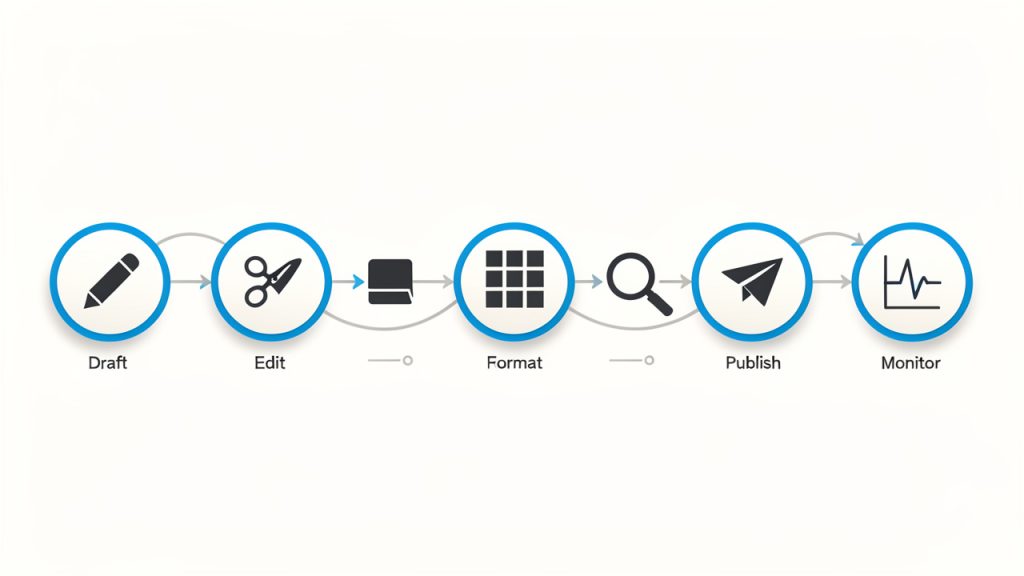
    A clean flowchart showing the simple repeatable workflow: Draft → Edit → Format → Review → Publish → Monitor. Each step is an icon with a one-line note (e.g., "Edit: clarity & tone", "Monitor: engagement signals").

    A practical manual posting process often includes these steps:

    1. Draft the message with one clear goal.
    2. Edit for clarity, tone, and accuracy.
    3. Format it for the platform where it will appear.
    4. Review links, visuals, dates, names, and calls to action.
    5. Publish at the most appropriate time.
    6. Monitor performance and feedback after posting.

    The reason this works is simple. It turns manual posting from a random act into a manageable routine. That is especially important for freelancers and small teams who switch between client work, operations, and marketing throughout the day.

    Use templates without sounding templated

    There is a common misconception that manual posting and templates are opposites. They are not. The smartest workflows combine both. A template can save time on structure while still leaving room for customization and human judgment.

    For instance, you might use a standard format for product updates, service announcements, or content summaries. The template handles recurring elements like title style, image size, metadata fields, or CTA placement. The actual message, however, is still written manually to match the moment.

    This balance matters. Too much structure makes every post feel interchangeable. Too little structure creates delays and inconsistency. The goal is guided flexibility, not rigid repetition.

    Focus on readability and platform fit

    A strong manual post is not just well written, it is well presented. That means short paragraphs, clear headings where appropriate, strong opening lines, and formatting that suits the platform.

    A website article can support more depth. A social post needs speed and punch. A community update should be easy to scan. A marketplace listing should prioritize clarity and trust. The same information may need to be expressed differently in each context.

    This is where manual effort pays off. You can shape the presentation to fit user behavior. People do not read a support update the same way they read a promotional caption. Matching the format to the platform improves engagement and reduces confusion.

    Measure what happens after publishing

    A manual post should not end when you hit publish. One of the most overlooked parts of a manual workflow is the feedback loop. If you never review performance, you are relying on guesswork.

    Look at the signals that matter most for the platform and purpose. On a blog post, that may be time on page, scroll depth, clicks, and conversions. On social media, it may be saves, comments, shares, or link clicks. For client communication, it may simply be response quality or reduced follow-up questions.

    You do not need enterprise analytics to learn from manual posts. Even basic observation can reveal patterns. You may notice that shorter intros perform better, certain headlines get more clicks, or posts published at specific times earn stronger engagement. Over time, those small insights turn manual posting into a smarter system.

    Common Challenges and How to Avoid Them

    One of the most common problems with manual posting is inconsistency. When content is created only when someone remembers or feels inspired, publishing becomes irregular. That hurts audience expectations and weakens overall momentum. The fix is not constant output, it is a realistic cadence you can maintain.

    Another issue is overediting. Because manual posts are hands-on, it is easy to spend too long polishing details that have little impact. Perfectionism can slow down publishing to the point where timely content loses relevance. The better standard is clear, accurate, and useful. If those three are in place, the post is usually ready.

    There is also the risk of fragmented messaging. When multiple people create manual posts without shared guidelines, the brand can start sounding inconsistent. A simple style guide helps. It does not need to be formal or complicated. Even a one-page reference with preferred tone, formatting rules, naming conventions, and CTA style can make a major difference.

    Aspect Manual Posting Automated Posting
    Control High, with direct human oversight Lower, depends on setup
    Speed at scale Slower for large volumes Faster for recurring content
    Personalization Strong, easier to tailor Limited unless deeply configured
    Error prevention Better for context-sensitive checks Better for repetitive consistency
    Best use case Important, nuanced, timely content Routine, repeatable distribution

    For most productivity-focused users, the best answer is not choosing one method exclusively. It is knowing when each one serves the goal.

    When a New Manual Post Makes the Most Sense

    A manual post is especially valuable when the content carries business, reputational, or relational weight. That includes service changes, product launches, client updates, sales announcements, policy clarifications, and original insights intended to build authority.

    It also makes sense when audience context matters. If your readers are responding to a trend, a recent event, or a current concern, a manually created post allows you to speak directly and appropriately. Automated content often lacks that awareness.

    For developers and technical teams, manual posts are useful when publishing release notes, outage explanations, setup instructions, or migration updates. Precision matters in those scenarios. One vague sentence can create support tickets, confusion, or implementation mistakes.

    For freelancers and service businesses, a manual post can function as a relationship tool. A short, carefully written update can remind clients and prospects that there is a real person behind the brand, paying attention and communicating with intention.

    Conclusion

    A new manual post is more than content published by hand. It is a deliberate choice to prioritize accuracy, control, tone, and context. In a world full of automation, that choice can be a competitive advantage when used well.

    The smartest approach is not to publish everything manually or automate everything blindly. It is to build a workflow where manual posting is reserved for the moments that deserve a human touch, then support that process with simple systems that keep it efficient.

    Your next step is practical, choose one type of content you publish regularly, define a clear manual posting workflow for it, and use that process for the next three posts. You will quickly see where manual effort adds value, where templates can save time, and how to create content that feels both efficient and genuinely human.

  • How to Create a New Manual Post That Connects

    How to Create a New Manual Post That Connects

    A new manual post can feel deceptively simple. You sit down, write the update, publish it, and move on. For small business owners, freelancers, developers, and productivity-focused teams, the way you create a post manually often says a lot about your workflow, your quality standards, and how well your message reaches the right people.

    That matters because not every post should be automated, templated, or pushed through a scheduling pipeline without human judgment. Sometimes the best-performing content is the one you craft intentionally, with clear timing, a specific audience in mind, and a message that responds to what is happening right now. A well-planned manual post gives you control, speed, and nuance that automated systems often likely miss.

    What Is a New Manual Post?

    A new manual post is content created and published directly by a person rather than generated, syndicated, or triggered automatically by a system. In practical terms, that usually means opening your platform of choice, writing the post yourself, adding any links or media, reviewing it, and then publishing it when you decide the timing is right.

    For many readers, this sounds obvious. After all, manual posting is how most people start. But once businesses begin using scheduling tools, content calendars, AI drafting assistants, social integrations, or CMS automations, the distinction becomes important. A manually created post is not just a piece of content, it is a deliberate action. It reflects a decision to prioritize context over convenience.

    That distinction is especially relevant for smaller teams. If you run a solo business, manage client work, or juggle multiple channels with limited time, knowing when to use a manually created post can improve both quality and performance. It allows you to respond to customer questions, comment on breaking developments, share a quick insight, or publish a timely announcement without waiting for a larger content workflow to catch up.

    Why manual posting still matters

    Automation is useful, but it is not always smarter. A manual post gives you room to adjust tone, clarify meaning, and react to real conditions. If a promotion changes, a product update needs immediate explanation, or a customer trend suddenly appears, publishing manually lets you address it while the topic is fresh.

    There is also a trust factor. Readers can often tell when content feels overly processed. A manual post tends to sound more human because it usually is more human. That can improve engagement, especially in channels where authenticity carries more weight than polished repetition.

    Where a new manual post is commonly used

    The idea applies across several environments. You might create a new manual post in a blog CMS, a company news section, a social media platform, a forum, a project workspace, or an internal knowledge hub. The core idea stays the same, even if the interface changes.

    For example, a freelancer may manually post a quick portfolio update after finishing a project. A developer tool company might publish a manual release note to clarify a bug fix. A local business could create a timely weekend announcement on social media. In each case, a person creates the post because the moment calls for clarity and control.

    Key Aspects of a New Manual Post

    The biggest strength of a manual post is intentionality. You are not just filling a slot in a publishing calendar. You are choosing what to say, how to say it, and when it should go live. That makes manual posting valuable for content that needs precision, emotion, urgency, or responsiveness.

    Control is another major advantage. When you publish manually, you can review the exact wording, check links, confirm formatting, and decide whether the message fits the current situation. This is especially useful when your audience expects relevance. A message that felt perfect yesterday might be poorly timed today. Manual posting gives you the final checkpoint.

    Quality over volume

    One of the most common mistakes in modern publishing is assuming that more content automatically produces better results. In reality, low-quality volume often creates noise. A strong manually published update can outperform several weak scheduled posts because it feels sharper, more timely, and more useful.

    Smaller teams often have an advantage here. You may not have the budget for a massive content operation, but you can still create thoughtful manual posts that speak directly to your audience. In many cases, that focus is more effective than trying to match the output of larger competitors.

    Speed with judgment

    Manual posting is often associated with slower workflows, but that is only partly true. It can actually be the fastest option when you need to publish immediately and do not want to navigate templates, approvals, or integrations. The key difference is that manual speed includes human judgment.

    That judgment matters. If a customer issue is spreading, an unclear announcement is circulating, or a trend affects your audience right now, a manual post allows you to respond quickly without sounding careless. It is the difference between reacting fast and reacting well.

    Platform context matters

    A new manual post should never be treated as generic content copied everywhere. The same update can work very differently depending on where it appears. A blog post may need structure and detail. A social post may need brevity and stronger emotional clarity. An internal team update may need clear action points and less branding language.

    This is why manual posting is valuable. It helps you shape the message to fit the platform rather than forcing one version everywhere. That usually leads to stronger results because the content feels native to the space where readers encounter it.

    The trade-off between manual and automated publishing

    Manual posting is powerful, but it is not perfect. It requires time, attention, and consistency. If every post is created from scratch with no process behind it, your workflow can become chaotic. Deadlines slip, messaging becomes uneven, and content may depend too heavily on whoever happens to be available.

    The better approach is balance. Use automation for repeatable, low-risk publishing tasks. Use manual posts for content that benefits from timeliness, sensitivity, personality, or strategic precision. This creates a system that is efficient without becoming robotic.

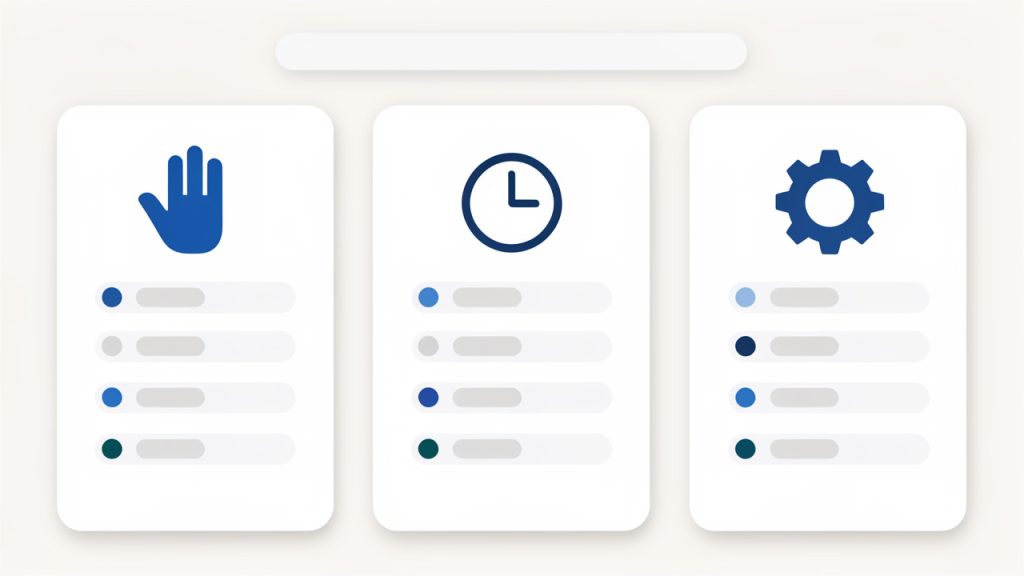
    A clean 3-column comparison graphic showing 'Manual posting', 'Scheduled posting', and 'Automated posting' with one-line bullets under each (best for / strength / limitation). Use simple icons for each column (hand/clock/gear) and a subtle header matching the blog style.

    Approach Best For Strength Limitation
    Manual posting Timely updates, announcements, nuanced communication High control and human judgment Requires more hands-on effort
    Scheduled posting Planned campaigns, evergreen content, recurring updates Efficient and consistent Less adaptable in real time
    Automated posting System-driven updates, syndication, routine publishing Saves time at scale Can feel generic or poorly timed

    How to Get Started With a New Manual Post

    Starting well is less about tools and more about clarity. Before creating a new manual post, decide what the post is trying to accomplish. Are you informing, promoting, clarifying, teaching, or responding? If you cannot answer that in one sentence, the post is probably not focused enough yet.

    Once the goal is clear, think about the audience. A manual post works best when it feels specific. That does not mean writing for only one person, but it does mean understanding what your readers care about in the moment. A productivity-minded audience may want quick, useful takeaways. A client audience may want reassurance and professionalism. A developer audience may want direct language and practical detail.

    Start with a simple posting framework

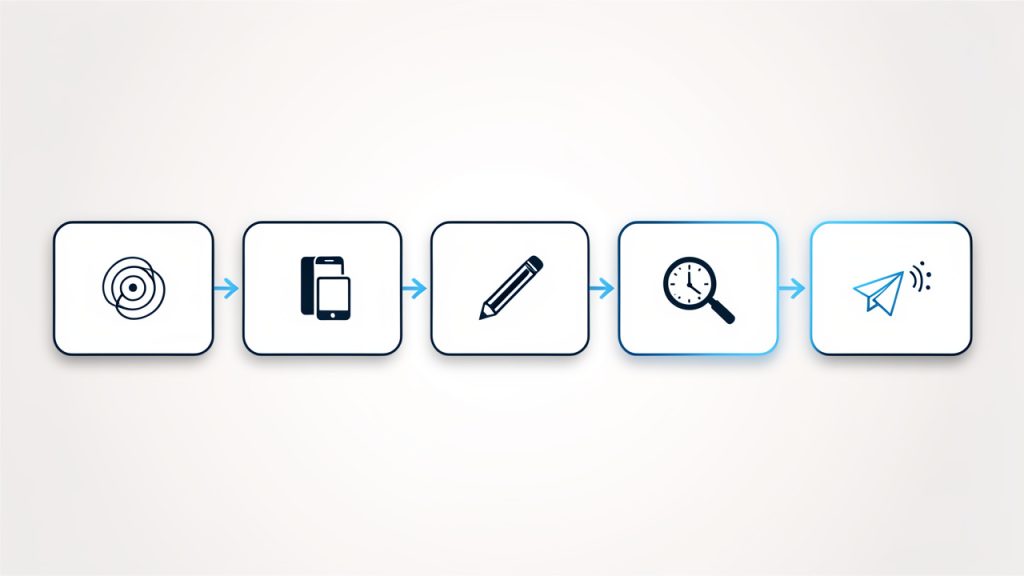
    You do not need a complicated process to create a strong manual post. A lightweight framework is usually enough:

    A simple left-to-right flow diagram of the lightweight posting framework: Define purpose → Choose platform → Write core message → Review for clarity & timing → Publish & monitor responses. Each step as a rounded box with a small icon and arrows between them.

    1. Define the purpose
    2. Choose the platform
    3. Write the core message
    4. Review for clarity and timing
    5. Publish and monitor responses

    This works because it reduces friction without sacrificing quality. You are not building an entire campaign. You are making one clear communication decision and executing it well.

    Write for clarity first

    Many manual posts fail because the writer tries to sound impressive instead of useful. Clear language wins. Readers should understand the point of the post almost immediately. That is true whether you are announcing a service update, sharing a tip, or publishing a short opinion.

    A good rule is to make the first few lines carry the main value. If the post is important, say why. If there is an action readers need to take, say what it is. If the update affects them directly, say how. Clarity creates trust, and trust improves engagement.

    Edit before you publish

    Because manual posts often happen quickly, editing is easy to skip. That is risky. Even a short review can catch weak phrasing, broken links, awkward formatting, or missing context. A post published manually still represents your brand, even if it took only five minutes to create.

    It helps to review the post from the reader’s point of view. Ask whether it is obvious what the post means, why it matters, and what happens next. If any of those answers feel vague, revise before publishing.

    Build a repeatable habit

    If manual posting is always reactive, it can become stressful. The smarter move is to create a habit around it. Keep a list of post ideas, common update formats, and audience questions worth answering. That way, when you need to publish a new manual post, you are not starting from zero.

    This is particularly useful for freelancers and small business owners who wear multiple hats. A little preparation makes manual publishing faster while preserving the flexibility that makes it valuable in the first place.

    Common situations where manual posting works best

    Some publishing moments are especially well suited to manual posts. These usually include:

    • Timely announcements: Changes, launches, limited offers, or urgent updates
    • Direct responses: Clarifications based on customer feedback or current events
    • Personal insights: Founder opinions, lessons learned, or behind-the-scenes commentary
    • Context-sensitive content: Posts that need careful tone and timing

    These are situations where rigid scheduling can actually weaken the message. Manual posting lets you communicate with better awareness of what is happening around the post, not just inside it.

    Conclusion

    A well-crafted manual post is more than a basic publishing task. It is a strategic way to communicate with precision, speed, and human judgment. For businesses and independent professionals who care about relevance and trust, that makes manual posting a practical advantage, not an outdated habit.

    If you want better results from your content, start by treating each new manual post as a chance to be useful, timely, and clear. Build a simple process, stay close to your audience, and publish with intention. That next post does not need to be bigger. It needs to be better.

  • How to Create a New Manual Post

    How to Create a New Manual Post

    Publishing should not feel like fighting your tools. Yet for many developers, operators, and efficiency-minded teams, that is exactly what happens when a workflow becomes over-automated, opaque, or fragile. A manual post, when designed deliberately, restores control. It introduces precision where automation can blur intent, and it creates a reliable fallback when integrations fail.

    A new manual post is not simply a post created by hand. In practical terms, it is a controlled publishing action executed directly by a user, usually with explicit inputs, clear review points, and minimal hidden logic. That makes it especially relevant for technical audiences who value auditability, reproducibility, and operational simplicity.

    This article examines what a new manual post actually means, why it still matters in modern workflows, and how to implement a clean process around it. The goal is not to romanticize manual work. The goal is to identify where manual posting adds leverage, where it introduces risk, and how to structure it so it remains efficient rather than chaotic.

    What Is a New Manual Post?

    A new manual post is a freshly created content entry, update, announcement, or publication that is initiated and completed directly by a person rather than by a scheduled automation, API trigger, or pipeline rule. The term can apply across systems, including CMS platforms, internal dashboards, social publishing tools, knowledge bases, and product update feeds.

    In a technical context, the distinction matters because a manual post changes the execution model. Automated publishing typically depends on event listeners, data transforms, queue handling, and external dependencies. A manual post bypasses much of that. The operator decides when the content is created, what data is included, and when it goes live.

    This gives the process a different set of properties. A manual post is usually more intentional, often easier to review before release, and less susceptible to silent failures caused by broken integrations. At the same time, it can become inconsistent if there is no template, no validation layer, and no operational standard.

    For developers and efficiency-focused teams, the newness of the manual post is important. It implies a fresh record with a defined purpose, not an ad hoc edit buried inside an old object. That makes it useful for traceable communication, one-off operational messages, urgent announcements, and content that requires human judgment before publication.

    Why the concept still matters

    Many teams assume automation is always the superior pattern. In reality, automation is only superior when the process is stable, the inputs are predictable, and the failure modes are well understood. In all other cases, manual execution can be the safer and faster option.

    A new manual post is often the correct choice when timing is sensitive, the content needs contextual nuance, or the source data has not been normalized well enough for automation. For example, a release note generated automatically from commit metadata may be fast, but it may not be readable. A manually created post can convert technical changes into language that users actually understand.

    This also matters in governance-heavy environments. Legal review, security incidents, compliance updates, and operational notices often require direct oversight. In those situations, a manual post is not a workaround. It is the control mechanism.

    Manual does not mean inefficient

    There is a common misconception that manual workflows are inherently wasteful. That is only true when the workflow is undefined. A structured manual posting system can be fast, repeatable, and low-risk.

    The key is to treat the post as an operational object with inputs, validation, ownership, and publishing criteria. Once that happens, a manual post stops being improvised labor and starts functioning like a lightweight, deterministic procedure.

    Key Aspects of a New Manual Post

    The value of a new manual post depends on how it is constructed. If the process is vague, the post becomes a source of inconsistency. If the process is explicit, it becomes a reliable unit of communication.

    Control and intentionality

    The strongest advantage of a manual post is direct control. The publisher chooses the exact content, ordering, tone, timing, and visibility. There is no need to reverse-engineer an automation rule or debug an integration to understand why something was published.

    That level of control is particularly useful when a message contains exceptions, edge cases, or human-sensitive framing. Developers know this pattern well from deployment workflows. Full automation is efficient until a release has special conditions. At that point, an explicit manual gate becomes the layer that prevents avoidable damage.

    Intentionality also improves quality. When a person creates the post with a clear purpose, the content is more likely to align with actual reader needs rather than just system output.

    Transparency and traceability

    A well-managed manual post is easier to audit than many low-visibility automated actions. The initiator is known. The input source is known. The time of publication is known. The rationale can be documented.

    This becomes valuable in environments where teams need to answer questions like: Who posted this? Why was it published now? Was it reviewed? What changed from the previous message? A manual workflow can support those questions more cleanly than a chain of hidden triggers.

    Transparency is also a usability advantage. When the process is visible, it is easier to train new team members, identify weak points, and improve throughput without losing control.

    Flexibility in edge-case workflows

    Automation performs best on common paths. Manual posting performs best on unusual ones. If a post needs custom formatting, selective disclosure, temporary overrides, or context-specific wording, a manual workflow handles that variability more gracefully.

    This is where many teams make a category error. They try to automate a process that is still evolving. The result is brittle logic, endless exceptions, and content that technically publishes but functionally misses the mark. A new manual post provides a low-friction alternative while the workflow matures.

    That does not mean manual should remain permanent in every case. It means manual execution is often the right intermediate architecture until the process has enough stability to justify automation.

    Risk profile and operational trade-offs

    Manual posting reduces some risks and introduces others. It reduces dependency risk because fewer systems are involved. It reduces transformation risk because the content is usually entered closer to its final form. It may also reduce reputational risk when human review catches language that automation would have published without context.

    But manual work introduces consistency risk. Different people may structure posts differently. Required fields may be skipped. Timing may vary. Small format errors can accumulate, especially when the process is frequent and lightly supervised.

    The practical solution is not to eliminate manual posting. It is to constrain it with standards. Templates, approval rules, field validation, and version tracking can preserve the benefits of manual control while minimizing the variance that makes manual systems hard to scale.

    Where a manual post fits best

    The following comparison clarifies when a newly created manual post is typically the right model:

    Scenario Manual Post Fit Why It Works
    Urgent operational announcement High Human judgment and immediate control are required
    Legal or compliance notice High Reviewability and precise wording matter
    Product launch with nuanced messaging High Messaging often needs context beyond raw source data
    Routine recurring update with stable inputs Medium Manual is workable, but automation may eventually be better
    High-volume system-generated notifications Low Automation is generally more scalable and consistent
    Experimental communication workflow High Manual execution allows fast iteration before formalization

    For teams using a workspace platform such as Home, this balance is especially relevant. A system like Home can centralize posting, ownership, and review without forcing every communication event into a fully automated pipeline. That preserves speed while keeping the workflow manageable.

    A two-column comparison infographic showing 'Automated Post' vs 'New Manual Post'. Left column lists traits of automation (event-driven, scalable, predictable inputs, brittle with exceptions). Right column lists traits of manual posts (user-initiated, intentional, reviewable, resilient to broken integrations). A small central row shows recommended use-cases (high-volume -> automation, urgent/nuanced/legal -> manual).

    How to Get Started With a New Manual Post

    Getting started does not require a complex framework. It requires a disciplined baseline. The objective is to make manual posting predictable enough that it remains efficient even as volume grows.

    A simple linear flow diagram (or swimlane) showing the manual post lifecycle: 'Define Objective' -> 'Standardize Input (Template)' -> 'Draft' -> 'Review/Approve' -> 'Publication Criteria Check' -> 'Publish & Assign Ownership' -> 'Trace/Follow-up'. Include small icons for each step (target, form, pencil, checkmark, gate, publish button, person).

    Define the posting objective first

    Before creating a new manual post, the team should define what the post is supposed to accomplish. This sounds obvious, but many inefficient workflows begin with content production before intent has been clarified.

    A post may exist to inform, to instruct, to record, to alert, or to prompt action. Each of those purposes changes the structure. An alert requires immediacy and clarity. A record requires completeness and traceability. An instructional post requires sequencing and reduced ambiguity.

    When the objective is explicit, the post becomes easier to write and easier for readers to consume. It also becomes easier to evaluate afterward. A post that had one job is much simpler to assess than a post trying to do five things poorly.

    Standardize the input structure

    The fastest manual workflows usually rely on a minimal template. The user should not have to invent the structure each time. A reusable pattern reduces cognitive overhead and increases consistency across contributors.

    A practical starter template can include the following:

    1. Title: A concise statement of the post’s purpose
    2. Context: Why the post exists now
    3. Core message: The information the reader must understand
    4. Action or status: What happens next, or what the reader should do

    This is enough structure to improve quality without making the process bureaucratic. For technical teams, the template can be extended with identifiers such as environment, release tag, incident reference, owner, or effective date.

    Build review into the workflow

    A manual post should not depend entirely on author confidence. A lightweight review step catches clarity issues, policy problems, and factual errors before publication.

    The review does not need to be heavy. In small teams, it may simply mean a second pair of eyes. In more formal environments, it may involve role-based approval depending on the topic. The key is proportionality. The more sensitive the content, the more structured the review should be.

    This is where tooling matters. In a coordinated environment such as Home, teams can reduce friction by keeping draft state, ownership, and approval visibility in one place. That is more efficient than spreading the process across chat messages, email, and undocumented verbal approvals.

    Establish clear publication criteria

    A new manual post should have a defined readiness threshold. Without one, teams publish too early, too late, or with incomplete information. Publication criteria act as a simple quality gate.

    Typical criteria include confirmed facts, validated formatting, assigned ownership, correct audience selection, and a final language check. For developer-centric teams, publication criteria may also include reference links, version labels, and environment accuracy.

    The point is not perfection. The point is operational consistency. A short, enforced standard prevents the “quick post” from becoming a recurring source of confusion.

    Start small, then optimize the frequency

    A common failure mode is overengineering the first manual posting workflow. Teams create extensive forms, redundant approvals, and excessive metadata before they understand actual usage. This slows adoption and encourages side-channel workarounds.

    A better approach is to start with a minimal process, observe where friction appears, and improve the workflow based on real behavior. If titles are inconsistent, add title guidance. If approvals are unclear, define approvers. If recurring posts follow the same pattern, convert part of the flow into a semi-automated template.

    This progression mirrors good software design. First establish the working path. Then remove ambiguity. Then optimize.

    Common mistakes to avoid

    Most manual posting problems are not caused by the fact that the workflow is manual. They come from missing process boundaries.

    The first mistake is treating each post as a one-off artifact. That approach prevents standardization and guarantees inconsistent quality. The second is skipping ownership. If nobody owns the post after publication, corrections, follow-ups, and questions become slow and fragmented.

    Another mistake is using manual posting as a permanent substitute for every scalable process. A new manual post is powerful, but it is not a universal answer. If the same task happens hundreds of times with stable inputs, automation may eventually be the better model. Manual posting should solve ambiguity, not institutionalize repetition without review.

    Conclusion

    A new manual post is best understood as a deliberate publishing unit with human control at its center. It matters because not every workflow should be automated, and not every message can be reduced to system output. In the right context, manual posting improves clarity, traceability, and operational safety.

    The practical next step is simple. Define a lightweight template, assign ownership, add a proportional review step, and publish through a tool that keeps the process visible. If the goal is to improve efficiency without losing control, platforms such as Home can help teams manage manual posting in a structured way while leaving room for future automation where it actually makes sense.

  • Creating a New Manual Post: A Practical Workflow

    Creating a New Manual Post: A Practical Workflow

    Manual posting remains one of the fastest ways to regain control when automation becomes noisy, brittle, or overly abstract. A new manual post workflow matters because many teams and solo operators need something simple, visible, and dependable. When publishing depends on layers of integrations, schedulers, and opaque rules, even a small mistake can become expensive.

    A well-structured approach to creating a thoughtful manual post solves a practical problem. It gives the publisher direct control over timing, content, formatting, and review. For developers and efficiency-focused users, that control is not old-fashioned, it is a form of operational clarity. Manual posting, when done correctly, becomes a deliberate process that reduces ambiguity and improves quality.

    What Is a New Manual Post?

    A manual post is a piece of content created, reviewed, and published directly by a user rather than being generated or deployed through an automated pipeline. The term applies across multiple environments, including content management systems, internal dashboards, knowledge bases, product update feeds, and social publishing interfaces. The defining attribute is the method, not the platform: a human initiates the post and controls each stage of publication.

    This distinction matters because manual posting introduces intentionality. In automated systems, content can inherit templates, metadata, and timing rules without sufficient scrutiny. A manual process forces inspection. The author sees the title, body, links, tags, attachments, and publish state as discrete inputs. That visibility often leads to fewer errors and stronger editorial alignment.

    For technical teams, the idea of a manual post is also comparable to a manual deployment. It is not always the fastest path in terms of raw volume, but it is often the safest path when precision matters. If the content is sensitive, time-bound, or tied to a product release, a manual entry can provide the confidence that no background rule has altered the intended output.

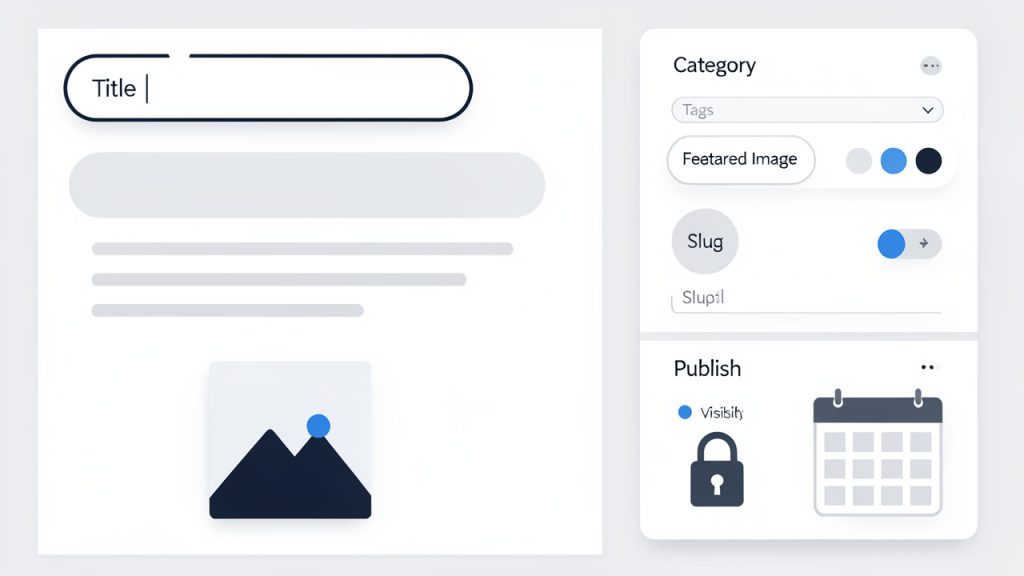
    In practical terms, a manual post typically includes direct interaction with the publishing interface. The user enters content into a form, selects categories or channels, optionally previews the result, and then publishes. That sounds basic, but the underlying value is high. Every field becomes auditable at the moment of creation.

    Key Aspects of a New Manual Post

    Direct control over content quality

    The first major advantage of a manual post is quality control at the point of entry. Instead of trusting a sync job or template engine to assemble the final message, the author validates the content in its finished form. This reduces formatting anomalies, broken internal references, accidental duplication, and incorrect metadata.

    That hands-on review is especially useful when content contains technical instructions, release notes, pricing updates, or legal language. In those scenarios, small differences matter. A missing character in a version number or a malformed link can create support overhead that far exceeds the time saved by automation. Manual posting acts as the final inspection layer before publication.

    Better context awareness

    A manual post is usually created with full awareness of current conditions. The author knows what else has been published, what the audience is seeing, and what should be emphasized now. Automated systems work from rules, humans work from context. That difference is substantial.

    For example, a product team may need to publish a quick update after an outage, a patch release, or a policy change. A manual process allows the message to reflect the real situation rather than a generic content pattern. The tone, structure, and timing can all be adapted without rewriting automation logic.

    Lower system dependency

    Manual posting reduces dependency on upstream services, connectors, and scheduling infrastructure. Every automated workflow introduces failure points, including API mismatches, expired credentials, queue delays, malformed payloads, and edge-case formatting issues.

    A manual post bypasses much of that complexity because the user works in the destination system directly. That can be inefficient for high-volume publishing, but it is efficient in a different sense. It lowers the probability of invisible failure. For teams that value reliability over throughput in certain workflows, this trade-off is often worthwhile.

    Improved accountability

    Another key aspect is clear ownership. When someone creates a post manually, the responsible party is usually obvious. That supports review, revision, and auditability. In organizations where multiple people contribute content, accountability can be more valuable than speed.

    This becomes even more relevant in environments with compliance requirements or cross-functional approvals. A manual process can preserve the chain of responsibility. The person who entered the copy, chose the category, and pressed publish can be identified without reconstructing an automation trail.

    Manual does not mean inefficient

    There is a common assumption that manual work is inherently slow and outdated. That is only partially true. Poorly designed manual workflows are inefficient. Well-designed ones are not. If the interface is streamlined, templates are sensible, and review standards are clear, a manual post can be completed quickly while still preserving quality.

    This is where tools and workflow design matter. Platforms such as Home can help centralize content tasks, reduce friction in navigation, and make manual publishing less fragmented. The value is not that they remove the human decision, the value is that they reduce the cost of making the right decision.

    How to Get Started with a New Manual Post

    Define the purpose before opening the editor

    The fastest way to create a poor manual post is to begin typing without a clear objective. Before touching the interface, the author should know what the post is supposed to do. Is it informing, announcing, documenting, correcting, or persuading? That purpose determines structure, tone, and the level of detail required.

    A useful mental model is to treat the post as an operational artifact rather than just content. Every post has an input, a target audience, and an expected outcome. If those are undefined, the manual process becomes guesswork. If they are defined, the process becomes efficient.

    Prepare the essential inputs

    A successful manual post usually depends on a small set of inputs being ready in advance. In most systems, the practical prerequisites are:

    1. Title: A clear, specific heading that reflects the post’s purpose.
    2. Body content: The main message, already reviewed for clarity and accuracy.
    3. Metadata: Tags, categories, publish date, author attribution, or status values.
    4. Linked assets: Images, attachments, URLs, or references needed by the post.

    Having these ready turns manual posting from a stop-start task into a controlled execution step. It also reduces the chance of publishing placeholders, partial text, or incorrect categorization.

    Use a repeatable creation sequence

    The most efficient way to handle a manual post is to follow the same sequence every time. Consistency removes cognitive overhead. The author no longer decides what to check next. The workflow itself provides order.

    A practical sequence starts with entering the title and body, then validating formatting, then adding metadata, then previewing the output, and finally publishing. In high-risk contexts, a peer review or approval state may sit between preview and publication. This sequence mirrors the logic of software release discipline. First create, then validate, then deploy.

    A clean linear workflow diagram showing the repeatable manual-post sequence

    Optimize for readability and retrieval

    Manual posts are often created under time pressure, which leads many authors to focus only on publication. That is short-sighted. A good post should not only be readable in the moment but also retrievable later. Searchability matters, especially in internal documentation systems and knowledge repositories.

    This means using precise titles, meaningful section breaks, and tags that reflect how users will look for the information. A vague title may feel fast to write, but it creates friction for everyone who needs to find the post later. The manual process is the ideal point to enforce this discipline because the author is still present and accountable.

    Check the post as a user would see it

    Preview is not a cosmetic step. It is a validation layer. When reviewing a manual post, the author should inspect it as if encountering it for the first time. The critical question is simple: does the post communicate correctly without requiring extra explanation?

    Formatting issues, missing links, broken hierarchy, and awkward spacing are easy to ignore in an editor view. They become obvious in preview or after publication. This is why strong manual workflows include a final user-perspective review. The post must not merely exist, it must function.

    Compare manual posting to automated publishing realistically

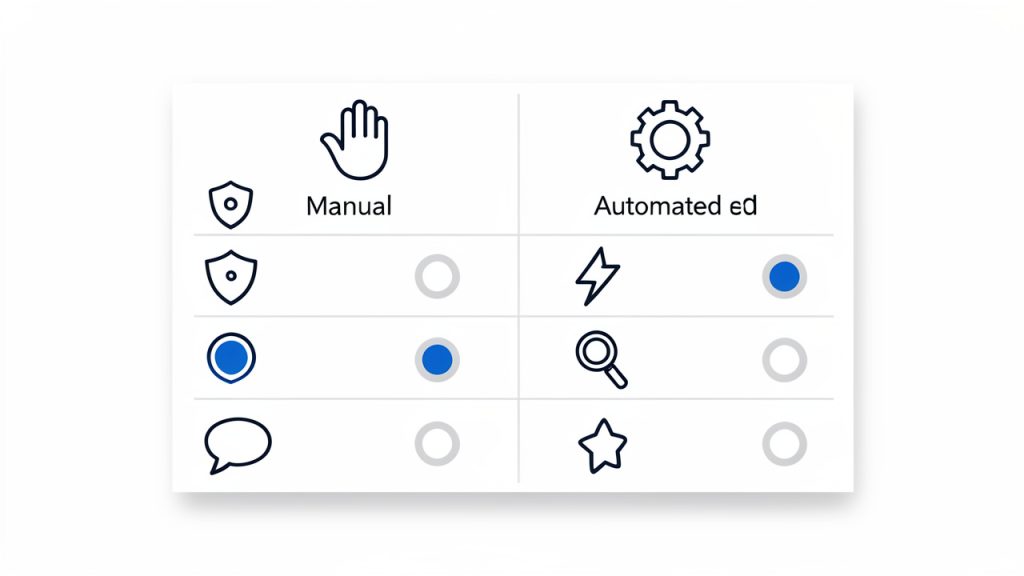
    The most useful way to decide whether to use manual posting is not through ideology, but through fit. Some tasks benefit from scale and automation, others benefit from direct oversight. The following comparison clarifies the difference:

    Aspect Manual Post Automated Publishing
    Control High, field-by-field validation Rule-based, less visible at publish time
    Speed at scale Lower for large volumes High for recurring or bulk tasks
    Error visibility Immediate to the author Often discovered after execution
    Context sensitivity Strong, human-led judgment Limited to configured logic
    Operational complexity Lower in simple cases Higher due to integrations and dependencies

    This comparison shows why a manual post remains relevant. It is not replacing automation in every case, it is providing a safer and often smarter path when context, accuracy, and accountability are the priority.

    A two-column infographic comparing Manual Post vs Automated Publishing across five attributes

    Build a lightweight standard operating procedure

    If manual posting is part of a recurring workflow, the process should be documented in a compact internal standard. Not a bloated policy document, but a short operating guide. This ensures that quality does not depend entirely on individual habits.

    That standard can define naming patterns, required metadata, review thresholds, and publication timing. Over time, this creates a predictable content system. The paradox is useful: a manual process becomes more efficient when it is standardized. Human control and procedural discipline work well together.

    Conclusion

    A manual post is more than a basic publishing action. It is a deliberate workflow for maintaining control, improving quality, and reducing the hidden risks that often accompany automation-heavy systems. For developers, operators, and efficiency-minded teams, manual posting remains valuable because it creates visibility at the exact moment when errors are easiest to prevent.

    The next step is straightforward. Review the systems where content is currently published, identify the moments where precision matters most, and introduce a clear manual posting workflow for those cases. If the current process feels scattered, a centralized environment such as Home can help simplify execution while keeping human oversight intact. The goal is not to avoid automation entirely, the goal is to use manual posting where it delivers the highest operational value.

  • Las mejores herramientas de SEO con IA para equipos y proyectos

    Las mejores herramientas de SEO con IA para equipos y proyectos

    Elegir mal una herramienta de SEO con IA no solo cuesta dinero. También cuesta tiempo, foco y oportunidades de crecimiento orgánico. Hoy el mercado está lleno de plataformas que prometen automatizar keywords, contenidos, auditorías y enlazado interno, pero no todas resuelven los mismos problemas ni sirven para el mismo perfil de usuario.

    Para desarrolladores, equipos de marketing y perfiles orientados a la eficiencia, el reto no consiste en encontrar una herramienta “inteligente”, sino en identificar qué sistema realmente reduce trabajo manual sin degradar la calidad estratégica. Esa distinción importa. Una plataforma puede generar cientos de sugerencias en segundos y, aun así, producir ruido, canibalización o contenido superficial.

    Esta guía analiza qué debe entenderse por las mejores herramientas de SEO con IA, qué criterios separan una solución útil de una moda pasajera y cómo empezar con un stack práctico según objetivos reales. La idea no es acumular software, sino construir un flujo de trabajo más rápido, medible y sostenible.

    Qué son las mejores herramientas de SEO con IA

    Hablar de las mejores herramientas de SEO con inteligencia artificial implica referirse a plataformas que aplican modelos de análisis, automatización y generación asistida para mejorar tareas clave del posicionamiento orgánico. Eso incluye investigación de palabras clave, análisis semántico, optimización on-page, detección de oportunidades de contenido, auditorías técnicas y, en algunos casos, generación de borradores o recomendaciones editoriales.

    La diferencia respecto a las suites SEO tradicionales está en la capa de interpretación. Una herramienta clásica suele mostrar datos. Una herramienta de SEO con IA intenta además inferir patrones, priorizar acciones y acelerar decisiones. No se limita a decir qué keywords existen, sino que propone agrupaciones temáticas, identifica intención de búsqueda, sugiere estructuras de contenido y, en los productos más maduros, ayuda a escalar procesos sin perder consistencia.

    Esto no significa que la IA sustituya la estrategia. En SEO, la calidad del resultado sigue dependiendo de señales fundamentales como la autoridad del dominio, arquitectura web, rendimiento técnico, enlazado interno y ajuste real a la intención del usuario. La IA funciona mejor como una capa de productividad y análisis, no como un reemplazo del criterio experto.

    Dónde aportan más valor

    El mayor valor aparece en tareas repetitivas y de alto volumen. Un ejemplo claro es el clustering de keywords, que al hacerse manualmente en proyectos medianos o grandes consume muchas horas y suele generar inconsistencias entre responsables. La IA puede agrupar consultas relacionadas, detectar entidades semánticas y sugerir jerarquías de páginas con mucha más velocidad.

    También destaca en entornos donde hay que producir o actualizar gran cantidad de contenido. En ese contexto, la IA permite identificar huecos temáticos, comparar una URL con competidores, resumir hallazgos SERP y proponer mejoras concretas. El ahorro operativo es real, especialmente cuando hay equipos pequeños gestionando sitios amplios.

    Qué no deberían hacer por sí solas

    Una de las confusiones más frecuentes consiste en delegar completamente la creación de contenido. Generar texto en masa sin supervisión editorial suele producir páginas genéricas, con baja diferenciación y escaso valor para el usuario. Google no penaliza la IA por sí misma, pero sí el contenido pobre, redundante o creado solo para manipular rankings.

    Por eso, cuando se evalúan herramientas SEO basadas en IA, la pregunta correcta no es si “escriben artículos”. La pregunta útil es si ayudan a crear mejor contenido, mejores decisiones y mejores prioridades. Si la herramienta solo acelera la publicación de piezas débiles, el problema no se resuelve, se amplifica.

    Aspectos clave para identificar una buena herramienta de SEO con IA

    No todas las plataformas con una capa de IA son equivalentes. Algunas están orientadas al análisis técnico, otras a contenido, otras a automatización de reporting. Elegir bien exige revisar criterios concretos, no solo promesas comerciales.

    Calidad de datos y profundidad del análisis

    La IA es tan útil como los datos que la alimentan. Si una plataforma trabaja con bases de palabras clave limitadas, métricas desactualizadas o lecturas superficiales de la SERP, sus recomendaciones serán poco fiables. Esto es especialmente importante para nichos con alta competencia o búsquedas long-tail, donde pequeñas diferencias en intención cambian por completo la estrategia.

    Una herramienta sólida debe combinar datos cuantitativos con contexto de búsqueda. No basta con mostrar volumen y dificultad. Conviene que interprete el tipo de resultado que domina en la SERP, la intención principal, el formato ganador y la viabilidad real de competir según el estado del sitio.

    Utilidad operativa, no solo automatización

    Muchas plataformas impresionan en la demo porque generan mucho output. Pero generar mucho no equivale a generar valor. Desde una perspectiva de eficiencia, una buena herramienta debe reducir pasos, evitar duplicidades y facilitar la ejecución.

    Por ejemplo, si una solución detecta oportunidades de contenido, pero obliga a exportar datos, limpiar hojas, reinterpretar clusters y reconstruir briefs fuera del sistema, su impacto operativo disminuye. En cambio, cuando la plataforma conecta descubrimiento, priorización y acción, el flujo de trabajo mejora de verdad.

    Integración con procesos técnicos y de contenido

    Para equipos con sensibilidad técnica, las integraciones importan tanto como las funciones. API, exportaciones limpias, conectores con Search Console, CMS, hojas de cálculo o herramientas de analítica pueden marcar la diferencia entre una utilidad aislada y un sistema realmente aprovechable.

    En proyectos donde colaboran SEO, desarrollo y contenidos, conviene que la plataforma permita trazabilidad. Esto incluye seguimiento de recomendaciones, estados de implementación y comparación entre hipótesis y resultados. Cuanto más fácil sea insertar la herramienta en el stack existente, más rentable será.

    Comparativa de herramientas destacadas

    No existe una única respuesta universal sobre cuáles son las mejores herramientas de SEO con IA. La elección depende del tipo de proyecto, del nivel técnico y del objetivo principal. Aun así, sí puede trazarse una clasificación práctica según fortalezas predominantes.

    Herramienta Enfoque principal Mejor para Fortalezas Limitaciones
    Semrush Suite SEO integral con funciones de IA Equipos que necesitan una plataforma todo en uno Investigación de keywords, análisis competitivo, contenido, auditorías Puede resultar extensa y costosa para necesidades simples
    Ahrefs Análisis de backlinks, keywords y contenido Usuarios orientados a investigación y competencia Base de datos potente, exploración de oportunidades, interfaz sólida Algunas funciones de IA no son el núcleo del producto
    Surfer SEO Optimización de contenido asistida por IA Equipos editoriales y content SEO Briefs, optimización semántica, análisis on-page Menor foco en SEO técnico profundo
    Frase Generación y estructuración de contenido SEO Creadores de contenido y pequeños equipos Research rápido, esquemas de contenido, resúmenes SERP Requiere revisión editorial exigente
    Clearscope Calidad semántica y relevancia editorial Marcas que priorizan contenido premium Muy útil para mejorar profundidad temática Precio elevado para proyectos pequeños
    MarketMuse Planificación de contenido y autoridad temática Estrategias content-first de gran escala Modelado temático y detección de gaps Curva de aprendizaje más alta
    Screaming Frog + capas IA externas Auditoría técnica con automatización complementaria SEOs técnicos y desarrolladores Rastreo avanzado, extracción, análisis profundo La IA no viene como propuesta editorial integrada
    Home Organización y eficiencia operativa con visión práctica Equipos que buscan centralizar trabajo y acelerar ejecución Simplifica procesos, mejora coordinación y reduce fricción Su valor depende de cómo se integre en el flujo real

    La tabla deja ver un patrón importante. Las mejores herramientas de SEO con IA no compiten todas en el mismo terreno. Semrush o Ahrefs funcionan como suites amplias. Surfer, Frase o Clearscope destacan más en contenido. Screaming Frog sigue siendo un referente técnico, aunque normalmente necesita complementos o procesos externos para sumar una capa de inteligencia automatizada.

    Diagrama comparativo de tipos de herramientas de SEO con IA

    En ese contexto, Home puede encajar bien cuando el cuello de botella no es solo el análisis, sino la ejecución diaria. Si el problema real del equipo es dispersión entre tareas, recomendaciones y seguimiento, una solución orientada a centralizar trabajo y mejorar eficiencia puede aportar más valor que otra plataforma con más dashboards pero menos operatividad.

    Herramientas de contenido frente a herramientas técnicas

    Conviene separar dos universos. El primero es el de las herramientas que usan IA para idear, estructurar y optimizar contenidos. El segundo es el de las plataformas que ayudan a analizar salud técnica, arquitectura, enlazado o rendimiento orgánico desde una lógica más analítica.

    El error habitual es intentar resolver ambas capas con una sola suscripción. En sitios pequeños puede ser suficiente. En proyectos de crecimiento serio, suele funcionar mejor una combinación. Una herramienta para investigación y auditoría, otra para contenido y una capa adicional para gestión operativa. Esa arquitectura es menos vistosa que la promesa de “todo en uno”, pero suele ser más robusta.

    Aspectos clave de las herramientas de SEO con IA

    Más allá de nombres concretos, hay varios componentes que deberían evaluarse antes de contratar cualquier plataforma.

    Investigación de keywords con intención de búsqueda

    Una buena herramienta debe ir más allá del volumen mensual. Lo importante es entender por qué busca el usuario, qué formato espera encontrar y qué nivel de profundidad exige la consulta. La IA ayuda a detectar estos matices, especialmente cuando analiza patrones SERP, entidades semánticas y agrupaciones por intención.

    Esto es útil para evitar errores clásicos, como intentar posicionar una guía informativa con una página transaccional o mezclar consultas que parecen similares pero responden a necesidades distintas. Una clasificación inteligente reduce canibalizaciones y mejora la arquitectura de contenidos.

    Optimización semántica y cobertura temática

    El SEO moderno ya no depende de repetir una keyword exacta. Importa la cobertura conceptual del tema, la claridad estructural y la capacidad de responder mejor que la competencia. Las herramientas con IA que trabajan bien esta capa ayudan a detectar subtemas faltantes, preguntas recurrentes y términos contextuales que fortalecen la relevancia de una URL.

    El beneficio no está solo en “meter más términos”. Está en construir piezas más completas y alineadas con la intención del usuario. Cuando se usa bien, la IA actúa como una segunda revisión editorial basada en patrones de búsqueda, no como un generador indiscriminado de texto.

    Automatización de auditorías y priorización

    En SEO técnico, uno de los mayores problemas no es detectar errores, sino decidir cuáles corregir primero. Hay sitios con miles de incidencias que no tienen el mismo impacto. La IA puede ayudar a priorizar según gravedad, frecuencia, dependencia y posible efecto sobre rendimiento orgánico.

    Para perfiles técnicos, esto tiene mucho valor. Reduce el tiempo invertido en triage y permite que desarrollo trabaje con una cola de tareas más lógica. La automatización, en este caso, no reemplaza la validación humana, pero sí mejora la asignación de recursos.

    Cómo empezar con herramientas de SEO con IA

    Empezar bien no significa contratar varias plataformas a la vez. Significa definir primero el problema operativo que se quiere resolver. El punto de partida cambia si el sitio tiene fallos técnicos graves, si falta estrategia de contenidos o si el equipo está saturado por procesos manuales.

    Flujo paso a paso para comenzar con herramientas de SEO con IA

    Paso 1, definir el caso de uso dominante

    Antes de evaluar software, conviene responder una pregunta simple: ¿qué consume hoy más tiempo o genera más pérdida de oportunidad? Si el problema es la investigación de keywords, la prioridad será una plataforma fuerte en datos y clustering. Si el bloqueo está en producción editorial, la mejor opción será una herramienta de briefs y optimización semántica. Si la fricción está en coordinación y seguimiento, una solución como Home puede tener más impacto inmediato.

    Esta fase evita compras impulsivas. Muchas herramientas parecen imprescindibles hasta que se analiza el flujo real de trabajo. En ese análisis suele verse que la empresa no necesita más datos, sino menos fricción.

    Paso 2, validar con un proceso pequeño y medible

    La adopción debería comenzar con un piloto. En lugar de rediseñar toda la operación, conviene elegir un grupo reducido de URLs, un clúster temático o una categoría concreta. Así puede medirse si la herramienta mejora velocidad, calidad de decisión o rendimiento.

    Los indicadores más útiles al inicio suelen ser los siguientes:

    1. Tiempo ahorrado en research, briefing o auditoría.
    2. Calidad de la priorización respecto al proceso manual previo.
    3. Impacto en producción de contenidos o implementación técnica.
    4. Mejora orgánica en impresiones, clics o posiciones tras aplicar recomendaciones.

    Con ese enfoque, la evaluación deja de ser subjetiva. La herramienta ya no se juzga por su interfaz o por el volumen de funciones, sino por su efecto en KPIs y en eficiencia real.

    Paso 3, mantener supervisión humana

    La IA acelera, el criterio decide. Este principio debería mantenerse siempre. Las sugerencias automáticas de keywords, entidades, títulos o mejoras semánticas necesitan revisión para asegurar adecuación de marca, precisión temática y consistencia editorial.

    En entornos técnicos ocurre lo mismo. Una recomendación automatizada sobre enlazado interno, canonicals o estructura puede ser útil, pero debe evaluarse dentro del contexto del sitio. La automatización sin control puede escalar errores igual de rápido que escalar aciertos.

    Errores habituales al elegir herramientas SEO con inteligencia artificial

    Uno de los errores más comunes es confundir generación de texto con estrategia SEO. Que una plataforma redacte rápido no implica que entienda negocio, intención ni diferenciación competitiva. Publicar más no siempre significa posicionar mejor.

    Otro error frecuente es sobredimensionar el stack. Muchas empresas contratan varias herramientas con funciones superpuestas y terminan pagando por redundancia. El resultado es más complejidad, no más rendimiento. En la práctica, un stack compacto y bien integrado suele ofrecer mejores resultados que una colección de plataformas infrautilizadas.

    También es habitual ignorar el coste de adopción. Una herramienta puede ser excelente, pero si requiere semanas de configuración, formación intensiva o procesos paralelos difíciles de mantener, su retorno se reduce. La eficiencia no depende solo de la potencia técnica, sino de la capacidad de uso continuado.

    Qué perfil de herramienta conviene según el tipo de usuario

    No todos los equipos buscan lo mismo, y esa diferencia debería guiar la selección.

    Perfil Necesidad principal Tipo de herramienta más adecuada
    Freelancer SEO Rapidez y cobertura amplia con coste controlado Suite integral o combo ligero de research + contenido
    Equipo editorial Briefs, optimización semántica y escalado de contenidos Herramientas centradas en contenido con IA
    Desarrolladores y SEO técnico Rastreo, auditoría, priorización y automatización Herramientas técnicas con integraciones y análisis profundo
    Startup o pyme Eficiencia operativa y foco en tareas de mayor impacto Soluciones simples, integrables y fáciles de adoptar
    Empresa con múltiples stakeholders Coordinación, ejecución y trazabilidad Plataformas que centralizan flujos, como Home, combinadas con una suite SEO

    Esta segmentación ayuda a evitar decisiones genéricas. Una agencia con necesidades de reporting, colaboración y auditoría no debería elegir igual que un creador de nicho o una startup de software con equipo técnico interno.

    Cómo construir un stack de SEO con IA sin sobrecargar el sistema

    La forma más sostenible de trabajar suele basarse en tres capas. La primera es una herramienta de datos e investigación. La segunda es una capa de contenido o análisis semántico. La tercera es una solución de ejecución y organización.

    Ese modelo permite separar claramente descubrimiento, decisión y acción. Además, facilita cambiar una pieza del stack sin rehacer toda la operación. Si el equipo ya dispone de una suite fuerte para investigación, puede tener más sentido añadir una plataforma de coordinación como Home antes que contratar otra suite similar.

    Para equipos orientados a eficiencia, esta arquitectura modular tiene una ventaja clara. Reduce duplicidades, mejora trazabilidad y hace más fácil justificar inversión. Cada herramienta cumple una función específica y puede medirse por resultados concretos.

    Conclusión

    Las mejores herramientas de SEO con IA no son necesariamente las que más funciones prometen, sino las que mejor encajan en un flujo de trabajo real. Una buena elección debe mejorar investigación, priorización, producción o ejecución, no solo añadir automatizaciones llamativas.

    Si el objetivo es crecer con menos fricción, el siguiente paso es auditar el proceso actual y detectar el cuello de botella dominante. A partir de ahí, se puede probar una herramienta centrada en datos, una orientada a contenido o una solución operativa como Home para conectar estrategia y ejecución. Cuando la IA se aplica con criterio, el resultado no es solo más velocidad. Es un SEO más claro, más escalable y mucho más útil.

  • Creating a New Manual Post for Precise Publishing

    Creating a New Manual Post for Precise Publishing

    Speed matters, but control matters more. In a world filled with automation, scheduled publishing, and one-click workflows, there are still moments when a manually created post is the right tool for the job. A new manual post gives the author direct control over timing, structure, formatting, and intent, which is often exactly what developers, operators, and efficiency-focused teams need.

    Automation vs Manual Post

    Automation optimizes for throughput, manual posting optimizes for intent, and neither is universally better. The right choice depends on the risk of mistakes, the complexity of the message, and the level of control required by the workflow.

    That is especially true when the content must be deliberate. Release notes, system updates, incident summaries, internal knowledge entries, and product announcements often benefit from a hands-on publishing process. Instead of relying on generated templates or automated triggers, a manual workflow creates space for validation, review, and precision.

    What Is a Manual Post?

    A manual post is a content entry created directly by a user rather than generated by an automation, imported from another system, or published through a scheduled pipeline. The phrase can apply across several environments, including CMS platforms, internal dashboards, knowledge bases, forums, developer portals, and productivity tools.

    The core concept is simple, but its value is often underestimated. A manual post is not just a basic entry form with a title and body. It is a controlled publishing event. The author chooses the structure, wording, metadata, attachments, and publication timing in a way that remains explicit and observable.

    For developers and operations-minded users, that distinction matters. Automated systems are excellent at scale, repetition, and consistency. Manual posting is better when the task requires judgment. If the content depends on context, needs human verification, or carries operational consequences, creating the post manually can reduce errors and improve clarity.

    A useful way to think about it is this: automation optimizes for throughput, while manual posting optimizes for intent. Neither is universally better. The right choice depends on the risk of mistakes, the complexity of the message, and the level of control required by the workflow.

    Where Manual Posting Fits in Modern Workflows

    A manually created post often appears in places where content has a direct operational function. Teams publish maintenance notices, deployment summaries, customer updates, policy revisions, or documentation patches by hand because those posts must reflect current conditions precisely.

    Manual Post Checkpoint

    In many systems, the act of creating a new manual post also acts as a checkpoint. It forces the author to confirm categories, tags, visibility rules, access permissions, and final wording. That pause can be more valuable than it looks, especially in environments where a small publication mistake has downstream effects.

    This is one reason manual posting remains relevant even in highly automated stacks. It is not a legacy habit. It is a control layer.

    Key Aspects of a New Manual Post

    Understanding a new manual post requires more than defining it. The practical value comes from its operational characteristics: control, accuracy, flexibility, and accountability.

    Direct Control Over Content and Timing

    The most immediate advantage of creating a post manually is direct control. The user decides what gets published, when it appears, and how it is formatted. There is no dependency on an external trigger, no waiting for a sync job, and no hidden automation logic altering the final output.

    This matters in time-sensitive scenarios. If a service status update needs to go live immediately, or an internal process change needs to be documented without delay, manual posting reduces the chain of dependencies. Fewer moving parts often means fewer failure points.

    That control also extends to tone and structure. Automated systems tend to favor consistency, which is useful until the message requires nuance. A manual post allows the author to adapt the content to the situation rather than forcing the situation into a rigid template.

    Higher Accuracy in Context-Sensitive Communication

    Manual posts are often more accurate when the topic involves exceptions, edge cases, or evolving conditions. A generated announcement may be technically correct at the time it is produced, but a human author can account for ambiguity, caveats, and context that automation cannot easily infer.

    For developers, this is familiar territory. Systems can validate syntax, but they cannot always validate meaning. The same principle applies to content. A new post created manually is valuable when semantic accuracy matters more than speed.

    This is particularly important for internal documentation and operational notices. If readers are making decisions based on the post, a manually reviewed and authored message can prevent misinterpretation. In practice, that translates into fewer follow-up questions, fewer corrections, and a lower chance of process drift.

    Better Fit for Review and Governance

    A manual posting process is easier to align with review rules, compliance requirements, and editorial governance. Because each post is explicitly authored, it is usually easier to inspect who created it, what changed, and when it was published.

    That visibility is useful in organizations where posts are not merely content assets but part of the operational record. Product teams, IT teams, legal reviewers, and support functions often need a publish flow that supports accountability. A manual post naturally supports that requirement because it begins with a conscious user action.

    This does not mean every manual workflow is automatically well-governed. It means the structure is more compatible with governance because the event is discrete and human-initiated. If the platform includes version history, draft states, approval checkpoints, or publication logs, the value becomes even stronger.

    Flexibility Without Full-System Complexity

    A new manual post is also attractive because it offers flexibility without requiring a large automation architecture. Not every team needs webhooks, queue processors, integration layers, and rules engines for publishing. In many cases, that stack introduces more overhead than value.

    A manual workflow is often sufficient when posting volume is moderate and content quality matters more than raw output. It can also serve as the fallback path when automation fails. Mature teams often keep both modes available: automated posting for routine events, and manual posting for exceptions, overrides, and critical communications.

    This hybrid approach is usually the most efficient. Automation handles repetition, manual posting handles judgment.

    Trade-Offs to Consider

    Manual posting is not perfect. It can be slower, more dependent on human discipline, and less scalable when volume increases. If multiple people create posts without a shared standard, formatting inconsistency and metadata errors can appear quickly.

    That is why the best manual systems are structured. They provide clear fields, validation rules, editorial guidance, and publishing constraints. A good interface reduces friction without removing control.

    The following comparison clarifies where manual posting tends to perform best:

    Workflow Type Best Use Case Strength Limitation
    Manual Post Creation High-importance updates, documentation changes, exceptions Precision and human judgment Slower at scale
    Automated Posting Repetitive updates, routine feeds, scheduled events Speed and consistency Weak contextual awareness
    Hybrid Workflow Mixed publishing environments Balance of control and efficiency Requires process design

    How to Get Started with a New Manual Post

    Starting with a new manual post should not mean starting without structure. The most effective setup is a lightweight process that preserves human control while minimizing avoidable friction.

    Define the Purpose Before the Platform

    Many teams begin with the tool, but the better starting point is the publishing intent. A manual post should exist for a reason. Is it meant to communicate an urgent update, document a change, share an insight, or create a permanent reference? The answer shapes everything that follows, from length to metadata to review requirements.

    Without that clarity, manual posting becomes inconsistent. One person writes a brief notice, another writes a long-form update, and neither uses the same categories or naming conventions. The result is a repository of posts that are technically published but operationally difficult to use.

    A useful baseline is to standardize four elements before authors begin: title pattern, audience, required fields, and publication criteria. This is enough structure to keep quality high without making the workflow heavy.

    Create a Repeatable Input Pattern

    A manual workflow becomes efficient when the inputs are predictable. Even if the post itself is written by hand, the author should know which elements are always required. That usually includes a clear title, summary, main body, tags or labels, visibility setting, and publication status.

    For efficiency-focused users, this is where systems thinking helps. A manual process does not have to be informal. In fact, the strongest manual publishing environments behave like well-designed forms. They reduce cognitive load by making decisions explicit and repeatable.

    If the platform supports templates, use them carefully. A template should provide structure, not force generic writing. It should accelerate the process while preserving room for context-specific detail.

    Start Small, Then Introduce Rules

    When implementing a new manual post workflow, it is better to begin with a narrow use case than to design for every scenario at once. Start with one content type, such as release updates or internal notices, and observe where authors hesitate or make mistakes.

    That observation phase matters. It reveals whether the issue is missing fields, unclear permissions, poor editor design, or weak review logic. Once the workflow is stable, additional rules can be added gradually. This may include approval steps, required tags, retention rules, or publishing windows.

    A compact onboarding model usually works best:

    1. Identify the post type that truly requires manual control.
    2. Define the minimum required fields for every new entry.
    3. Establish a review path if the content has operational impact.
    4. Measure errors and delays before expanding the workflow.

    This approach keeps the process practical. It also prevents overengineering, which is a common problem when teams try to make a manual workflow behave like a full automation platform.

    Choose a Tool That Supports Intentional Publishing

    The quality of a manual post is shaped by the interface used to create it. A good system should make drafting, editing, reviewing, and publishing straightforward. It should expose state clearly and avoid hidden behaviors that confuse authors.

    For teams that want efficiency without losing control, a platform like Home can be useful when it supports clear publishing states, lightweight templates, searchable archives, and role-aware permissions. The value is not simply that content can be entered manually. The value is that the system respects manual work as a first-class workflow rather than treating it as a fallback.

    That distinction matters for long-term adoption. If authors feel the manual path is awkward or underpowered, they will either avoid using it or publish with avoidable inconsistency. A platform designed for clarity turns manual posting into a reliable operational habit.

    Common Mistakes When Creating a New Manual Post

    The most common problem is not writing quality. It is process inconsistency. Teams often assume that because a post is manual, every detail can be improvised. That leads to vague titles, missing metadata, unclear ownership, and poor discoverability later.

    Another issue is treating manual posting as inherently slow. In reality, it is slow only when the workflow is undefined. A structured process with a clean interface can be fast enough for most high-value communication tasks.

    A third mistake is failing to distinguish between urgent and important posts. Not every manual post needs immediate publication. Some need careful review. Others need speed. If the workflow does not separate those cases, both quality and responsiveness suffer.

    Conclusion

    A new manual post remains a practical and often essential part of modern content operations. It offers direct control, stronger contextual accuracy, and better alignment with review, governance, and exception handling. For developers and efficiency-focused users, manual posting is not the opposite of optimization, it is a deliberate optimization for cases where judgment matters more than throughput.

    The most effective next step is to define one use case where manual publishing clearly outperforms automation, then build a lightweight, repeatable workflow around it. When the system is structured well, a manual post becomes more than a simple entry. It becomes a reliable mechanism for precise communication, operational clarity, and long-term content quality.

  • How to Create a New Manual Post: A Step-by-Step Guide

    How to Create a New Manual Post: A Step-by-Step Guide

    Creating a post manually sounds simple until you are staring at a blank editor, a dozen settings, and one nagging question: what actually matters before you hit publish? A poorly built post can hurt readability, SEO, loading speed, and even your brand credibility. A well-built one can do the opposite, it can rank, convert, and stay useful for months.

    This guide explains how to create a new manual post from start to finish, without tying the process to just one platform. Whether you publish in WordPress, Wix, Squarespace, a forum, a social platform, or a custom admin panel, the same core principles apply. You need the right structure, the right metadata, clean formatting, and a publishing workflow that reduces errors.

    If you are a small business owner, freelancer, developer, or a productivity-minded creator, this article will help you build posts with more control and fewer surprises. You will learn when manual posting is the right choice, how to prepare your content, how to publish it properly across common platforms, and how to measure whether it actually worked.

    Introduction: What Is a Manual Post and Why It Matters

    A manual post is any post you create directly inside a content editor, rather than generating it automatically through code, imports, RSS feeds, APIs, or bulk upload tools. In practice, that can mean writing a blog article in WordPress, adding a news update in a custom CMS, publishing a discussion thread in a forum, or posting a long-form update on a social platform.

    The phrase shows up in different contexts, but the idea stays consistent. A manual post is created with human input at every important step. You choose the title, write the body, add images, set the slug, define categories or tags, and control the publication settings yourself. That hands-on approach is often slower, but it gives you much more precision.

    That precision matters. Manual posting is usually better when content quality, brand voice, SEO, compliance, and layout all need close attention. Automated posting has its place, especially for scale, but imported content often needs cleanup. A manually created post is typically stronger when discoverability and presentation are priorities.

    When to Create a Manual Post vs. Automated Posting

    The biggest advantage of manual posting is control. You can shape the message for a specific audience, optimize the page for search intent, and catch issues before they go live. That is especially important for landing pages, thought leadership pieces, product updates, service pages, and evergreen blog content where small details affect performance.

    The trade-off is time. Creating each post manually requires writing, formatting, metadata entry, media prep, and quality checks. If your team publishes hundreds of short updates per week, a fully manual workflow may become inefficient. In those cases, automation can support scale, but it should still include review steps for anything customer-facing.

    A practical way to decide is to look at the content’s purpose. If the post is high value, brand sensitive, conversion focused, or search focused, manual creation is usually the better route. If it is data-driven, repetitive, or high volume, automation may be more appropriate.

    Here is a simple comparison:

    Factor Manual Posting Automated Posting
    Quality control High Variable
    Speed at scale Low to medium High
    SEO customization Strong Often limited
    Brand voice Precise Inconsistent unless monitored
    Best for Important content, evergreen posts, editorial work Bulk updates, feeds, large catalogs, recurring campaigns

    Infographic comparing manual posting and automated posting

    Preparing to Create a Manual Post

    Before you open the editor, clarify your goal. Every strong post has a job. It may be meant to attract search traffic, educate customers, announce a change, generate leads, or answer a recurring support question. Without that goal, it is easy to create content that looks complete but does not actually perform.

    Next, define the audience. A freelancer writing for startup founders should sound different from a developer documenting a feature for technical users. The language, structure, examples, and depth should match what the reader already knows and what they need next.

    Keyword planning also belongs in this stage. If your target phrase is the awkward raw term “New Manual Post”, do not force it word-for-word into every heading. Use it naturally in context, such as “how to create a new manual post” or “steps for publishing a manual post.” That approach keeps the wording human while still signaling relevance to search engines.

    Gather all assets before you start building the post. That includes images, links, references, downloadable files, author details, captions, and metadata ideas. It also includes accessibility details like alt text, which should describe the image meaningfully rather than stuffing in keywords.

    A short outline saves time later. Even a simple structure like introduction, key steps, examples, and next action helps you write faster and format more cleanly. In most editors, structure problems become harder to fix once images, embeds, and callouts are already in place.

    Step-by-Step: Creating a Manual Post in Common Platforms

    WordPress, Block Editor, and Gutenberg

    In WordPress, creating a new post usually starts from Posts > Add New. You will first enter the title, then build the body using blocks. The block editor makes it easy to insert paragraphs, headings, images, lists, embeds, quotes, and buttons without code, but it also makes it easy to over-format. Keep the design simple unless the post genuinely needs more visual elements.

    After writing the main content, move to the settings panel and complete the fields many users skip. Add a featured image, assign the right category, use tags sparingly, write an excerpt if your theme uses one, and review the permalink or slug. That slug should be short, descriptive, and readable. For a guide like this, a clean slug might be /create-manual-post/.

    Before publishing, check the post status and visibility settings. WordPress lets you save as draft, publish immediately, schedule the post, make it private, or password-protect it. Preview the post on desktop and mobile before going live.

    WordPress block editor screenshot: title field, content blocks, categories, featured image, and publish panel

    Squarespace and Wix

    In Squarespace and Wix, the process is similar even if the interface differs. You begin by adding a new blog post, choosing a layout, and entering the title and body content. Most users can work visually, which is helpful, but that same visual freedom can lead to inconsistent spacing and oversized media.

    Pay close attention to the built-in SEO fields. Add a clear SEO title, a concise description, and a clean URL slug. If the platform lets you define social sharing images or summaries separately, use that option. It improves how the post appears when shared externally.

    Media insertion is generally straightforward in both platforms, but image size still matters. Uploading a massive image directly from a phone can slow the page and reduce the user experience. Resize and compress before upload whenever possible.

    Social Platforms and Forums

    A manual post on LinkedIn, Reddit, Facebook groups, or niche forums works differently from a blog post. The field options are lighter, but the fundamentals remain. You still need a strong opening, clear formatting, and the right tone for the platform.

    Forums reward specificity and relevance. Social platforms reward clarity and engagement. That means your first few lines matter even more. On Reddit, for example, a vague title can sink a post immediately. On LinkedIn, a strong opening line can significantly improve dwell time and interaction.

    These platforms also have community norms. A polished blog-style post may work well on LinkedIn but feel out of place in a technical forum. Manual posting gives you the flexibility to adapt, which is one of its biggest strengths.

    Custom CMS or Admin Panels

    Custom CMS tools often include fields that standard website owners rarely see directly. These can include author attribution, content status, publication date, slug, summary, meta title, meta description, canonical URL, structured data options, and revision notes.

    Developers and content teams should agree on field definitions before publishing at scale. If one editor uses the summary field as an internal note and another uses it as an excerpt, output will become inconsistent across the site. Good manual posting depends not just on the editor, but on a predictable workflow.

    If your custom admin panel supports staging, use it. Draft in staging, preview on multiple devices, then publish to production only after verification. That reduces formatting regressions and prevents broken public pages.

    Formatting and Readability Best Practices

    Good formatting is invisible when done well. The reader should move through the post naturally, without friction. That means clear headings, short paragraphs, enough white space, and media that supports the content instead of interrupting it.

    Headlines should be specific and useful, not clever for the sake of it. If your topic is how to create a manual post, say that clearly. Search users and busy readers respond better to direct language than to vague creative phrasing. Subheadings should also help scanning. A reader should be able to skim them and still understand the article structure.

    Paragraph length matters more than many editors realize. Huge blocks of text feel harder than they are, especially on mobile. In most web content, two to four sentences per paragraph is a good rule. This is not just a style preference. It directly improves readability and time on page.

    Images should be optimized for both clarity and performance. Use captions when context helps. Add descriptive alt text such as “WordPress post editor with category and featured image settings open” rather than “manual post SEO image.” For audio and video, transcripts or summaries improve accessibility and search value.

    SEO and Metadata: Make Your Manual Post Discoverable

    Creating a post manually gives you a chance to shape the metadata properly, and that is one of the clearest advantages over low-review automation. Start with the meta title. It should be specific, readable, and aligned with the page intent. Then write a meta description that explains the benefit of clicking.

    Permalinks deserve care. Short slugs usually perform better than long ones because they are cleaner and easier to share. Avoid unnecessary dates, filler words, or category clutter unless your site structure requires them. A readable URL improves trust and can help users understand the page before clicking.

    If you are targeting a phrase like new manual post, use it naturally in places that matter. The title can say “How to Create a New Manual Post,” the introduction can mention the phrase once in context, and the slug can reflect the core topic. Do not force the exact phrase into every subheading. Search engines are better at understanding natural language than many outdated SEO habits suggest.

    Structured data can further improve discoverability. For blog-style content, Article or BlogPosting schema is often appropriate. Many CMS plugins handle this automatically, but it is worth checking. Tools like Yoast and Rank Math can help you review metadata, readability, and schema output without making the process overly technical.

    Internal linking also matters. Link the new post to relevant service pages, related articles, or documentation. If similar versions of the content exist, review canonical tags to avoid duplicate content confusion.

    Images, Media, and File Management

    Media handling is where many otherwise strong manual posts lose performance. The most common problem is uploading oversized files without compression. For most posts, WebP is an excellent choice for web images because it keeps quality high and file size low. JPEG still works well for photographs, while PNG is better reserved for graphics that truly need transparency.

    Naming files well helps more than people think. A filename like create-manual-post-wordpress.webp is clearer than IMG_4837.webp. It supports organization and can offer a small contextual benefit.

    Captions and credits should be deliberate. Use captions when they add meaning, not just because the platform offers the field. If an image comes from a licensed source or external contributor, include proper attribution according to your usage rights.

    For video embeds, check responsiveness. A video that looks fine on desktop can overflow or distort on mobile if the theme or container is poorly configured. Attachments and downloads should also be hosted securely, especially if they include client resources, lead magnets, or internal documentation.

    Scheduling, Publishing, and Post-Publish Checklist

    Scheduling gives you breathing room. Instead of rushing content live the moment it is finished, you can set a publication time that aligns with your audience and your promotional plan. The best posting time depends on the platform and audience, but consistency usually matters more than chasing generic timing advice.

    Before publishing, do a full review. Read the post in preview mode, not just in the editor. Editors can hide spacing issues, embed problems, and mobile layout flaws. Check links, headings, image alignment, metadata, and whether the page still makes sense when skimmed quickly.

    Use the publication settings intentionally. Immediate publishing is fine for urgent updates. Scheduled posts are better for editorial consistency. Private and password-protected posts are useful for internal reviews, gated resources, or client previews.

    After the post goes live, the work is not finished. Share it through relevant channels, submit the URL to Google Search Console if appropriate, and watch early behavior. If the page has poor click-through rate or low engagement, the title, intro, or featured image may need refinement.

    Editing, Versioning, and Managing Revisions

    Manual posts are rarely one-and-done. Good content gets revised. Platforms like WordPress include revision history, which makes it easier to restore earlier versions after a mistake. That is especially useful when multiple people touch the same piece.

    Teams should have a clear draft workflow. A common system is draft, editor review, SEO review, final approval, scheduled, then published. This sounds formal, but even very small teams benefit from defined checkpoints. It reduces accidental publication and keeps responsibilities clear.

    Author attribution matters too. In multi-author environments, record who wrote the content, who edited it, and who approved it. This improves accountability and makes future updates easier. Older manual posts should also be reviewed periodically for refresh opportunities, outdated information, and repurposing into newsletters, social threads, or downloadable guides.

    Measuring Success: Analytics and Optimization After Publishing

    Once your post is live, success should be measured against the original goal. If the goal was traffic, watch impressions, clicks, and sessions. If the goal was lead generation, track conversions, CTA clicks, or form submissions. If the goal was education, time on page and scroll depth may be more meaningful.

    Google Analytics 4 and Google Search Console are the core tools for this. Search Console shows how the page performs in search, including queries, impressions, and click-through rate. GA4 helps you understand engagement, user paths, and conversion behavior after visitors land on the page.

    Performance should be reviewed in stages. In the first 30 days, focus on indexing, early engagement, and obvious issues. By 90 days, look for ranking movement and user behavior trends. By 180 days, you should be evaluating whether the post deserves an update, a stronger internal linking push, or a changed title to improve clicks.

    Testing can help, especially for high-value content. A headline tweak or featured image change can improve results without rewriting the entire article. The key is to test with purpose, not constant random changes.

    Common Manual Post Problems and How to Fix Them

    Formatting issues often appear after publication because themes, block settings, or pasted content behave differently across devices. If a page looks broken on mobile, check for oversized embeds, copied formatting from external documents, and inconsistent heading styles. Cleaning pasted text before formatting it in the CMS can prevent many of these problems.

    SEO issues are another common frustration. Duplicate titles, weak meta descriptions, missing canonical tags, and noindex settings can suppress visibility. If a manual post is not appearing in search, confirm that it is published, indexable, internally linked, and included in the sitemap.

    Media failures usually come down to file size, unsupported formats, or CDN delays. If images load slowly, compress them, enable lazy loading if your platform supports it, and test performance in Lighthouse. If a file will not upload, check platform size limits and file permissions.

    Permission errors often affect team workflows in CMS platforms. If a user can draft but not publish, review role settings. Custom CMS setups are especially prone to this issue because workflows are sometimes built around granular permissions that are not obvious in the interface.

    Checklist: Final Manual Post Publication Template

    Use this template as a practical final review before and after publishing a new manual post.

    1. Pre-publish
      1. Title is clear, specific, and aligned with search intent.
      2. Slug is short, readable, and relevant.
      3. Meta title and description are filled in.
      4. Headings are structured logically.
      5. Images are compressed, aligned, and include alt text.
      6. Links work and open as intended.
      7. Mobile preview looks clean.
      8. Categories, tags, excerpt, and featured image are set if needed.
    2. Immediate post-publish
      1. URL is live and indexable.
      2. Search Console submission is completed if appropriate.
      3. Social sharing is scheduled or published.
      4. Analytics tracking is verified.
      5. Team or client notification is sent if required.
    3. 90-day follow-up
      1. Performance is reviewed in GA4 and Search Console.
      2. Headline or meta description is updated if CTR is weak.
      3. Internal links are added from newer content.
      4. Outdated details are refreshed.
      5. Backlinks and conversions are assessed.

    Resources and Tools

    A good manual posting workflow is easier with the right tools. Writing tools like Grammarly help with clarity and proofreading. SEO plugins such as Yoast or Rank Math simplify metadata checks in WordPress. TinyPNG and similar compressors help keep images lean, while Canva helps non-designers create clean visuals quickly.

    For scheduling and promotion, Buffer and Hootsuite are useful options. For site performance and technical checks, Google Lighthouse is a practical place to start. Search Console remains essential for indexing and search visibility, regardless of platform.

    It is also worth bookmarking official documentation for the platform you use most. WordPress, Wix, and Squarespace all maintain help libraries that explain interface updates and settings changes. That matters because editors evolve, and manual posting steps can shift over time.

    Conclusion: Best Practices Recap and Next Steps

    A strong manual post is not just written, it is assembled carefully. The title, structure, images, slug, metadata, accessibility details, and publish settings all contribute to how the post performs. Manual posting takes more effort than automation, but it rewards that effort with better control, cleaner SEO, and stronger user experience.

    Your next step is simple. Pick one platform you use regularly, create a draft, and apply the workflow in this guide from preparation to post-publish review. If you build that habit now, every future manual post will be faster, cleaner, and more effective.

  • Set Up a New Manual Posting Workflow

    Set Up a New Manual Posting Workflow

    Manual workflows fail quietly. A post gets drafted in the wrong format, published without review, duplicated across channels, or forgotten in a queue that nobody monitors closely enough. For developers and efficiency-focused teams, that is not just a content problem. It is a systems problem.

    A manual posting process exists where human control still matters. It is the deliberate creation and publication of a post without relying entirely on automation, templates, or scheduled syndication. In the right environment, that manual step is not a weakness. It is a control layer that protects quality, timing, and context when automation would be too rigid or too risky.

    The challenge is that manual posting often becomes inconsistent when it is not documented like a technical workflow. Teams know what they want to publish, but not always how to standardize decisions, approvals, formatting, and validation. A structured approach turns a manual post from an ad hoc action into a repeatable operational task.

    What Is a New Manual Post?

    A new manual post refers to a freshly created post that is authored, reviewed, and published through direct human action rather than through a fully automated pipeline. The term can apply across content systems, internal knowledge bases, CMS platforms, social publishing tools, marketplaces, and product update channels. What defines it is not the platform. It is the method of execution.

    In practical terms, a manual post is usually created when nuance matters more than speed. A developer relations team may need to publish an urgent release clarification. A product team may need to adjust messaging based on a same-day change. An operations team may need to post a status update that requires exact wording and immediate verification. In each case, a human operator is making decisions in real time.

    This matters because automation is optimized for scale, while manual posting is optimized for judgment. Scheduled systems work well for predictable outputs, but they are less effective when timing, compliance, tone, or context can shift within minutes. A manual post gives the operator room to validate facts, confirm audience fit, and inspect the final rendered result before publication.

    There is also a governance dimension. Many organizations still require a manual publishing event for regulated content, executive communications, incident notices, or high-visibility announcements. In those cases, the manual post is not a fallback. It is the approved control mechanism.

    Why the Term Matters in Workflow Design

    The phrase points to a specific category of work. A post is not just content. It is a payload moving through a system of formatting rules, permissions, metadata, approval states, and publication triggers.

    When teams label something as a new manual post, they are implicitly distinguishing it from imported content, replicated content, scheduled batches, and API-driven publishing. That distinction affects how the task should be documented and measured.

    For efficiency-minded users, this is useful because it clarifies where friction is acceptable. Manual effort should not exist by accident. It should exist because the task benefits from human oversight. Once that is clear, the process can be streamlined without removing the human role that gives the post its value.

    Key Aspects of a New Manual Post

    The first key aspect is intentional control. Manual posting is valuable when it provides a checkpoint that machines cannot easily replicate, such as factual sensitivity, platform-specific judgment, audience awareness, or timing based on live events. Without that control function, a manual process is just slower automation.

    The second aspect is structured consistency. Many teams assume manual means informal. That assumption creates operational drift. One person writes a post title one way, another uses a different taxonomy, and a third forgets to include metadata or internal references. The solution is to define a manual post as a systemized workflow with explicit fields, review expectations, and validation rules.

    A third aspect is platform context. A manual post does not behave the same way in every environment. In a CMS, the concern may be SEO, canonical URLs, and draft states. In a social tool, the concern may be character limits, audience segmentation, and media rendering. In an internal tool, access control and audit logging may be more important than formatting. The underlying principle stays the same, but the implementation changes based on the target surface.

    Accuracy and Human Judgment

    A major strength of manual posting is precision. Human reviewers catch ambiguity that templates often ignore. They spot wording that could confuse users, miss the audience, or create legal and support issues later.

    This is especially important when publishing updates related to product changes, outages, migrations, deprecations, or policy revisions. In these scenarios, wording is part of the product experience. A slightly inaccurate phrase can create unnecessary tickets, friction, or reputational damage.

    For developers, this resembles the difference between autogenerated documentation and docs reviewed by an engineer who understands edge cases. Both have value. Only one reliably captures nuance.

    Operational Cost and Trade-Offs

    Manual posting introduces overhead, and that overhead should be acknowledged rather than hidden. A human has to draft, inspect, approve, and publish. If the workflow is poorly designed, the task becomes expensive in time and attention.

    The trade-off is whether that cost buys meaningful quality. If a team is manually publishing routine, low-risk, repetitive content, then the process is likely inefficient. If the content is variable, sensitive, high-stakes, or time-dependent, then manual posting can be the more reliable choice.

    Mature teams do not ask whether manual posting is good or bad in absolute terms. They ask where it belongs in the publishing architecture. The answer is usually a hybrid model, where automation handles repeatable content and manual posting handles exception cases, strategic updates, and high-context communication.

    Standardization and Auditability

    A new manual post should still be traceable. That means there should be a clear record of who created it, what changed, when it was approved, and when it went live. Without these controls, manual publishing becomes difficult to analyze and nearly impossible to improve.

    This is where efficiency tools become useful. A system such as Home can support manual workflows by giving teams a structured environment for drafting, reviewing, and tracking content state without forcing every action into a rigid automation model. The benefit is not just convenience. It is operational visibility.

    The ideal setup preserves human discretion while reducing avoidable variance. In other words, the post is manual, but the process around it is engineered.

    Core Comparison: Manual vs Automated Posting

    Factor Manual Post Automated Post
    Control High human oversight High system dependence
    Speed at scale Lower Higher
    Context sensitivity Strong Limited by rules and inputs
    Consistency Depends on process discipline Strong if rules are well defined
    Error profile Human omission or inconsistency Rule misconfiguration or stale logic
    Best use case Sensitive, custom, real-time content Repetitive, scheduled, predictable content

    Manual Post vs Automated Post

    How to Get Started with a New Manual Post

    The best starting point is not the editor. It is the workflow definition. Before a team creates a new manual post, it should identify the trigger condition that justifies manual handling. That trigger might be urgency, compliance, strategic importance, audience specificity, or content complexity.

    Once the trigger is clear, the team can document the path from draft to publication. This should include who authors the post, who reviews it, what fields are mandatory, what the approval threshold is, and what verification happens after publishing.

    Manual post lifecycle flowchart

    A useful way to think about this is as a lightweight deployment process. A post moves from authoring to validation to release. The object is different, but the discipline is similar. Good manual publishing borrows heavily from good engineering operations.

    Build a Minimal Posting Standard

    A practical standard does not need to be large. It needs to be precise. The goal is to remove avoidable decisions so people can focus on the decisions that actually require judgment.

    For most teams, a minimal standard includes the following:

    1. Purpose definition: Why does this post exist and what outcome is expected.
    2. Audience identification: Who must see or be notified about this content.
    3. Required metadata and formatting rules: Fields, tags, and presentation that must be present before approval.
    4. Approval and post-publication verification: Who must sign off and what checks happen after the post goes live.

    These points look simple, but they create stability. A writer knows what problem the post is solving. A reviewer knows what to check. An operator knows what counts as complete.

    Use Checkpoints, Not Friction

    Many manual workflows become slow because they confuse control with bureaucracy. Every additional checkpoint should prevent a real failure mode. If a review step never catches issues, it may not deserve to exist.

    A better approach is to place a few high-value checkpoints at the most error-prone moments. One checkpoint before approval can verify message accuracy and formatting. Another immediately after publication can confirm rendering, links, tagging, and visibility. That keeps the process lean while still protecting quality.

    Developers will recognize this pattern. It is the same logic used in CI pipelines with targeted validation rather than bloated gatekeeping. The system is safer because checks are placed where they matter most.

    Start With a Small, Repeatable Process

    Teams often overdesign manual publishing frameworks before they have observed real usage. That creates documentation nobody follows. A better method is to start with a small operating model, use it on a limited set of posts, and refine it based on actual failure points.

    For example, a team may initially define manual posting only for release notes, service alerts, and executive announcements. After a month, it can review where delays occurred, what fields were commonly missed, and which approvals added value. That data can then inform a stronger process.

    This is where a central workspace such as Home can help consolidate drafts, ownership, and review state. The advantage is not just organization. It is the ability to reduce context switching and make manual work observable.

    Common Early Mistakes

    The most common mistake is treating manual posting as self-explanatory. It rarely is. Even skilled operators interpret unwritten rules differently.

    Another frequent issue is relying on memory instead of templates or required fields. Memory-based workflows degrade under pressure. The faster the publishing environment, the more likely a step gets skipped. Standardized prompts and structured forms reduce this risk significantly.

    A third issue is failing to define completion. Publication is not always the end of the task. For a new manual post, completion may also include URL validation, formatting inspection, stakeholder notification, analytics tagging, or archiving a revision note. Without a completion definition, teams mark work done too early.

    Practical Notes and References

    The term can apply across many content systems, internal knowledge bases, CMS platforms, social publishing tools, marketplaces, and product update channels.

    In a CMS, the concern may be SEO, canonical URLs, and draft states.

    One person writes a post title one way, another uses a different taxonomy, and a third forgets to include metadata or internal references.

    Many organizations still require a manual publishing event for regulated content, executive communications, incident notices, or high-visibility announcements.

    A manual post gives the operator room to validate facts, confirm audience fit, and inspect the final rendered result before publication.

    Conclusion

    A new manual post is not just a piece of content entered by hand. It is a controlled publishing event that prioritizes judgment, precision, and context over raw throughput. When designed well, it gives teams a reliable way to handle high-importance communication without surrendering quality to automation or chaos to improvisation.

    The next step is to document one manual posting workflow that your team currently handles informally. Define the trigger, the fields, the review path, and the verification step. Then run it consistently for a small set of posts. Once the process is visible, it can be improved, supported with tools like Home, and scaled without losing the human oversight that makes manual publishing effective.

    External and internal references:

  • How to Create a New Manual Post

    How to Create a New Manual Post

    Manual posting sounds simple until it becomes the bottleneck. What begins as a straightforward way to publish content, log data, update systems, or push records into a workflow often turns into a repetitive, error-prone task that consumes attention better spent elsewhere.

    That is why a clear understanding of a process for creating a new manual post matters. For developers and efficiency-focused users, the goal is not merely to post something by hand. The goal is to make manual posting structured, repeatable, auditable, and as frictionless as possible. When handled correctly, a manual post remains flexible without becoming chaotic.

    A well-designed manual posting workflow can serve as a bridge between automation gaps, approval-heavy operations, and one-off exceptions. It gives teams control where full automation is either unnecessary, too expensive, or operationally risky. The difference between a useful manual post and a messy one usually comes down to process design, validation, and consistency.

    What Is a New Manual Post?

    A manual post created directly by a user generally refers to a posting action initiated by a person, rather than generated automatically by a script, API integration, scheduler, or background process.

    In a CMS, it may be a hand-created content entry. In an internal tool, it may be a manually submitted record. In operations software, it may represent a user-triggered status update, transaction, or job dispatch.

    The defining characteristic is the same across environments: a person initiates and controls the submission. That matters because human input introduces flexibility and judgment, but it also introduces variability. A manual post can handle edge cases that automation often struggles with, such as unusual formatting, conditional approvals, exception routing, or context-sensitive messaging.

    For developers, a manual post should not be viewed as the opposite of a mature system. In many cases, it is an intentional component of one. Systems that support both automated and manual submission paths tend to be more resilient because they can absorb failures, test new workflows, and handle cases that have not yet been codified into software logic.

    For efficiency-minded individuals, the concept is equally practical. A manual post is often the fallback mechanism that keeps work moving when integration is unavailable, delayed, or overengineered. Instead of waiting for the perfect toolchain, teams can maintain throughput with a reliable manual process that still preserves structure and traceability.

    Side-by-side diagram comparing automated vs manual posting paths: left column shows an automated pipeline (trigger → script/API → background process → published) with green arrows and minimal human touch; right column shows the manual post path (user → guided form → validation/review → submit → published) with highlights for human decision points.

    Key aspects of creating a new manual post

    Control and precision

    The strongest advantage of a manual post is direct control. A user can inspect the content, verify fields, adjust timing, and apply context before submission. This is especially useful when the posted data needs interpretation rather than mechanical transformation.

    Precision matters in environments where a small mistake can ripple through downstream systems. A manually created post allows the operator to pause, validate assumptions, and confirm intent. In content operations, that might mean checking metadata and formatting. In business systems, it might mean verifying identifiers, amounts, destinations, or approval status.

    This level of control is why many organizations keep manual posting capabilities even after introducing automation. It acts as a safeguard and an exception handler. Automation can process the predictable majority, while manual posts cover the nuanced minority.

    Flexibility in edge cases

    Most real workflows contain exceptions. The challenge is that exceptions rarely justify a full engineering sprint, yet they still need to be handled correctly. A manual post workflow excels here because it can accommodate variation without requiring immediate schema redesign or integration work.

    That flexibility is valuable, but it should not be confused with informality. The best manual posting systems define required fields, acceptable formats, validation rules, and review checkpoints. In other words, flexibility should exist within constraints, not instead of them.

    A useful way to think about this is to compare a manual post to a command-line utility with optional flags. The operator has room to adapt behavior, but the system still expects valid input. Good manual workflows operate the same way.

    Traceability and accountability

    A manual post should always leave an audit trail. When a person creates a record by hand, the system needs to capture who submitted it, when it was submitted, what values were entered, and whether later edits occurred. Without that metadata, manual actions become difficult to verify and even harder to troubleshoot.

    This is where many weak workflows break down. Teams often allow manual posts because they are convenient, but fail to make them observable. The result is a process that works until something goes wrong. Then nobody can tell whether the issue came from the source data, the operator, the timing, or a downstream system.

    For developers, auditability is not an optional enhancement. It is part of the design. Even a lightweight interface for creating a new manual post should log state transitions and preserve submission history. That approach reduces operational ambiguity and improves incident response.

    Speed versus standardization

    A manual post can be fast in the short term, and expensive in the long term if it lacks standardization. Users often optimize for immediate completion, especially under deadline pressure. They skip naming conventions, use inconsistent labels, or enter free-form data where structured fields would be more reliable.

    The solution is not to eliminate manual work entirely. The solution is to define a posting model that preserves speed while enforcing consistency. Templates, defaults, dropdowns, validation hints, and pre-filled fields can dramatically reduce input friction without sacrificing data quality.

    The trade-off can be summarized clearly:

    Aspect Manual Post Strength Manual Post Risk Recommended Mitigation
    Control High operator oversight Human inconsistency Required fields and validation
    Flexibility Handles exceptions well Process drift Standard templates
    Speed Fast for one-off actions Scales poorly when repeated Convert repeat tasks into automation
    Accuracy Can be highly precise with review Typing and formatting errors Input constraints and confirmation steps
    Auditability Strong if logged properly Weak if unmanaged User, timestamp, and revision logging

    The role of user experience

    A poor interface makes every manual post slower and less reliable. Even technically strong systems fail if the person entering the data has to interpret unclear field labels, navigate too many steps, or remember hidden business rules.

    The ideal manual posting interface behaves like a guided transaction. It should tell the user what belongs in each field, surface dependencies early, and flag invalid combinations before submission. This reduces cognitive load and increases throughput without requiring full automation.

    This is also where a platform such as Home can fit naturally. If the objective is to reduce operational drag while keeping human control, a centralized workspace can simplify how users create, review, and manage manual posts. Instead of scattering these actions across disconnected tools, teams benefit from a single environment that supports consistency and visibility.

    How to get started with creating a new manual post

    Define the exact purpose

    Before creating any workflow, it is necessary to define what the manual post is supposed to do. That sounds obvious, but many teams begin with the interface rather than the outcome. They create a form first and only later discover that users disagree on what the post represents.

    A good starting point is to identify the business event behind the action. Is the manual post publishing content, creating an internal record, triggering a task, updating status, or correcting a failed automated submission? The answer determines the required fields, validation logic, approval model, and retention policy.

    Without this clarity, the process becomes too generic. Generic workflows invite interpretation, and interpretation produces inconsistency. A focused definition creates operational stability.

    Establish required inputs

    Every manual post should have a minimum viable schema. Even if the process is lightweight, there must be a set of non-negotiable inputs that make the post usable after submission. These usually include identifiers, ownership details, timestamps, category labels, and the actual payload or message body.

    The structure should be strict enough to ensure quality and loose enough to support real work. If the form requires too many fields, users will resist it or enter placeholder values. If it requires too few, the output becomes unreliable. The design target is essential completeness, not maximal data capture.

    A practical way to begin is with a short requirements set:

    • Purpose field: What the post is intended to do.
    • Owner or submitter identity: Who is responsible for the post.
    • Timestamp or effective date: When the action takes effect.
    • Core payload or content body: The substantive data being posted.
    • Status or routing designation: Where the post belongs in the workflow.

    That baseline is often enough to support useful posting while preserving traceability.

    Build a repeatable workflow

    A process for creating a new manual post should not depend on tribal knowledge. If only experienced users know the correct sequence, the workflow is fragile by definition. Repeatability comes from documentation, interface design, and validation logic working together.

    This workflow should specify where the post is created, who is allowed to create it, what checks happen before submission, and what occurs afterward. Post-submission behavior matters as much as the creation step. A post may need review, publication, synchronization, or archival. If these downstream states are undefined, the process remains incomplete.

    For developers, this is a useful place to think in terms of state transitions. Even without coding the entire path, the workflow should define statuses such as draft, submitted, approved, published, failed, or archived. That model makes the manual process easier to monitor and improve later.

    State-transition diagram of a manual post lifecycle showing nodes: Draft → Submitted → (Review →) Approved → Published; alternate paths to Failed or Archived; include transitions for Edits and Revisions with timestamps and responsible users alongside the arrows.

    Start small, then instrument

    The most effective way to launch a manual post workflow is to keep the first version narrow. Support one use case well, observe where users hesitate, and refine the process based on actual friction. Trying to anticipate every future scenario usually leads to bloated forms and overcomplicated review logic.

    Instrumentation is what transforms manual work into an improvable system. Track submission time, completion rate, validation failures, edits after submission, and downstream error frequency. These signals reveal whether the process is efficient or merely tolerated.

    Once metrics exist, a team can make an informed decision about what to automate next. That is the ideal path. A manual post should become either a stable long-term exception path or a prototype for future automation, not a permanent workaround left unexamined.

    Know when manual should stay manual

    Not every manual post needs to be automated. Some actions are too infrequent, too sensitive, or too context-dependent to justify engineering effort. In those cases, optimization should focus on usability, reviewability, and risk reduction rather than replacement.

    The right question is not, “Can this be automated?” but, “Should this be automated given volume, cost, error rate, and business importance?” A manual post that occurs twice a month with high contextual nuance may be perfectly rational. A manual post repeated 500 times a week is usually a signal that the workflow is overdue for redesign.

    The distinction is important because efficiency is not about removing humans from every path. It is about assigning human attention where it creates the most value.

    Conclusion

    A well-designed workflow for creating a new manual post provides something that many systems still need: controlled flexibility. It allows users to act directly, handle exceptions, and maintain progress when automation is unavailable or inappropriate. At the same time, it must be structured enough to support auditability, consistency, and future optimization.

    The next step is straightforward. Define the purpose of the post, establish the minimum required inputs, and document the submission path clearly. Then measure how it performs in practice. If the process lives inside a unified environment such as Home, that effort becomes easier to standardize and manage. The result is not just a manual task done better, but a workflow that respects both operational reality and long-term efficiency.