

If your website feels slower than it should, your image format might be the hidden culprit. Large JPG files are still everywhere, but they are not always the most efficient choice for modern websites, apps, and digital workflows.
Converting JPG images to AVIF can dramatically reduce file size while preserving visual quality. That matters whether you run an online store, publish blog content, build web apps, or simply want faster-loading pages and leaner media files. For small business owners, freelancers, developers, and productivity-focused users, this is one of those simple upgrades that can pay off immediately.
What Is JPG to AVIF?
At its core, converting a JPG file into AVIF means changing a traditional image into a newer, more efficient format. JPG, or JPEG, has been the standard for years because it is widely supported and easy to use. AVIF is a newer format designed to deliver better compression, often with noticeably smaller file sizes at similar or better visual quality.
Think of it like packing a suitcase more intelligently. A JPG gets the job done, but AVIF often fits the same contents into less space. That smaller footprint can reduce bandwidth usage, improve page speed, and make image-heavy websites feel much more responsive.

AVIF stands for AV1 Image File Format. It is based on the AV1 video codec, which is known for efficient compression. In practical terms, that means AVIF can store rich image detail while keeping file sizes low. It also supports modern features such as transparency and high dynamic range, which gives it an edge in certain use cases.
For many users, the reason to convert from JPG to AVIF is straightforward: faster delivery with less compromise. If you are managing web assets, sending image files online, or optimizing a site for SEO and performance, that matters.
Key Aspects of JPG to AVIF
Why people convert JPG images to AVIF
The biggest reason is file size reduction. Smaller image files can improve load times, especially on mobile networks and slower connections. That directly affects user experience. It can also affect conversions, bounce rate, and search visibility, because speed is now part of how people judge a site and how search engines evaluate it.
There is also a storage benefit. If you manage hundreds or thousands of images, even modest compression gains can translate into significant savings. That is helpful for e-commerce catalogs, portfolio sites, marketing teams, content publishers, and SaaS platforms that serve media at scale.
Another important factor is quality retention. AVIF often performs better than JPG at lower file sizes, particularly in images with gradients, subtle color shifts, or detailed textures. The exact results depend on the source image and compression settings, but in many cases AVIF gives you a better balance between appearance and weight.
JPG vs AVIF at a glance
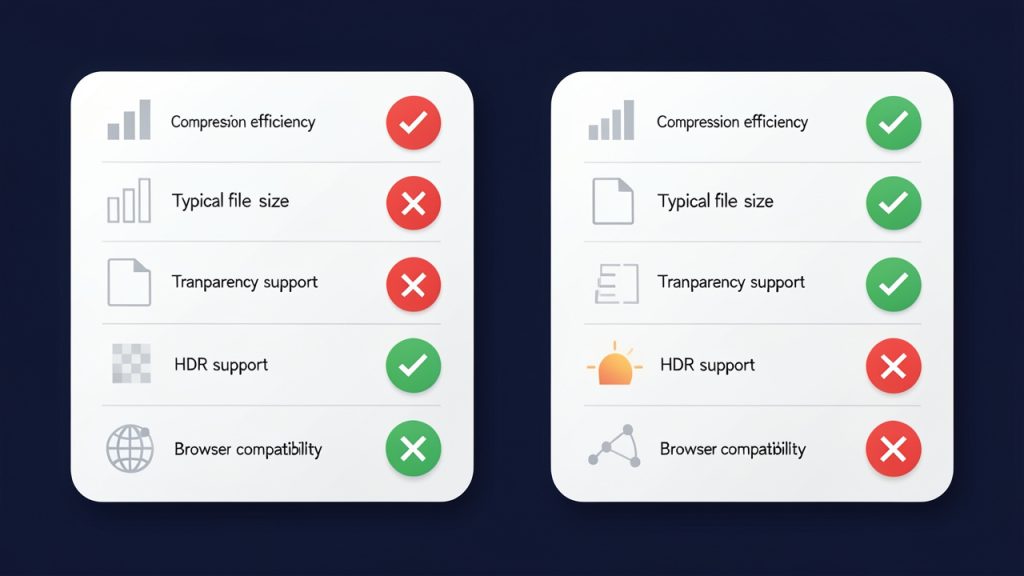
| Feature | JPG | AVIF |
|---|---|---|
| Compression efficiency | Good | Excellent |
| File size | Typically larger | Typically smaller |
| Image quality at low size | Acceptable to good | Often better |
| Transparency support | No | Yes |
| HDR support | Limited | Yes |
| Browser compatibility | Very broad | Broad, but not universal in older environments |
| Best use case | Legacy compatibility | Modern web optimization |
JPG remains useful because it works almost everywhere. AVIF is more future-focused. If maximum compatibility is your top priority, JPG still has a role. If performance and modern optimization matter more, AVIF is often the stronger option.
The quality trade-off you should understand
No image conversion is magic. When you convert a JPG into AVIF, the AVIF file can only work with the data already present in the JPG. If the original JPG was heavily compressed or visually degraded, converting it will not restore missing detail.
That is why source quality matters. A high-quality JPG usually converts more successfully than a low-quality one. AVIF can preserve what is there very efficiently, but it cannot invent lost information. For the best results, start with the cleanest source image you have.
You should also be aware that aggressive AVIF compression can go too far. While the format is powerful, very small file targets can still introduce artifacts, soften detail, or alter texture. The goal is not to create the smallest file possible. The goal is to create the smallest file that still looks right for the viewer.
Where AVIF works best
AVIF is especially effective for websites, landing pages, digital product interfaces, blog images, and online stores. In these environments, every kilobyte counts. Faster pages can improve engagement and help visitors stay focused instead of waiting for visuals to load.
It is also useful in workflows where you serve multiple image sizes and want efficient delivery across desktop and mobile devices. Developers often prefer AVIF because it supports modern performance strategies without forcing a visible quality drop.
That said, AVIF may not be ideal for every scenario. Some older software tools, legacy systems, and outdated browsers may not handle it well. If your audience includes users on older platforms, you may need a fallback format such as JPG or WebP.
How to Get Started With JPG to AVIF
Choose the right conversion method
Most people start with an online JPG-to-AVIF converter. This is the easiest route because it requires no installation and usually works in a browser. You upload the JPG, select quality settings if available, convert the file, and download the result.
This option is ideal for casual use, quick tasks, or small batches. It is especially attractive for freelancers and small businesses that want speed and simplicity without learning new software.
If you handle images regularly, desktop software or automated workflows may be more efficient. Developers and teams working with large media libraries often prefer batch tools or build-process integration. That makes it easier to optimize images consistently without manual repetition.
What to look for in a good converter
Not all converters are equal. A useful tool should preserve visual quality, offer clear settings, and process files quickly. It should also be transparent about privacy, especially if you are uploading client assets, product photography, or branded media.
A strong converter typically offers these essentials:
- Quality control, so you can balance appearance and file size
- Batch conversion, if you work with multiple images
- Secure handling, especially for business or client files
- Fast processing, so optimization does not become a bottleneck
If a tool gives no control over output quality, the result can feel unpredictable. For serious use, that is a limitation worth avoiding.
A simple workflow that works
The easiest way to approach converting JPG files into AVIF is to test a few representative images first. Do not convert your entire library blindly. Pick one product photo, one banner, one blog image, and one detailed visual. Compare the AVIF outputs side by side with the originals.
Pay attention to text clarity, edge sharpness, gradients, skin tones, and fine textures. Some images compress beautifully. Others need gentler settings. A short testing phase can save you from rolling out assets that are technically smaller but visually weaker.
Once you find the right quality range, apply it consistently. This turns image optimization from a guessing game into a repeatable process. For businesses and creators, that kind of consistency matters just as much as raw compression.
Best practices for websites and online content
If you are using AVIF on a website, keep compatibility in mind. Many modern browsers support it, but a fallback strategy is still wise. That is especially true if your site serves a wide audience across devices and regions.
You should also avoid uploading oversized source images just because AVIF compresses well. Compression is only one part of performance. Proper dimensions, responsive image delivery, and sensible quality settings still matter.
| Scenario | Better choice | Why |
|---|---|---|
| Legacy system or universal compatibility needed | JPG | Safest support across older tools and browsers |
| Modern website focused on speed | AVIF | Strong compression and lower bandwidth use |
| Images need transparency | AVIF | Supports alpha transparency |
| Quick social sharing with minimal workflow changes | JPG | Easier support across platforms |
| Large content library with performance goals | AVIF | Better long-term optimization potential |
Common mistakes to avoid
One common mistake is assuming every image should be converted automatically. Some visuals benefit greatly from AVIF, while others may show little improvement or require careful tuning. It is better to evaluate by use case than to treat all files the same.
Another mistake is ignoring visual review. File size is measurable, but quality is contextual. An image that looks fine in a thumbnail may fall apart in a hero banner or full-width product view. Always check the image where it will actually be used.
People also forget about workflow compatibility. If your CMS, design software, email platform, or client handoff process does not support AVIF smoothly, the best technical format may still create practical friction. Efficiency is not just about compression. It is also about how easily your team can use the result.
Conclusion
Converting JPG images to AVIF is one of the smartest low-effort upgrades for modern digital performance. It can reduce file size, improve loading speed, and help you serve cleaner, lighter media across websites and online platforms. For small businesses, freelancers, developers, and productivity-minded users, that makes AVIF well worth considering.
The best next step is simple: take a few of your most-used JPG files and convert them to AVIF as a test. Compare file size, loading behavior, and visual quality in real use. Once you see what works for your images and audience, you can build a faster, more efficient workflow around it.
Leave a Reply