

Time is expensive, but most people do not lose it in dramatic ways. They lose it in tiny fragments, a few minutes spent searching for a file, another ten switching between tabs, another half hour trying to remember what should happen next. That is why free productivity tools matter. The right ones do not just save money, they reduce friction, protect focus, and make work feel lighter.
For small business owners, freelancers, developers, and anyone trying to do more with limited resources, the appeal is obvious. You want software that is easy to adopt, flexible enough to support real work, and free enough to test without a procurement process or a long commitment. The challenge is not finding tools. It is finding the right tools, using them well, and avoiding a stack so cluttered that your productivity system becomes another source of stress.
What are free productivity tools?
Free productivity tools are apps, platforms, and online services designed to help individuals or teams organize work, manage time, communicate, automate routine tasks, and store information, all without an upfront cost. In practical terms, these tools cover everything from task managers and calendar apps to note-taking systems, cloud storage, writing assistants, collaboration platforms, and automation utilities.
The word free deserves a closer look. Some tools are truly free with generous features for personal use or small teams. Others operate on a freemium model, which means the core product is available at no cost, while advanced features sit behind a paid plan. That distinction matters because a tool that feels perfect today can become restrictive once your client load grows or your business starts collaborating across a larger team.
Productivity itself is often misunderstood. It is not about cramming more tasks into the day. It is about using your time, attention, and energy with greater intention. A good free productivity tool supports that goal by making priorities visible, reducing repetitive work, and helping you move from idea to execution with less effort.
For a freelancer, that might mean a simple project board that keeps client work from slipping through the cracks. For a small business owner, it could be a shared document system that prevents version confusion. For a developer, it may be a lightweight automation or note system that keeps context organized across projects. The category is broad, but the purpose is consistent, better output with less wasted motion.
Key aspects of free productivity tools
Usability matters more than feature count
One of the biggest mistakes people make is choosing tools based on long feature lists rather than real-world usability. A productivity app can be powerful on paper and still fail in daily use if it is cluttered, slow, or hard to understand. In most cases, the best free productivity tools are the ones you can start using in minutes, not the ones that require hours of setup before they become useful.
That is especially true for solo users and small teams. When you are already managing clients, deadlines, or product work, you do not need another system that demands constant administration. A clean interface, fast search, and sensible defaults often create more value than dozens of advanced options you may never touch.
Free does not always mean fully free
There is a practical trade-off behind most free plans. Some tools limit storage. Others cap integrations, user seats, project boards, automation runs, or history length. These limits are not necessarily a problem, but they should be understood early. A tool can still be an excellent choice if its free tier aligns with your actual workflow.
The smartest approach is to evaluate free tools not by what they hide, but by what they genuinely enable. If a task manager gives you enough projects, reminders, and views to run your week smoothly, then it is doing its job. If a note app lets you capture and retrieve information quickly, that may be all you need. The goal is not to get enterprise software for free. The goal is to get meaningful utility without paying before you are ready.
Integration can make or break your workflow
A productivity tool rarely works in isolation. Your calendar connects to meetings, your notes connect to tasks, your files connect to client work, and your communication tools connect to everything. That is why integration is one of the most overlooked aspects of choosing free productivity tools.
When tools work well together, they reduce duplication. You stop copying deadlines from one place to another. You stop hunting for attachments across email, chat, and cloud folders. Even a basic level of integration can save significant time over a month.
For developers and technical users, this can extend into APIs, webhooks, and lightweight automations. For non-technical users, it might simply mean choosing tools that offer calendar syncing, browser extensions, or cloud file support. Either way, the underlying principle is the same, less manual transfer means fewer mistakes and more focus.
Collaboration features are increasingly essential
Even solo professionals collaborate constantly. You may share drafts with clients, exchange feedback with contractors, or coordinate timelines with partners. That is why many of the best free productivity tools now include commenting, shared workspaces, permission controls, and live editing.
This shift is important because productivity is no longer just personal. It is operational. A tool that works only for you but creates confusion for everyone around you can become a bottleneck. A free plan that supports lightweight collaboration often delivers more value than a more advanced app designed purely for individual use.
Security and reliability should not be ignored
When software is free, people sometimes assume the stakes are lower. In reality, if a tool stores client notes, financial drafts, passwords, project plans, or business files, reliability matters a great deal. Look for tools with strong reputations, regular updates, transparent privacy policies, and export options.
The ability to export your data is especially important. Free tools are useful, but lock-in is not. If your needs change, you should be able to move your notes, tasks, or files without rebuilding everything from scratch. Portability is a quiet feature, but it becomes critical the moment a free plan no longer fits.
Different categories solve different bottlenecks
It helps to think of free productivity tools by the problem they solve, not just by their app category. Some reduce cognitive load by giving you a trusted place to capture tasks and ideas. Others reduce administrative work through scheduling, templates, and automation. Some improve execution by keeping projects visible. Others improve communication by centralizing conversations and documents.
A simple comparison makes this easier to evaluate:
| Category | What It Helps With | Best For | Common Free Plan Limits |
|---|---|---|---|
| Task Management | Tracking to-dos, deadlines, priorities | Freelancers, small teams, personal planning | Limited projects, automations, or team seats |
| Note-Taking | Capturing ideas, meeting notes, documentation | Writers, developers, consultants | Storage caps, restricted collaboration |
| Calendar and Scheduling | Time blocking, appointments, meeting coordination | Service businesses, consultants, remote workers | Booking limits, branding, fewer integrations |
| Cloud Storage | File access, sharing, backup | Small businesses, distributed teams | Limited storage space |
| Communication Tools | Messaging, quick coordination, updates | Remote teams, client-facing businesses | Message history limits, user caps |
| Automation Tools | Repetitive task reduction, workflow triggers | Power users, developers, operations-focused teams | Limited runs, fewer app connections |
This is why no single tool can solve productivity by itself. If your bottleneck is poor planning, a note-taking app will not fix it. If your bottleneck is repetitive admin, a calendar app alone will not help much. Good tool selection starts with honest diagnosis.
How to get started with free productivity tools
Start with your biggest source of friction
The best way to adopt free productivity tools is to avoid building a full system all at once. Instead, begin with the part of your work that feels most consistently frustrating. That might be missed deadlines, scattered notes, scheduling chaos, or the feeling that important tasks are living in five different places.
When you identify that friction clearly, tool selection becomes simpler. You are no longer asking, “What is the best productivity app?” You are asking, “What tool can reduce this specific problem?” That question produces better decisions and faster results.
For example, if you repeatedly forget follow-ups, choose a task manager with reminders before adding anything else. If meetings consume too much time, adopt a free scheduling tool. If project materials are scattered, implement a shared cloud folder and a simple naming convention. Productivity improves fastest when the solution matches the constraint.
Keep your first setup intentionally small
Many people sabotage tool adoption by overbuilding from day one. They create elaborate workspaces, too many tags, deeply nested folders, and complicated rules they cannot maintain. A better approach is to create a minimal structure that supports immediate use.
A practical starter setup usually includes just a few essentials:
- One task hub for what needs to happen next.
- One note space for ideas, reference material, and meeting notes.
- One calendar for deadlines, appointments, and focused work blocks.
- One file location for documents you need to find quickly.
This is enough to create order without adding complexity. Once the system proves useful, you can refine it gradually. That sequence matters. Stable habits should come before advanced customization.
Evaluate tools by behavior, not branding
A tool may be popular and still be wrong for your work style. Some people think visually and prefer boards. Others want simple lists. Some need collaborative editing. Others need offline access and strong search. The only way to judge a tool properly is to use it for actual work over several days.
Pay attention to your own behavior. Are you returning to the tool naturally, or avoiding it? Does it reduce mental clutter, or add another layer of maintenance? Can you find what you saved last week? Do you trust it enough to stop keeping backup notes in three other places? These questions reveal more than product marketing ever will.
A short evaluation framework can help:
| Evaluation Factor | What to Ask |
|---|---|
| Ease of Use | Can I understand the interface without training? |
| Daily Fit | Does this match how I naturally plan and work? |
| Scalability | Will the free version still work a month from now? |
| Collaboration | Can clients, teammates, or partners use it easily? |
| Portability | Can I export data if I need to switch later? |
This kind of review keeps you grounded. It shifts the decision from novelty to usefulness.
Build habits around the tool, not dependence on it
A tool helps only when it supports a repeatable habit. A task manager, for instance, becomes valuable when you check it at a consistent time, capture tasks immediately, and review priorities before work starts. Without those behaviors, even excellent software produces weak outcomes.
That is why getting started with free productivity tools should include a routine. Spend a few minutes each morning reviewing priorities. End the day by clearing inboxes, updating task status, and scheduling the next important action. Keep it short and sustainable. Consistency beats sophistication.
The most productive users often have surprisingly simple systems. Their edge comes from trust. They know where tasks go. They know where notes live. They know how to recover context quickly. Free tools can absolutely support this level of clarity, as long as the workflow remains disciplined.
Avoid the trap of tool collecting
There is a hidden cost to free software: because it is easy to try, it is also easy to accumulate. You install one app for notes, another for tasks, another for bookmarks, another for documents, and soon your system is fragmented. This feels productive at first because setup creates the illusion of progress. But too many tools create decision fatigue and information loss.
A useful rule is to add a new tool only when it replaces confusion or manual work. If it does not clearly solve a problem, it is probably a distraction. Fewer tools, used consistently, almost always outperform a bloated stack full of overlapping functions.
Think in workflows, not apps
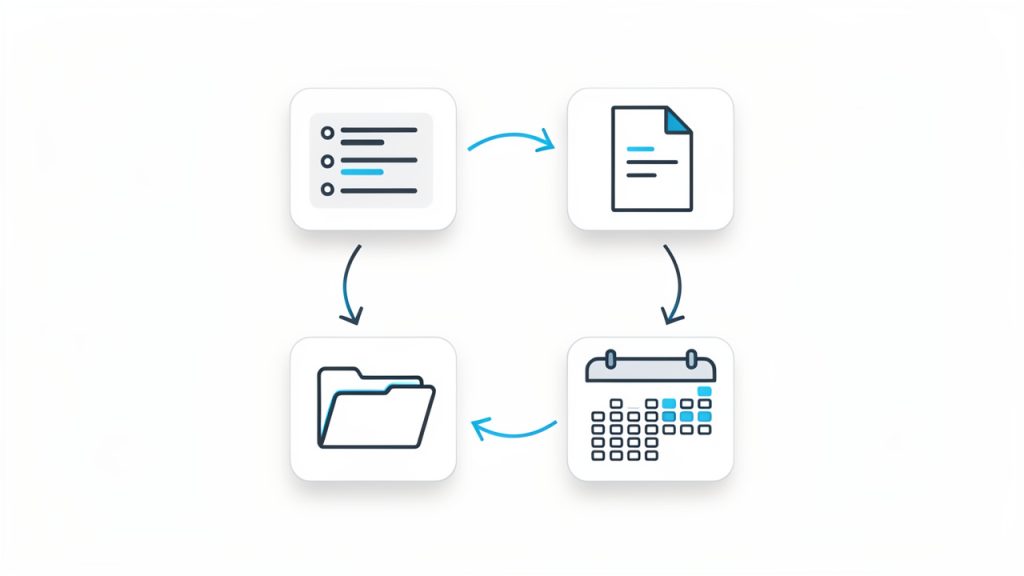
The most effective way to use free productivity tools is to see them as part of a workflow. A lead comes in, gets added to your notes or CRM. A task is created. A meeting is scheduled. Documents are stored in one place. Follow-up happens on a defined date. Each tool supports one stage of movement.
This mindset is especially valuable for small businesses and freelancers. When your process is clear, tools become interchangeable parts rather than sources of dependency. You can test a free tool confidently because you understand what job it is supposed to perform. That makes upgrades, replacements, and simplification much easier over time.
Conclusion
Free productivity tools are not just budget-friendly alternatives. When chosen carefully, they are powerful systems for reducing friction, improving visibility, and helping work move forward with less effort. The key is not using the most tools. It is using the right ones, in a way that supports your real workflow.
Start with one bottleneck, choose one or two tools that solve it well, and build simple habits around them. Once your system feels trustworthy, expand only where needed. That approach keeps your stack lean, your processes clear, and your productivity grounded in results rather than software experimentation.
Leave a Reply